How to Draw This Arrow?
Printed From: CAD Forum
Category: EN
Forum Name: AutoCAD
Forum Description: Discussion about AutoCAD and AutoCAD LT, viewers, DWG and DXF formats, Design Review, AutoCAD web, Drive, add-ons
URL: https://www.cadforum.cz/forum_en/forum_posts.asp?TID=13651
Printed Date: 05.Sep.2026 at 04:16
Topic: How to Draw This Arrow?
Posted By: dery
Subject: How to Draw This Arrow?
Date Posted: 20.Oct.2021 at 16:23
|
Can someone please tell me how to draw arrow like this? Thanks  |
Replies:
Posted By: John Connor
Date Posted: 21.Oct.2021 at 00:12
|
In 2D or 3D? ------------- "Humans have a strength that cannot be measured. This is John Connor. If you are reading this, you are the resistance." <<AutoCAD 2015>> |
Posted By: philippe JOSEPH
Date Posted: 21.Oct.2021 at 06:56
|
In 2D with ellipses and lines. In 3D with circles, lines and the EXTRUDE command but it looks like there is no thikness. Note : the extremity of the ribbon facing the extremity of the arrow is not vertical.
|
Posted By: dery
Date Posted: 21.Oct.2021 at 17:53
2D. I know I can use ellipse command and do some trim command. I am confuse and don't understand how to draw the correct direction of the arrow (or where the arrow is pointing at). Please tell me step-by-step.
|
 John Connor wrote:
Posted By: dery
Date Posted: 21.Oct.2021 at 17:59
This is another example of the arrow. |
Posted By: John Connor
Date Posted: 22.Oct.2021 at 14:16
I roughed this out in a couple of minutes using the Ellipse, Line, Copy, Mirror, and Trim commands. Yes, it is not an exact replica of the image you posted, I realize that, but the technique would be exactly the same. Note: The ellipses are the same. I created the one in white first then I copied it to a position lower than itself. I changed the color of the copied ellipse to make it show up better for demonstration purposes.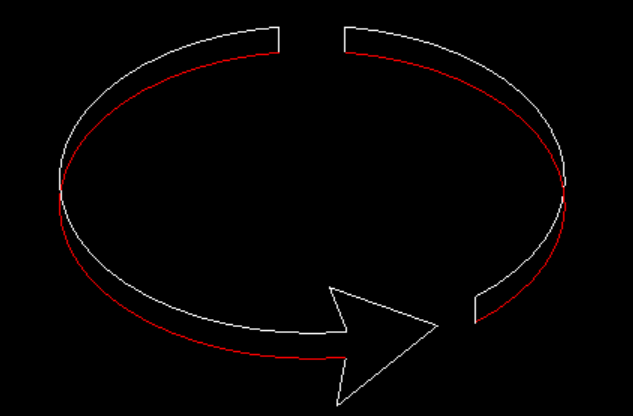 ------------- "Humans have a strength that cannot be measured. This is John Connor. If you are reading this, you are the resistance." <<AutoCAD 2015>> |
Posted By: dery
Date Posted: 22.Oct.2021 at 18:41
| How do you draw tip of the arrow so that the direction of the arrow is correct? |
Posted By: John Connor
Date Posted: 23.Oct.2021 at 15:05
Really? It's merely the intersection of a line parallel to the small vertical line to the right and the red ellipse. ------------- "Humans have a strength that cannot be measured. This is John Connor. If you are reading this, you are the resistance." <<AutoCAD 2015>> |
Posted By: dery
Date Posted: 23.Oct.2021 at 18:30
| Can you show me the construction line and it is better if you could show me by an image. |
Posted By: John Connor
Date Posted: 23.Oct.2021 at 20:53
|
This is just basic AutoCAD 101. No math. No convoluted geometry. The construction line would be parallel to the small vertical line to the right, in the image provided, and long enough so that when you extend the ellipse (temporarily) it will create an intersection with the construction line.
------------- "Humans have a strength that cannot be measured. This is John Connor. If you are reading this, you are the resistance." <<AutoCAD 2015>> |