Technical Drawing Question (Tangent To 2 Circles)
Printed From: CAD Forum
Category: EN
Forum Name: AutoCAD
Forum Description: Discussion about AutoCAD and AutoCAD LT, viewers, DWG and DXF formats, Design Review, AutoCAD web, Drive, add-ons
URL: https://www.cadforum.cz/forum_en/forum_posts.asp?TID=13659
Printed Date: 05.Sep.2026 at 19:37
Topic: Technical Drawing Question (Tangent To 2 Circles)
Posted By: dery
Subject: Technical Drawing Question (Tangent To 2 Circles)
Date Posted: 23.Nov.2021 at 17:06
|
I know I can do it by using the Ttr command in AutoCAD, but that's not what I want to know. Can someone please tell me how to draw an arc that tangent to 2 circles using traditional method (e.g. using compass)? For example, how to draw such as below image in AutoCAD using traditional method with the given 2 known-diameter circle with a distance of 7 between its center point? How do you draw an arc with radius of 12 that tangent to these two circles? Thank you 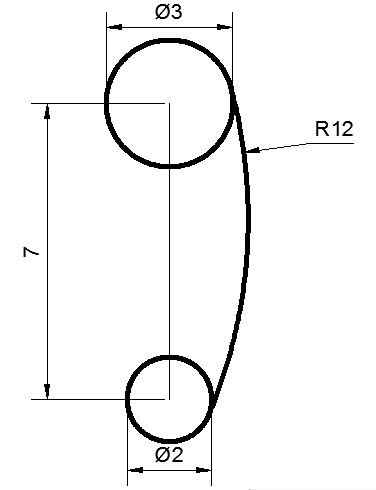 |
Replies:
Posted By: philippe JOSEPH
Date Posted: 24.Nov.2021 at 15:03
|
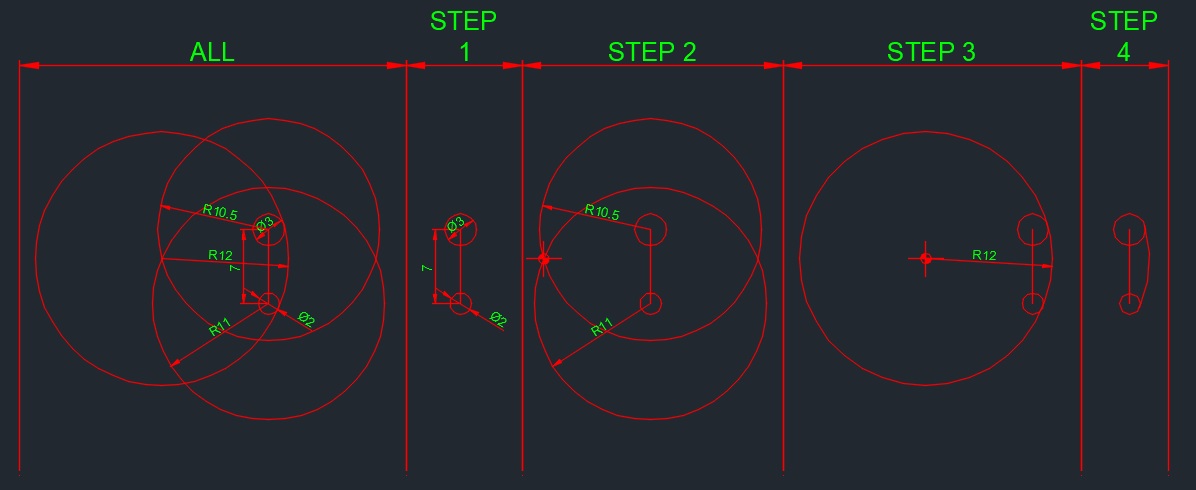
Hello Dery, you must : Draw a circle R : 12 - ( 3/2 ) = 10.5 at the center of the circle diameter 3. Draw a circle R : 12 - ( 2/2 ) = 11 at the center of the circle diameter 3. At the junction of the 2 circles you must draw a circle radius 12 that will be tangent to your circles dia. 3 and dia. 2 and that will have a radius r : 12, then you trim the circle r : 12 to your circles dia. 3 and 2. I'm afraid this is basic design.
|
Posted By: philippe JOSEPH
Date Posted: 24.Nov.2021 at 15:21
|
Posted By: philippe JOSEPH
Date Posted: 26.Nov.2021 at 07:07
| Dery, if you do the work with or without the TTR command and then you lay the dimensions r10.5 and r11 you should try and found the method by yourself wich is not a bad thing. |
Posted By: dery
Date Posted: 29.Nov.2021 at 13:24
|
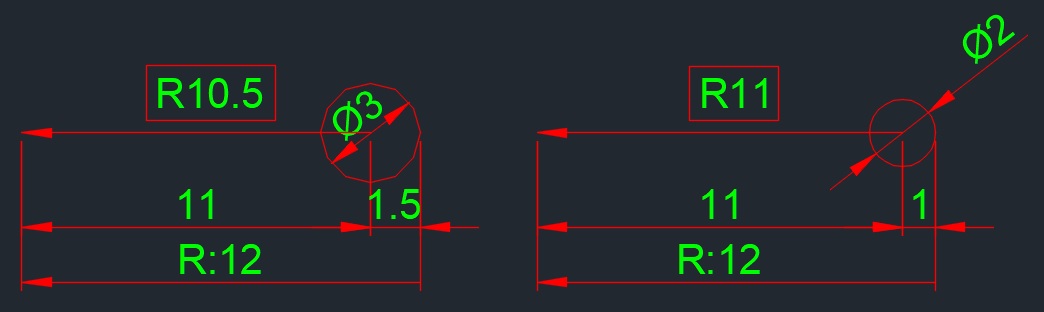
Why do you choose R10.5 and R11 in Step 2? I don't understand, please explain. |
Posted By: philippe JOSEPH
Date Posted: 29.Nov.2021 at 15:08
|
Hello Dery, the solution for drawing the radius R12 to be TANGENT to both the diameters 3 and 2 is FINDING the CENTER of that radius R12 by DRAWING CIRCLES to find the COMMON POINT / center of the radius R12. That center is found by subtracting values to R12 and it can even be done informatically with non exact radius and diameters values on AutoCAD by working with line lengths. The radius R12 will be at radius X from the center of diameter 3 and that will be R12 minus the radius of the diameter 3 that is 3/2, so : R12 - ( diameter 3 / 2 ) = 12 - ( 3/2 ) = 12 - 1.5 = 10.5. The radius R12 will be at radius X from the center of diameter 2 and that will be R12 minus the radius of the diameter 2 that is 2/2, so : R12 - ( diameter 2 / 2 ) = 12 - ( 2/2 ) = 12 - 1 = 11. Normally the steps are self explanatory and you could have found the solution with a paper and a compass and some tests. I hope this will make cense because I'm loosing my mind by doing these explanations in my non native language ( sorry ).
|
Posted By: philippe JOSEPH
Date Posted: 29.Nov.2021 at 15:17
|