White background text see example
Printed From: CAD Forum
Category: EN
Forum Name: AutoCAD
Forum Description: Discussion about AutoCAD and AutoCAD LT, viewers, DWG and DXF formats, Design Review, AutoCAD web, Drive, add-ons
URL: https://www.cadforum.cz/forum_en/forum_posts.asp?TID=13701
Printed Date: 30.Oct.2026 at 01:03
Topic: White background text see example
Posted By: Fenguli
Subject: White background text see example
Date Posted: 11.May.2022 at 19:26
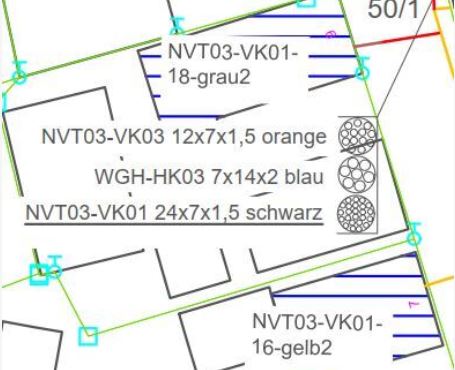
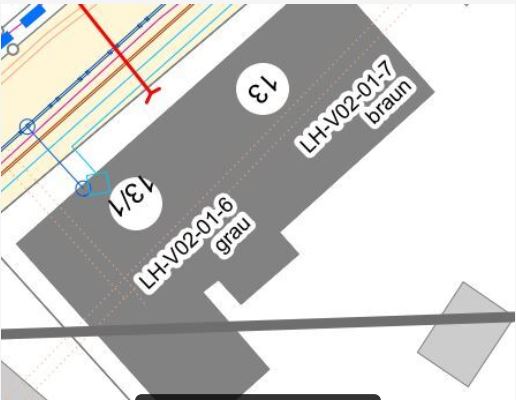
Hi together,Is there a way to make the font as white as shown in figure 2 below. I don't want a white block like picture 1, I just want the font to have a delicate white border. Otherwise the cover takes too much from the plan.
|
Replies:
Posted By: Vladimir Michl
Date Posted: 12.May.2022 at 07:34
|
Yes, see e.g. the tip: https://www.cadforum.cz/en/readability-of-annotations-white-halo-on-autocad-texts-tip11389 ------------- Vladimir Michl //CADs.cz" rel="nofollow - //CADs.cz , https://www.linkedin.com/in/vmichl/" rel="nofollow - LinkedIn Autodesk Expert Elite |
Posted By: philippe JOSEPH
Date Posted: 12.May.2022 at 08:58
|
Hello Vladimir, sorry to interfer here but I have this question regarding dimensions that are creating those white rectangles on anything on wich they are placed. I have experienced this on files not of mine and I don't know how to set or "unset" this.
|
Posted By: Vladimir Michl
Date Posted: 12.May.2022 at 09:28
|
For rectangular (not outline) text backgrounds ("halos") you can use the text mask functionality available also in dimensions. Try the DimMask utility (in Downloads) for easier control of text masking in dimensions. ------------- Vladimir Michl //CADs.cz" rel="nofollow - //CADs.cz , https://www.linkedin.com/in/vmichl/" rel="nofollow - LinkedIn Autodesk Expert Elite |
Posted By: Fenguli
Date Posted: 12.May.2022 at 14:43
|
Hi Valadimir, yes, with texthalo I can make a halo but the problem is, i can´t white it. where can i find the dimMask download to try this way
|
Posted By: Vladimir Michl
Date Posted: 12.May.2022 at 15:28
|
Bothe TextHalo and DimMask should work - both can be downloaded here from the Downloads section. ------------- Vladimir Michl //CADs.cz" rel="nofollow - //CADs.cz , https://www.linkedin.com/in/vmichl/" rel="nofollow - LinkedIn Autodesk Expert Elite |
Posted By: Fenguli
Date Posted: 13.May.2022 at 09:33
|
Thank you very much. Is it possible to make the halo in white? I have aprox. 100 changes with this option to do in my plan, is it nessesary to change every single text? Because actually I have a white background behind my text and i will change it to the halo.
|
Posted By: Vladimir Michl
Date Posted: 13.May.2022 at 11:47
|
Talking about TEXTHALO? Just select all the texts, set the halo width (e.g. 1.0) and set the halo color to 7. ------------- Vladimir Michl //CADs.cz" rel="nofollow - //CADs.cz , https://www.linkedin.com/in/vmichl/" rel="nofollow - LinkedIn Autodesk Expert Elite |