Downgrade AutoCAD Versions
Printed From: CAD Forum
Category: EN
Forum Name: CAD - general
Forum Description: General discussion about CAD, formats, standards, management, licensing, networking, harware, other CAD applications
URL: https://www.cadforum.cz/forum_en/forum_posts.asp?TID=13713
Printed Date: 02.Oct.2026 at 08:20
Topic: Downgrade AutoCAD Versions
Posted By: tmwong9797
Subject: Downgrade AutoCAD Versions
Date Posted: 03.Jun.2022 at 08:33
| Is it can or how to downgrade the AutoCad to my working versions, such as from new Version 2022 to old versions 2000 ~ 2018? |
Replies:
Posted By: philippe JOSEPH
Date Posted: 03.Jun.2022 at 10:26
|
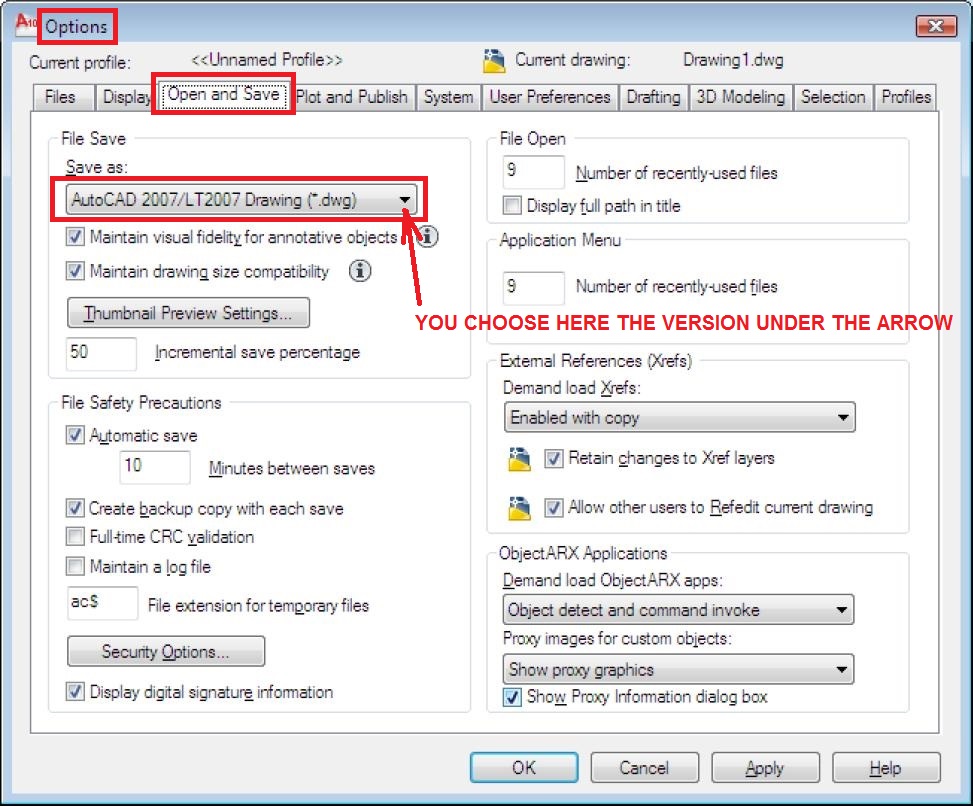
You do a "save as" and choose the appropriate version or you go to OPTION / Option and save and set definitively the version so that each time you do as simple save it will go to the choosen version. I personally don't do the second option as I had already have bad things on files such as a fatal error when simply trying to open some modified files.
|
Posted By: philippe JOSEPH
Date Posted: 03.Jun.2022 at 21:06
| In fact if I remember well, the 2022 is in fact a 2018 anyway when saved, you should check in OPTIONS / Options and save. |
Posted By: tmwong9797
Date Posted: 04.Jun.2022 at 08:03
| I am sorry that I take a wrong questions. Now my using AutoCad version of 2017 & 2018. May AutoCad files are 2019 to 2022 or 23. How to or can its downgrade these files to 2017 or 2018 or 2000 formats. thank you very much. |
Posted By: philippe JOSEPH
Date Posted: 04.Jun.2022 at 12:35
|
It's the same : try and do a "saveas" and choose the 2000 version.
Then to verify if it's OK open the downgraded file on a computer with only AutoCAD 2000 or : Open it on your AutoCAD 2022, type F2 to read better the command line and it should be indicated : Opening of an AutoCAD 2000 file. If it hasn't been downgraded correctly you should not be abble to open it with an AutoCAD 2000.
|
Posted By: philippe JOSEPH
Date Posted: 04.Jun.2022 at 12:45
|
Posted By: philippe JOSEPH
Date Posted: 04.Jun.2022 at 13:00
FILE / SAVE AS :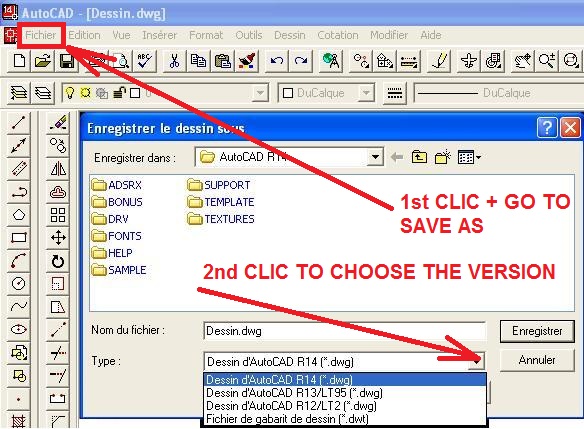
|
Posted By: John Connor
Date Posted: 06.Jun.2022 at 12:52
Open the drawings in DWG TrueView and do a "Save as" to the version of AutoCAD you are working in. ------------- "Humans have a strength that cannot be measured. This is John Connor. If you are reading this, you are the resistance." <<AutoCAD 2015>> |
 tmwong9797 wrote:
Posted By: rizal1
Date Posted: 15.Aug.2022 at 10:48
| any free software autocad ? |
Posted By: Kent Cooper
Date Posted: 15.Aug.2022 at 13:54
| If you mean for converting newer-version files to older versions, DWG TrueView is free, and can do that. See http://https://www.autodesk.com/products/dwg-trueview/overview" rel="nofollow - >here< . |
Posted By: John Connor
Date Posted: 15.Aug.2022 at 17:54
Are you looking for 2D, 3D or both? ------------- "Humans have a strength that cannot be measured. This is John Connor. If you are reading this, you are the resistance." <<AutoCAD 2015>> |
Posted By: tmwong9797
Date Posted: 16.Aug.2022 at 15:48
Dear anybody, and thank you very much. I have downloaded the TrueView 2023 and solved the problems.
|