LTM_1400-7.1_18.dwg from Cfytr
Printed From: CAD Forum
Category: EN
Forum Name: AutoCAD
Forum Description: Discussion about AutoCAD and AutoCAD LT, viewers, DWG and DXF formats, Design Review, AutoCAD web, Drive, add-ons
URL: https://www.cadforum.cz/forum_en/forum_posts.asp?TID=13821
Printed Date: 21.Sep.2026 at 02:31
Topic: LTM_1400-7.1_18.dwg from Cfytr
Posted By: philippe JOSEPH
Subject: LTM_1400-7.1_18.dwg from Cfytr
Date Posted: 10.Mar.2023 at 17:16
 Cfytr, I have looked
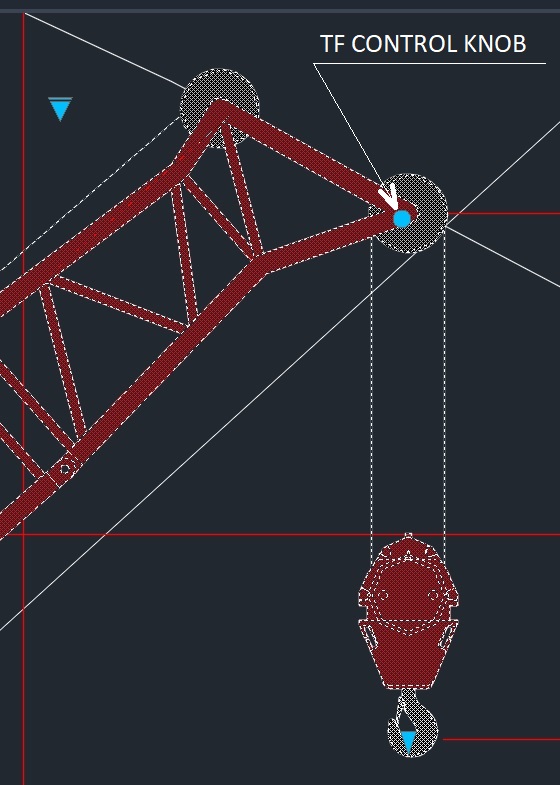
inside your excellent update and only on the TF jibs the control knob
is not centered, little on the 7m jib and growing bigger to the 56 m.
The rest is so good and I'm just not able to do 10% like this. P.S. Eventually save your file in zoom extends so that the persons see the entire drawing. The "colored" shapes let me think at first it was only a "print screen" of the Liebherr catalog. Eventually write in very big capital letters : DYNAMIC BLOCKS. |
Replies:
Posted By: Cfytr
Date Posted: 17.Mar.2023 at 16:52
|
I just saw your message today. Unfortunately, for the TF boom, it is impossible to put the control handle in the center of the block. since the angle of inclination of the boom should be counted from the horizontal. < id="BFI_" style="width: 1px; height: 1px; display: none;"> |
Posted By: philippe JOSEPH
Date Posted: 17.Mar.2023 at 20:05
|
Hello Cfytr, it's OK, you are doing a so great job with all your cranes. I personnaly have done a lot of mobile cranes for my job that you can eventually see here in the CAD/BIM Blocks library by re-drawing from blank including the diagrams but "only" with "simple blocks.
|
Posted By: malaycobra
Date Posted: 19.Mar.2023 at 01:43
|
Cfytr, Your dynamic crane blocks are the best I have seen. I have some CAD work for you if you are interested. Please contact me at SS@baycrane.com Thanks, Steve
|
Posted By: philippe JOSEPH
Date Posted: 20.Mar.2023 at 12:52
|
Hello Cfytr, in fact the TF control knob looks to be centered, don't know what hapened. Anyway the TF configurations are difficult because of the fixed lean angle of the jib ( 0°, 20° or 40° ) to combine with the variable lean angle of the main boom "T". For the hatched area I saw now your message : The hatching is located on a separate layer, OK for me. I wish you all the best for you.
|
Posted By: Drpepper1
Date Posted: 03.Oct.2023 at 06:19
|
Hello there Cfytr, I am writing to you from Australia. I have been using a couple of your dynamic models which work great! Was just wondering of you have any plans to build an LTC1050-3 or GMK3060L? Many thanks, Peter.. |
Posted By: Cfytr
Date Posted: 03.Oct.2023 at 12:30
|
Hello there Drpepper1. Now I am working on the Block of the crane LTM 1110-5.2. When I finish I can make a crane block LTC1050-3.1. For the GMK3060L crane, I only have a PDF brochure, you can make a crane block but it will not be quite accurate. If you have a DWG drawings of the GMK3060L crane, then from them I can make the block much faster < id="BFI_" style="width: 1px; height: 1px; display: none;"> |
Posted By: G Hodgy
Date Posted: 21.Oct.2023 at 13:49
|
Hello Cfytr, Like most other people playing with cranes for work. I have mainly been self taught in AutoCAD through trial and error - lots of errors i have to say.  Your dynamic blocks are amazing and i would like to say thank you for sharing your hard work.  I do have a question that i hope you can assit with, I need to make a multi stage crane boom extend but in sections ( 1 section extends to its limit then the next stage extends from that point and so on. ) do you know if this can be done using the one pick point ? ------------- Every day is a School day |
Posted By: Cfytr
Date Posted: 21.Oct.2023 at 14:17
| https://dropmefiles.com/rn5RH |
Posted By: jr0207
Date Posted: 25.Oct.2023 at 07:37
|
G'day from Australia Cfytr, Your Blocks are awesome. I also have some CAD work for you if you are interested. Please let me know if you are interested. jralph55@gmail.com Cheers John ------------- Cheers, John |
Posted By: Cfytr
Date Posted: 26.Oct.2023 at 10:20
|
I answered you to jralph55@gmail.com
< id="BFI_" style="width: 1px; height: 1px; display: none;"> |
Posted By: parulfojii
Date Posted: 13.Nov.2023 at 17:01
| I personnaly have done a lot of mobile cranes for my job that you can eventually see here in the CAD/BIM Blocks library by re-drawing from blank including the diagrams but "only" with "simple blocks. |