LISP to display aligned segments
Printed From: CAD Forum
Category: EN
Forum Name: AutoCAD
Forum Description: Discussion about AutoCAD and AutoCAD LT, viewers, DWG and DXF formats, Design Review, AutoCAD web, Drive, add-ons
URL: https://www.cadforum.cz/forum_en/forum_posts.asp?TID=13873
Printed Date: 25.Oct.2026 at 18:54
Topic: LISP to display aligned segments
Posted By: Edouard Lambert
Subject: LISP to display aligned segments
Date Posted: 05.Jul.2023 at 09:49
|
Hello everyone, I'm a beginner in LISP, I started looking for myself but I'm stuck. I want to create a LISP which takes into account the polylines (or lines) of a given layer in my dwg drawing, and which displays in color (red for example) those which are aligned between them. My approach for this is the following: the code will decompose the polylines of my layer in order to make of them lines (segments), then it will analyze the properties of these lines, and change the color of those whose coordinates XY " start of line" and/or "end" are identical, AND whose angle is similar to 0.005 £ 200 grads (or 0.00008 £ ?? rad). I have attached the properties of the lines in AutoCAD. I work on AutoCAD MAP 2014, with Covadis 14. I hope that this is not a big constraint for this code... So far I have code that explodes my polylines and changes the color of the resulting lines to red (lsp attached). uploads/937907/propri£t£s_ligne.pdf" rel="nofollow - uploads/937907/propri£t£s_ligne.pdf
Thanks in advance for your help ?? Edouard |
Replies:
Posted By: Kent Cooper
Date Posted: 06.Jul.2023 at 14:28
|
[I get a 404 not-found error with the link for the PDF file.] Can you illustrate what you're talking about? I think [in the English-language page] the British-Pound-symbol character must be a substitution for something else, which makes it hard to understand what your "whose angle is similar to 0.005 ? 200 grads (or 0.00008 ? ?? rad)" means. [And since that same character is part of the link to the PDF, it may be the cause of its not being found.] EDIT: And after posting, I see the British-Pound symbols as I copied and pasted from the original post got re-substituted and became question marks. That makes me also suspect the original double question marks are also character substitutions.
|
Posted By: Edouard Lambert
Date Posted: 06.Jul.2023 at 14:46
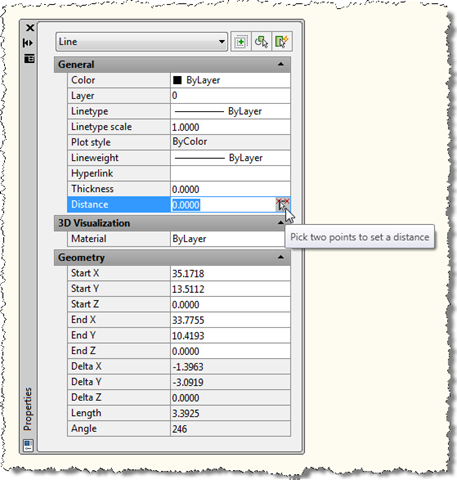 
Hey, Sorry for the character issues. Here is the properties window for a line in AutoCAD. I would like the LISP to use X,Y Start and End, and Angle. I added an example, in which the lines colored in red are lines 2 and 3 (same start and/or end, same angle). Let me correct this sentence in my original message : "AND whose angle is similar to 0.005 more or less 200 grads (or 0.00008 more or less pi rad)." My question marks were actually exclamation point... Thanks
 |
Posted By: Kent Cooper
Date Posted: 07.Jul.2023 at 14:49
What do you want to do with the things that you want made red? If you want to identify them just so you can join them across the place where they meet, you can do that without Exploding Polylines, using OVERKILL with the right options -- blue for your 2 & 3 still as a Polyline, yellow for your 2 & 3 as separate Lines: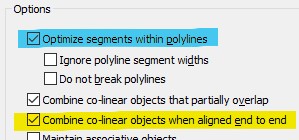
|