Geometry in properties panel
Printed From: CAD Forum
Category: EN
Forum Name: AutoCAD
Forum Description: Discussion about AutoCAD and AutoCAD LT, viewers, DWG and DXF formats, Design Review, AutoCAD web, Drive, add-ons
URL: https://www.cadforum.cz/forum_en/forum_posts.asp?TID=13923
Printed Date: 19.Oct.2026 at 12:01
Topic: Geometry in properties panel
Posted By: Ivan54
Subject: Geometry in properties panel
Date Posted: 03.Dec.2023 at 18:35
|
Hey, My problem.... If i draw an object ( circle , rectangle etc ... and i ask the properties panel, the tab geometrie does not show up.... The object is select in the model mode, what i can see is the tab General, 3D vision, and the Misc 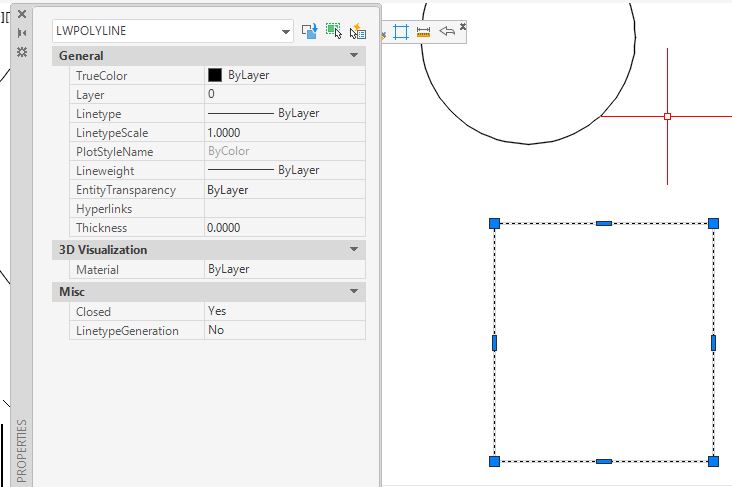 |
Replies:
Posted By: ajay1579
Date Posted: 21.Oct.2024 at 15:46
| problems with property pannels are mainly due to non compatible dotnet version installed in the PC. please check the correct version and lets hope your problem may solved. |
Posted By: jolasamuel
Date Posted: 24.Oct.2024 at 16:45
|
hi, try to region the objects first and see the properties panel again
|