How to Draw Arc with Known 3 Parameters?
Printed From: CAD Forum
Category: EN
Forum Name: AutoCAD
Forum Description: Discussion about AutoCAD and AutoCAD LT, viewers, DWG and DXF formats, Design Review, AutoCAD web, Drive, add-ons
URL: https://www.cadforum.cz/forum_en/forum_posts.asp?TID=13945
Printed Date: 06.Sep.2026 at 05:09
Topic: How to Draw Arc with Known 3 Parameters?
Posted By: dery
Subject: How to Draw Arc with Known 3 Parameters?
Date Posted: 28.Jan.2024 at 08:07
|
I would like to ask technical drawing question. How do you draw arc with radius of 400 that pass through point A and tangent to the Red line as shown in attached image? Please show me the step-by-step and its construction geometry. Thank you in advance 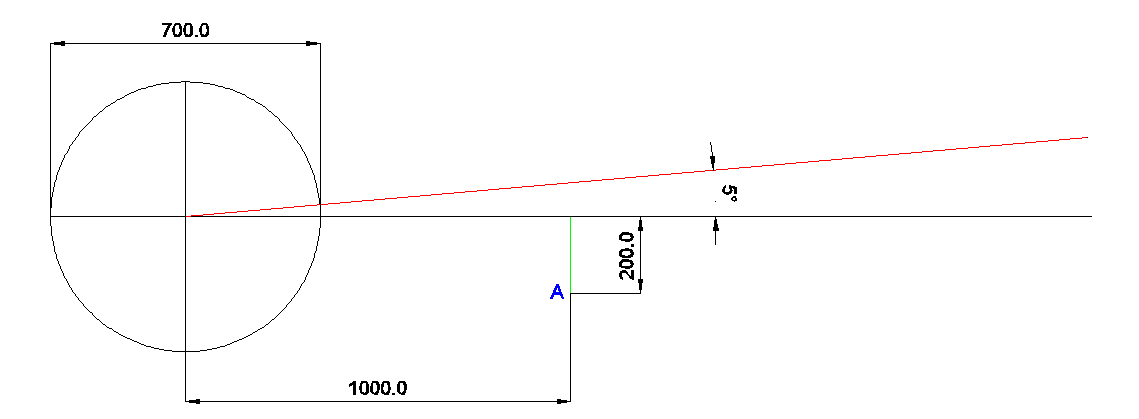 |
Replies:
Posted By: dery
Date Posted: 29.Jan.2024 at 19:46
| Hi Mr. Philippe Joseph, can you answer my question please? |
Posted By: philippe JOSEPH
Date Posted: 29.Jan.2024 at 19:49
|
How to draw an arc with three known parameters ? -1- Offset the red line by 400 on the lower side. -2- Draw a circle of radius 400 centered on the point "A". -3- Draw a circle of radius 400 passing by the intersection between the offseted red line and the circle centered on the point "A". -4- Trim the circle on the red line and the green line and you have got your arc.
|
Posted By: Kent Cooper
Date Posted: 30.Jan.2024 at 15:43
... bearing in mind that there are two such Circles, and two resulting Arcs tangent to the red line through point A [unless point A is close enough to an end of the line that one of the tangency points would be off the end].
|
 philippe JOSEPH wrote:
Posted By: philippe JOSEPH
Date Posted: 30.Jan.2024 at 17:24
|
Hello Kent and Dery, I have placed in the CAD/BIM Blocks library my file : HOW TO DRAW AN ARC-PJH.dwg. I see only one arc but I can be wrong.
|
Posted By: dery
Date Posted: 31.Jan.2024 at 08:55
Hi Mr. Joseph, can you create the CAD/BIM block that can be opened in AutoCAD 2014 please? Thanks
|
Posted By: philippe JOSEPH
Date Posted: 31.Jan.2024 at 11:37
| It's in the CAD/BIM BLocks : HOW TO DRAW AN ARC-PJH-2014.dwg |
Posted By: dery
Date Posted: 31.Jan.2024 at 14:32
| Hi Mr. Joseph. I saw your drawing already. However I still don't understand. How do you obtain those angles? Please advance and explain. |
Posted By: dery
Date Posted: 31.Jan.2024 at 14:56
Hi Mr. Joseph, currently I am at this step (please see attached image). Can you tell me please what should I do for the next step? Thank you so much. |
Posted By: philippe JOSEPH
Date Posted: 31.Jan.2024 at 17:41
| Dery, the "step by step" method is in the CAD/BIM Block library. |