Auto load LISPs
Printed From: CAD Forum
Category: EN
Forum Name: AutoCAD
Forum Description: Discussion about AutoCAD and AutoCAD LT, viewers, DWG and DXF formats, Design Review, AutoCAD web, Drive, add-ons
URL: https://www.cadforum.cz/forum_en/forum_posts.asp?TID=1464
Printed Date: 22.Oct.2026 at 15:36
Topic: Auto load LISPs
Posted By: Breeze104
Subject: Auto load LISPs
Date Posted: 18.Dec.2008 at 14:41
|
I am am new to using LISP files and was wondering how one gets certain ones to auto load every time you open ACAD? ------------- Breeze |
Replies:
Posted By: msplcdykee69
Date Posted: 18.Dec.2008 at 15:32
| Command APPLOAD then mouse over to LOAD find the lisp programs you wish to add then mouse over to contents and do the same. One loads lisp's for just that session of CAD the other loads as a default. |
Posted By: Arben.Allaraj
Date Posted: 19.Dec.2008 at 14:05
Follow steps begining from this photo. 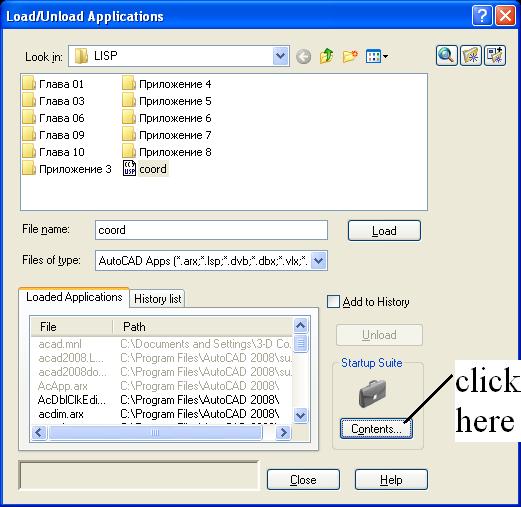 ------------- Ing Arben.Allaraj http://cad-drafting-corner.blogspot.com |
 Breeze104 wrote: