Dynamic block to follow line or polyline path
Printed From: CAD Forum
Category: EN
Forum Name: AutoCAD
Forum Description: Discussion about AutoCAD and AutoCAD LT, viewers, DWG and DXF formats, Design Review, AutoCAD web, Drive, add-ons
URL: https://www.cadforum.cz/forum_en/forum_posts.asp?TID=14782
Printed Date: 05.Sep.2026 at 00:48
Topic: Dynamic block to follow line or polyline path
Posted By: M07
Subject: Dynamic block to follow line or polyline path
Date Posted: 14.May.2026 at 04:01
|
Hello everyone, I need your help. I am a plumbing draughtsman, and I use dynamic block pipes that I can stretch or resize. I also use various fittings like elbows, tees, etc. I want to know if there is a way to use a lisp or command to insert my predefined dynamic block so that it follows a line or polyline route previously drawn, similar to how it's done in Revit. I am using the full version of AutoCAD 2026 for my 2D work. Can someone please enlighten me |
Replies:
Posted By: Vladimir Michl
Date Posted: 14.May.2026 at 07:49
|
A single block (just align) or an array following the polyline path? The automatic alignment is a part of the dynamic blocks parameters. See e.g.: https://www.cadforum.cz/catalog_en/block.asp?blk=3220 And for the array, you can use https://www.cadforum.cz/en/display-complex-linetypes-on-3d-curves-in-plain-autocad-tip14665 See e.g.: 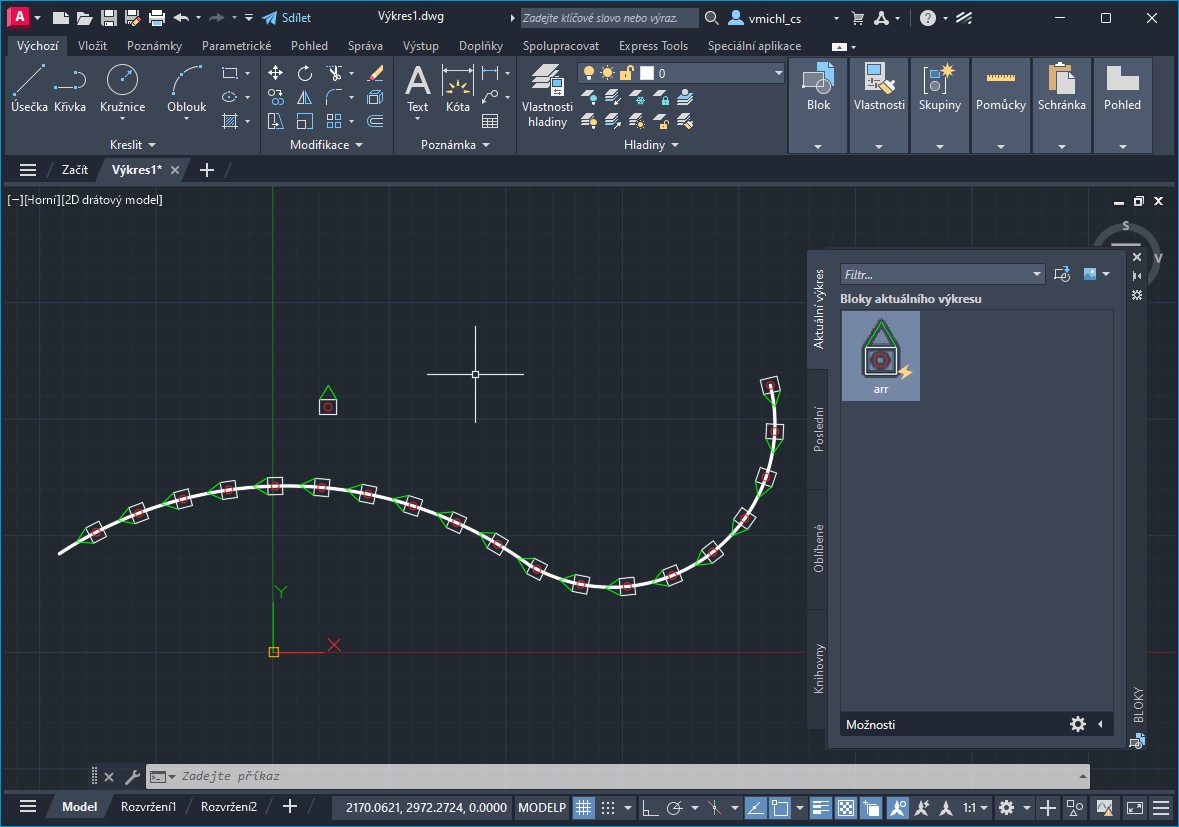 ------------- Vladimir Michl (moderator) https://www.linkedin.com/in/vmichl/" rel="nofollow - LinkedIn , Autodesk Expert Elite |