help on arcs
Printed From: CAD Forum
Category: EN
Forum Name: AutoCAD
Forum Description: Discussion about AutoCAD and AutoCAD LT, viewers, DWG and DXF formats, Design Review, AutoCAD web, Drive, add-ons
URL: https://www.cadforum.cz/forum_en/forum_posts.asp?TID=1945
Printed Date: 22.Oct.2026 at 01:33
Topic: help on arcs
Posted By: g_sems
Subject: help on arcs
Date Posted: 24.Apr.2009 at 01:59
| i need to design a jig for gluing up a curved glue lam. the arc needs to be 96" from end to end and 25" high. how to i make an accurate arc using these dimensions? |
Replies:
Posted By: Arben.Allaraj
Date Posted: 24.Apr.2009 at 08:38
See about this image below ? 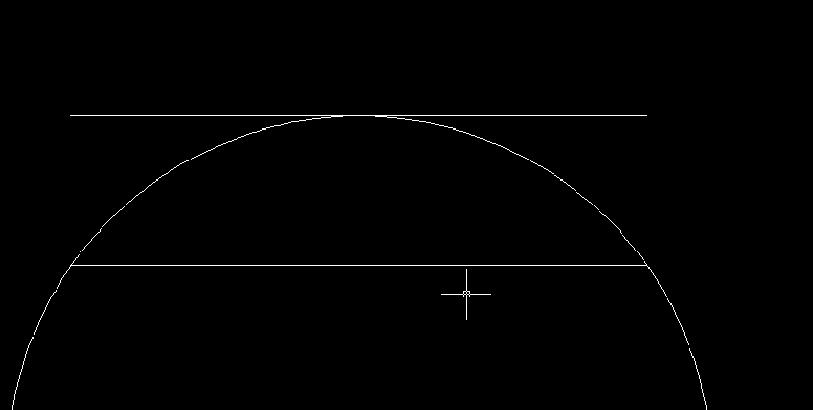 ------------- Ing Arben.Allaraj http://cad-drafting-corner.blogspot.com |
 g_sems wrote:
Posted By: g_sems
Date Posted: 25.Apr.2009 at 02:35
| is there a way to do it without using any guide lines? |
Posted By: msplcdykee69
Date Posted: 25.Apr.2009 at 04:05
|
Command line> A (Arc) Select start point
Command line> E (End)
enter in numeric number for your length
Command line> R (Radius)
Enter in numeric length for radius.
That should do it for you. If you cannot get it to give you the exact radius select the arc then adjust it by the properties window.
the way Arben Allaraj Outlined it is a very good way, this way your within the guidelines and you know it is correct. then just delete the guide lines after completed. ------------- Engineering Manufacturing Medical Cables/Adjunct Instructor Engineering Graphics/Engineering Computations and Careers msplcdykee69@yahoo.com Shawn |