Remove UCS icon
Printed From: CAD Forum
Category: EN
Forum Name: AutoCAD
Forum Description: Discussion about AutoCAD and AutoCAD LT, viewers, DWG and DXF formats, Design Review, AutoCAD web, Drive, add-ons
URL: https://www.cadforum.cz/forum_en/forum_posts.asp?TID=2207
Printed Date: 02.Sep.2026 at 20:47
Topic: Remove UCS icon
Posted By: rika
Subject: Remove UCS icon
Date Posted: 14.Jul.2009 at 15:14
| How do I permanently, forever, never-ever-coming-back, until-the-end-of-time, f**king-f**king-f**king-piss-off, DISABLE the UCS icon in Autodesk 2006? |
Replies:
Posted By: msplcdykee69
Date Posted: 15.Jul.2009 at 03:49
|
It is under the tools>options I do not know off hand which tab it is under. Hope that helps ------------- Engineering Manufacturing Medical Cables/Adjunct Instructor Engineering Graphics/Engineering Computations and Careers msplcdykee69@yahoo.com Shawn |
Posted By: Arben.Allaraj
Date Posted: 15.Jul.2009 at 08:54
Ok you can change it by this image. 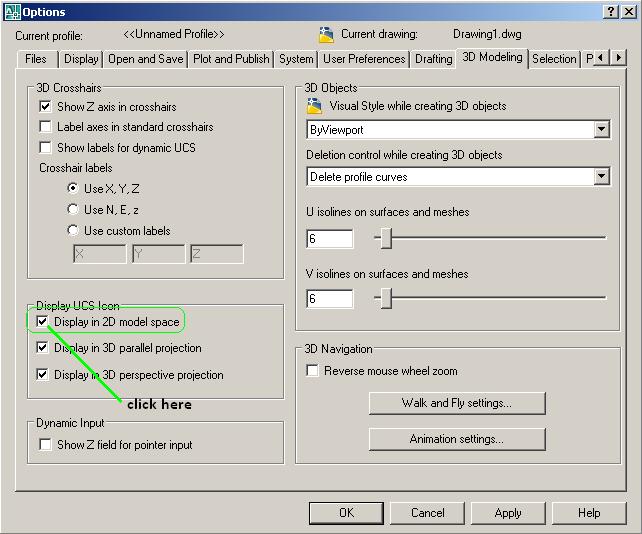 ------------- Ing Arben.Allaraj http://cad-drafting-corner.blogspot.com |
 rika wrote:
Posted By: rika
Date Posted: 15.Jul.2009 at 13:07
Strange, I have no 3D modelling tab in my options dialogue o_O I am using Autocad 2006 version Z.54.10. |
Posted By: Arben.Allaraj
Date Posted: 15.Jul.2009 at 14:40
Ok for moment type :UCSICON-->OFF save as this drawing as template . Start your work from this template file. Maybe you need an AutoLISP file . ------------- Ing Arben.Allaraj http://cad-drafting-corner.blogspot.com |
Posted By: rika
Date Posted: 18.Jul.2009 at 00:24
| Ok, thanks for your help! |