UCS???
Printed From: CAD Forum
Category: EN
Forum Name: AutoCAD
Forum Description: Discussion about AutoCAD and AutoCAD LT, viewers, DWG and DXF formats, Design Review, AutoCAD web, Drive, add-ons
URL: https://www.cadforum.cz/forum_en/forum_posts.asp?TID=5151
Printed Date: 20.Oct.2026 at 22:15
Topic: UCS???
Posted By: anggidesk73
Subject: UCS???
Date Posted: 20.Jan.2011 at 10:21
|
Dear all... I am a beginner as a drafter..and just signed in to a company. I receive a drawing from a consultant company... Drawing is here: 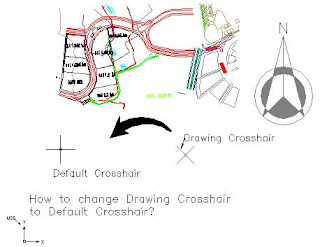 Drawing from consultant came with crosshair as drawing crosshair above... I want to change Drawing Crosshair to default crosshair... How?? I was explore the web and found amany answer like following: 1.Type in UCS then W for world, that should set you back to normalBut all above answers not match to the drawing. Any body can help me??? Please help and give me detail answer... Thanks Sweet regards, Anggiat Thamrin ------------- Regards...Anggiat Thamrin S |
Replies:
Posted By: HAWDesigner
Date Posted: 20.Jan.2011 at 16:37
|
The crosshairs have nothing to do with UCS. Try changing your [VAR]SNAPANG[/VAR] to 0. Does that work? ------------- -- R. Williams AutoCAD 2010 Certified Professional <!-- If all else fails hit F1 --> <<AutoCAD 2009 |
Posted By: Arben.Allaraj
Date Posted: 20.Jan.2011 at 18:06
|
Or change snap style in 'Standard' Command:snap enter then choose S ------------- Ing Arben.Allaraj http://cad-drafting-corner.blogspot.com |