automateing beam draw
Printed From: CAD Forum
Category: EN
Forum Name: AutoCAD
Forum Description: Discussion about AutoCAD and AutoCAD LT, viewers, DWG and DXF formats, Design Review, AutoCAD web, Drive, add-ons
URL: https://www.cadforum.cz/forum_en/forum_posts.asp?TID=5478
Printed Date: 19.Oct.2026 at 15:10
Topic: automateing beam draw
Posted By: samifox
Subject: automateing beam draw
Date Posted: 15.Mar.2011 at 10:40
|
Hi Im using AutoCAD 2007 LT. I need to draw a beam, usually I draw the lines I need, and then, I offsetting it twice, so I get 3 parallel lines. Is there any command I can use in order to automate this? I mean maybe I can draw one line and AutoCAD will follow with 2 parallel and offseted lines? hope I didn’t push to far
Thanks Shay |
Replies:
Posted By: John Connor
Date Posted: 15.Mar.2011 at 10:58
|
AutoCAD LT? Well that rules out the use of lisp. That leaves either a macro or Diesel.
Are you drawing a cross-section of the beam? ------------- "Humans have a strength that cannot be measured. This is John Connor. If you are reading this, you are the resistance." <<AutoCAD 2015>> |
Posted By: samifox
Date Posted: 15.Mar.2011 at 12:56
|
i have a co-worker with 2008 full, we can switch our computers. so assuming that i have 2008 full, how can it be done? thanks Shay |
Posted By: John Connor
Date Posted: 15.Mar.2011 at 13:24
|
There are some lisp routines and maybe even a couple of Dynamic Blocks floating around that can handle the task. Metric or Imperial units?
We are talking a cross-section of a beam right?
------------- "Humans have a strength that cannot be measured. This is John Connor. If you are reading this, you are the resistance." <<AutoCAD 2015>> |
Posted By: samifox
Date Posted: 15.Mar.2011 at 14:26
i need it metric. ive posted a picture of what i mean. http://storeimg.com/out.php/i4390_beam.gif" rel="nofollow">  thanks Shay |
 John Connor wrote:
Posted By: John Connor
Date Posted: 15.Mar.2011 at 14:35
|
Did someone turn out the lights? I see no picture. It was a simple question that I've asked twice now. I guess I'll assume you are drawing beam sections typically shown in most structural steel manuals. It makes the most sense. ------------- "Humans have a strength that cannot be measured. This is John Connor. If you are reading this, you are the resistance." <<AutoCAD 2015>> |
Posted By: samifox
Date Posted: 15.Mar.2011 at 14:46
soory. i cant answer that. im asking this for a friend engineer. its not a cross-section(at least we dont call it like this here :)). its simple draw. i upload the image with another hosting. hope it will work now. Thanks Shayu http://img163.imageshack.us/i/beamr.gif/" rel="nofollow">  Uploaded with http://imageshack.us" rel="nofollow - ImageShack.us |
Posted By: John Connor
Date Posted: 15.Mar.2011 at 15:01
|
Our IT department blocks sites like that because they are potential virus threats. Can't you just post the image here? Are you showing a plan view with continuous lines for the outside edge of the flange and two dashed lines for the web? ------------- "Humans have a strength that cannot be measured. This is John Connor. If you are reading this, you are the resistance." <<AutoCAD 2015>> |
Posted By: samifox
Date Posted: 15.Mar.2011 at 15:25
 i didnt notice there is attchment file here. thats way i looked for image hosting. in the formatting controls, i press "insert image" with the same image hosting url, is that ok? |
Posted By: John Connor
Date Posted: 15.Mar.2011 at 15:31
|
Sorry...nothing appears in your last post that I can see. Try reading this:
http://www.cadforum.cz/forum_en/forum_posts.asp?TID=5421&PID=13802#13802 - http://www.cadforum.cz/forum_en/forum_posts.asp?TID=5421&PID=13802#13802 ------------- "Humans have a strength that cannot be measured. This is John Connor. If you are reading this, you are the resistance." <<AutoCAD 2015>> |
Posted By: samifox
Date Posted: 15.Mar.2011 at 16:07
|
i dont have the "Browse" button. any idea? i have flash installed |
Posted By: John Connor
Date Posted: 15.Mar.2011 at 16:49
|
I have no more ideas. Send a postcard. LOL
I've described two ways to show a beam and neither are what you are looking for? Then forget my previous suggestions as I don't think anyone has gone through the trouble to do what you are requesting. Until I see an image posted here at the CADforum I think I'll have to stop.
Are you drawing a beam in elevation view? If so, front side or right/left side?
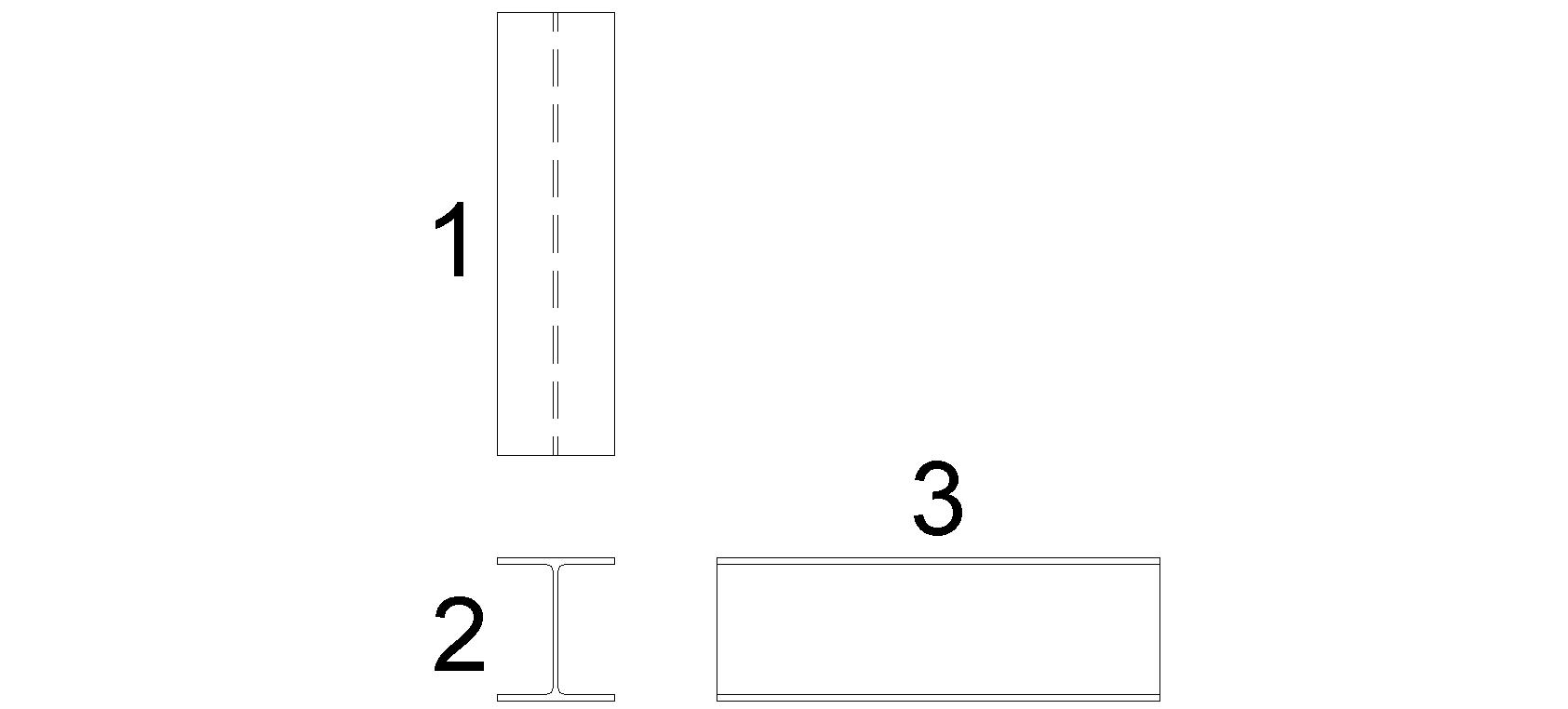
Somehow, some way, you should be able to describe, in words, what view of a beam you are drawing. How tough can it be? Pick a number: The beam shown below is a W250x200x49.1
 ------------- "Humans have a strength that cannot be measured. This is John Connor. If you are reading this, you are the resistance." <<AutoCAD 2015>> |
Posted By: samifox
Date Posted: 15.Mar.2011 at 19:42
really appriciate the effort you put in this  sorry , english is not my native language and i cant explain better cuz im not engineer. its number 3. thanks again by the way, browse button is not there, i install java, i test in FF, IE7 and chrome. it sould be something to consider, i think Thanks Shay |
Posted By: Cad64
Date Posted: 15.Mar.2011 at 20:14
Does Autocad LT have multilines? Try the MLINE command or maybe the DLINE command. ------------- Online Portfolio: http://www.rdeweese.com/" rel="nofollow - http://www.rdeweese.com/ |
Posted By: John Connor
Date Posted: 15.Mar.2011 at 22:43
|
Looks like we have a winner folks. It's number 3! Yeah! 1 - Top view. 2.- Front view. 3.- Side view. Try the suggestions Cad64 provided and let us know if that works for you. ------------- "Humans have a strength that cannot be measured. This is John Connor. If you are reading this, you are the resistance." <<AutoCAD 2015>> |
Posted By: samifox
Date Posted: 16.Mar.2011 at 10:55
|
thank you folks! its worked for us...no need to switch pc
|
Posted By: samifox
Date Posted: 16.Mar.2011 at 10:58
| another small thing, i want all lines i draw using the "dline" command to be joined. is theer a way to pre-command it? (i mean before creation) |
Posted By: Cad64
Date Posted: 16.Mar.2011 at 14:48
|
Have you checked your Autocad Help files? In full Autocad there is MLINE, MLSTYLE and MLEDIT, so maybe there are similar commands in Autocad LT for DLINE? I don't know? ------------- Online Portfolio: http://www.rdeweese.com/" rel="nofollow - http://www.rdeweese.com/ |
Posted By: John Connor
Date Posted: 16.Mar.2011 at 16:16
|
You're talking about "Caps" I believe. What I mean by that is the open ends of your dlines are capped (closed) off. This feature can be turned On/Off at the command line.
For those of you using full AutoCAD who fondly remember DLine from your LT days and wish you had it now, the South Plains AutoCAD Users Group has a tweaked version of the routine in AutoLISP form at their website free for the downloading. It is aptly named DLINE.LSP and can be accessed via the link below.
DLine options include: Break, Caps, Close, Dragline, Snap, Undo and Width.
http://www.spaug.org/LISP_Index.Html" rel="nofollow - http://www.spaug.org/LISP_Index.Html ------------- "Humans have a strength that cannot be measured. This is John Connor. If you are reading this, you are the resistance." <<AutoCAD 2015>> |