The Lowly AutoCAD UCSICON is Lowly No More!
Printed From: CAD Forum
Category: EN
Forum Name: RSS Feeds
Forum Description: Automatic publishing of CAD information from other web sources
URL: https://www.cadforum.cz/forum_en/forum_posts.asp?TID=6107
Printed Date: 17.Sep.2026 at 09:37
Topic: The Lowly AutoCAD UCSICON is Lowly No More!
Posted By: BetweenTheLines
Subject: The Lowly AutoCAD UCSICON is Lowly No More!
Date Posted: 20.Jun.2011 at 18:38
|
To experiment with the features, draw a rectangle and rotate it to something other than 45 or 30 (boring) degrees. How to Adjust Your A2012 UCS Icon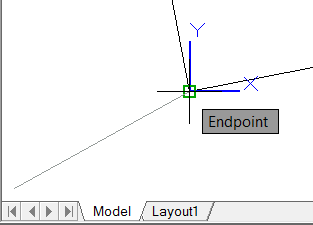
Article by www.autocadtrainerguy.com - Michael Beall a.k.a.” http://www.autocadtrainerguy.com/ - The AutoCAD Trainer Guy ” from his monthly http://www.autodesk.com/autocad - AutoCAD Tips newsletter June 2011: http://www.cadtutor.net/corner/2011/june.php#article_405
http://feeds.feedburner.com/~ff/blogs/btl?a=UbQm8-MuDrI:WWbahvJCLIE:yIl2AUoC8zA"> Go to the http://feedproxy.google.com/~r/blogs/btl/~3/UbQm8-MuDrI/the-lowly-autocad-ucsicon-is-lowly-no-more.html - original post... ------------- http://autodesk.blogs.com/between_the_lines/" rel="nofollow - Between the Lines - Autodesk blog by Shaan Hurley |
 Bless its heart. The UCS icon has been through years of neglect with only occasional costume changes. Several versions ago they put it on WeightWatchers® which made it much less clunky.
 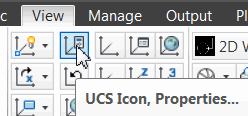 Then somewhere along the line they added the Properties option of the UCSICON command. [View tab
 Coordinates tab
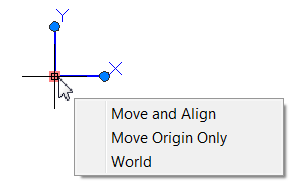 In AutoCAD 2012, however, they have empowered the icon itself with multi-function grips! Yes, the RTUCS command is still around (Real Time UCS, covered nearly 7 years ago in http://www.cadtutor.net/corner/2004/august.php - August 2004 ), but the A2012 improvements are much more intuitive.
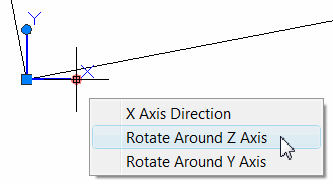 At this point, that is my most favorite feature of AutoCAD 2012, based on frequency of use and time saved. Next month, we'll look at the new associative Array command.