AutoCAD problem of selection with zooming
Printed From: CAD Forum
Category: EN
Forum Name: AutoCAD
Forum Description: Discussion about AutoCAD and AutoCAD LT, viewers, DWG and DXF formats, Design Review, AutoCAD web, Drive, add-ons
URL: https://www.cadforum.cz/forum_en/forum_posts.asp?TID=7270
Printed Date: 05.Sep.2026 at 14:51
Topic: AutoCAD problem of selection with zooming
Posted By: Sainbayar
Subject: AutoCAD problem of selection with zooming
Date Posted: 01.Feb.2012 at 03:22
|
Hi gues. I think it is shameful problem of AutoCAD. Why Autocad can't select all of my lines which included of my selection. Don't you understand? pls see above video url. How to solve this? youtube.com/watch?v=8j1Wm82lLNs
|
Replies:
Posted By: Sainbayar
Date Posted: 01.Feb.2012 at 03:29
|
s |
Posted By: heinsite
Date Posted: 01.Feb.2012 at 08:59
|
Does the same thing happen if you try to make the same selection with a left crossing window?... in other words, from the bottom right corner to the top left? Dave. ------------- Dave Hein, P.E. Hawaii District Engineer Kona International Airport AutoCAD Certified Professional Autodesk Expert Elite |
Posted By: heinsite
Date Posted: 01.Feb.2012 at 09:03
|
Are any of those lines on locked layers? Look in the Layers palette and see if the padlock is closed next to any layers.
------------- Dave Hein, P.E. Hawaii District Engineer Kona International Airport AutoCAD Certified Professional Autodesk Expert Elite |
Posted By: John Connor
Date Posted: 01.Feb.2012 at 12:15
|
Are you in a paper space layout or in model space?
------------- "Humans have a strength that cannot be measured. This is John Connor. If you are reading this, you are the resistance." <<AutoCAD 2015>> |
Posted By: Sainbayar
Date Posted: 01.Feb.2012 at 12:23
| s |
Posted By: Sainbayar
Date Posted: 01.Feb.2012 at 12:27
| s |
Posted By: Sainbayar
Date Posted: 01.Feb.2012 at 12:27
| s |
Posted By: John Connor
Date Posted: 01.Feb.2012 at 12:46
|
No, all of AutoCAD does not have this problem. I have four versions of AutoCAD on my computer and not one of them have the problem. YOU have the problem and that is why YOU posted here. Post a copy of the drawing so somewhere here can have a look at it. Let's stop playing word-tennis or we'll be at this all day. Is this a 2D or 3D drawing? ------------- "Humans have a strength that cannot be measured. This is John Connor. If you are reading this, you are the resistance." <<AutoCAD 2015>> |
Posted By: Sainbayar
Date Posted: 01.Feb.2012 at 12:51
| s |
Posted By: John Connor
Date Posted: 01.Feb.2012 at 12:56
|
OK...I downloaded your drawing and followed the steps you previously outlined on flicker and I was able to select all the lines and move, copy, rotate them, you name it. Like I said, it works for me with no problem.
------------- "Humans have a strength that cannot be measured. This is John Connor. If you are reading this, you are the resistance." <<AutoCAD 2015>> |
Posted By: Sainbayar
Date Posted: 01.Feb.2012 at 12:56
| s |
Posted By: John Connor
Date Posted: 01.Feb.2012 at 13:06
|
Dude! I already tried it and it worked for me! Maybe you need more practice. What command were you trying to use on the selected lines? Just to be perfectly clear...I experienced NO problems what-so-ever with the section of the drawing that you posted. I followed the same procedure you demonstrated with your five flicker images. I can move, copy, rotate, erase, mirror, etc. making the selection of the lines using my mouse. I have no clear idea why you can't. Are we clear? ------------- "Humans have a strength that cannot be measured. This is John Connor. If you are reading this, you are the resistance." <<AutoCAD 2015>> |
Posted By: Sainbayar
Date Posted: 01.Feb.2012 at 13:28
| s |
Posted By: Sainbayar
Date Posted: 01.Feb.2012 at 13:30
| It is practical problem |
Posted By: John Connor
Date Posted: 01.Feb.2012 at 13:36
|
No problem here zooming with my mouse. You can solve all your zooming problems by reverting to an old AutoCAD feature called the Aerial View. It was originally pioneered by a company called nth Engine then AutoDesk basically stole it. In AutoCAD 2012 it is now a deprecated (meaning "hidden") command. You have to type .DSVIEWER at the command line. Don't forget the < . > in front of the command name. You can zoom into a part of your drawing, start the line command for example, then zoom to the opposite end of the drawing and pop back out to finish the command. Worked a treat. ------------- "Humans have a strength that cannot be measured. This is John Connor. If you are reading this, you are the resistance." <<AutoCAD 2015>> |
Posted By: John Connor
Date Posted: 01.Feb.2012 at 14:06
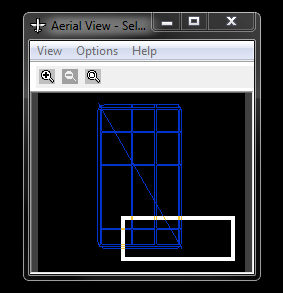 This is what Aerial View looks like when it is enabled. ------------- "Humans have a strength that cannot be measured. This is John Connor. If you are reading this, you are the resistance." <<AutoCAD 2015>> |
Posted By: Sainbayar
Date Posted: 01.Feb.2012 at 15:17
| s |
Posted By: John Connor
Date Posted: 01.Feb.2012 at 16:33
|
If I want to see a video I'll go to the movies. It's a lot more entertaining and I get to have a soda and popcorn. I have no problem creating a selection set and zooming with my mouse. Maybe you need to look into getting a better mouse or changing your mouse drivers. ------------- "Humans have a strength that cannot be measured. This is John Connor. If you are reading this, you are the resistance." <<AutoCAD 2015>> |
Posted By: heinsite
Date Posted: 02.Feb.2012 at 01:43
|
Two strikes against you in this thread, Dude: Both the Flickr and Mediafire URL domains you've referenced are BLOCKED on a lot of systems, as are many other social media sites. I for one don't appreciate the warning messages that result, nor the entries that go into my personal database, because of them.
This is all the more reason for you (and others) posting to these forums to upload your drawing files, blocks, images or information right here with your post. We would much prefer to one stop shop than to have to chase all over the internet looking for your stuff - only to get busted for it! So do me (us) a favor if you want your questions read or responded to in the future... put everything right here.
My 2˘
Dave. ------------- Dave Hein, P.E. Hawaii District Engineer Kona International Airport AutoCAD Certified Professional Autodesk Expert Elite |
Posted By: Sainbayar
Date Posted: 02.Feb.2012 at 03:52
|
s |
Posted By: Sainbayar
Date Posted: 02.Feb.2012 at 04:16
|
s
|
Posted By: heinsite
Date Posted: 02.Feb.2012 at 04:30
|
I'm afraid that pictures and videos aren't going to help any of us debug this problem. WIthout the actual dwg file, or at least a portion of it that contains the trouble issues, we can only guess. It's impossible to tell what's going on from what you've provided so far. Dave. ------------- Dave Hein, P.E. Hawaii District Engineer Kona International Airport AutoCAD Certified Professional Autodesk Expert Elite |
Posted By: Sainbayar
Date Posted: 02.Feb.2012 at 04:36
| s |
Posted By: heinsite
Date Posted: 02.Feb.2012 at 04:38
We don't know that yet, and won't (!) until you upload a dwg. The fact may well be that it's only happening on your system.
Dave ------------- Dave Hein, P.E. Hawaii District Engineer Kona International Airport AutoCAD Certified Professional Autodesk Expert Elite |
 Sainbayar wrote:
Posted By: heinsite
Date Posted: 02.Feb.2012 at 04:40
To upload a file with your post you need to click the button in the editor shown below.
 ------------- Dave Hein, P.E. Hawaii District Engineer Kona International Airport AutoCAD Certified Professional Autodesk Expert Elite |
Posted By: Sainbayar
Date Posted: 02.Feb.2012 at 04:51
| I know this. And it isn't caused by dwg file. I show this problem on just some lines. pls wait for my video. |
Posted By: heinsite
Date Posted: 02.Feb.2012 at 04:54
Sorry, my friend, but no more help from me without a dwg file or portion of one uploaded here for everyone to see and learn from. I do NOT like that "mediafire" site nor recommend sites like it for the simple reason those places are prone to virus propagation.
But just so you know... I have a complete understanding of the problem AND a solution as well now as a few comments about the drawing itself. Dave. ------------- Dave Hein, P.E. Hawaii District Engineer Kona International Airport AutoCAD Certified Professional Autodesk Expert Elite |
Posted By: Sainbayar
Date Posted: 02.Feb.2012 at 10:20
|
all over. watch these video to totally understand this issue (problem) of AutoCAD. post if you full understand this problem and can solve this.
|
Posted By: John Connor
Date Posted: 02.Feb.2012 at 11:51
|
I see you've made a lot of progress. Since Dave has now stepped in I'll just move off to the side here and wait to see what transpires. Yep, I know what the problem is too. ------------- "Humans have a strength that cannot be measured. This is John Connor. If you are reading this, you are the resistance." <<AutoCAD 2015>> |
Posted By: wihanl
Date Posted: 02.Feb.2012 at 12:04
| Remember that the blue selection fence will only select objects within the boundaries. Were you using lines or polylines? |
Posted By: heinsite
Date Posted: 02.Feb.2012 at 20:34
Get that popcorn and soda ready... 'cause this *is* going to be entertaining. Still waiting for those conditions to be satisfied tho'.
 Dave. ------------- Dave Hein, P.E. Hawaii District Engineer Kona International Airport AutoCAD Certified Professional Autodesk Expert Elite |
Posted By: John Connor
Date Posted: 03.Feb.2012 at 00:20
|
I got 'em right here. Hurry up though because I'm not missing the Super Bowl dude. I'm rooting for the NY GIANTS.
------------- "Humans have a strength that cannot be measured. This is John Connor. If you are reading this, you are the resistance." <<AutoCAD 2015>> |
Posted By: heinsite
Date Posted: 03.Feb.2012 at 00:35
|
It's in the Mongolian's court right now. As soon as he uploads that dwg fragment I've got his popcorn right here.
Yeah... Go Giants! Since they took out my Cheeseheads I'm on their side this time too.
Dave. ------------- Dave Hein, P.E. Hawaii District Engineer Kona International Airport AutoCAD Certified Professional Autodesk Expert Elite |
Posted By: deus_pax
Date Posted: 03.Feb.2012 at 22:33
| I remember I've met this selection issue for first time in AutoCAD 2000, since then I'm waiting, version by version, the autodesk programming team to fix it somehow... it looks like we have to use with this as being already distinguishing mark of AutoCAD |
Posted By: heinsite
Date Posted: 04.Feb.2012 at 05:22
Yup. This one goes way back. And it's a case where you get nowhere if you try and fight the program. Thinking that something "should" work a certain way is a clear path to frustration. It's better to just calm down and get on with the task the way things are. If yours is really a "problem" eventually a new version will come out with your wishes granted.
... still more coming on all this ...
 Dave ------------- Dave Hein, P.E. Hawaii District Engineer Kona International Airport AutoCAD Certified Professional Autodesk Expert Elite |
Posted By: heinsite
Date Posted: 07.Feb.2012 at 11:36
|
It's time to close the book on this thread. The Super Bowl is over and all the popcorn and chips are gone. What the OP was trying to do here was make a right crossing window selection, but the procedure used was contrary to what AutoCAD allows. We can talk about "right or wrong" or "good or bad" all day, but it's futile to fight a computer program. To make a valid right crossing window in AutoCAD you must left click and hold, drag to enclose the entire area to be selected, and release the mouse button. Everything within the rectangular area chosen will be selected, and it all has to be onscreen at the time. What the OP did however was click and release in the upper left corner of the intended selection, zoom to the lower right corner and then click again. Unfortunately in doing so the original selection point went off screen and the only things selected were the objects entirely onscreen in the final zoom window. This method would have still worked if the original point had been onscreen, but once it was no longer there AutoCAD took over and made the decisions. This is just how the program works... and is very similar to how hatching used to work. If you didn't have your entire boundary onscreen you got an error. I was able to reproduce the behavior repeatedly using the OP's drawing. Try it using the attached, and while there note the variety of object types used to create the model. At first I suspected these might be contributing to the selection trouble, but they weren't. Dave. uploads/20120207_113453_Selection_CAD_F.dwg" rel="nofollow - uploads/20120207_113453_Selection_CAD_F.dwg ------------- Dave Hein, P.E. Hawaii District Engineer Kona International Airport AutoCAD Certified Professional Autodesk Expert Elite |
Posted By: John Connor
Date Posted: 07.Feb.2012 at 11:58
|
And they all lived happily ever after. The End. Thanks Dave. That was a beautiful ending. I almost cried at the part where the princess and the prince ride off into the sunset on the unicorn. GO GIANTS! My team....Big Blue did it. ------------- "Humans have a strength that cannot be measured. This is John Connor. If you are reading this, you are the resistance." <<AutoCAD 2015>> |
Posted By: Sainbayar
Date Posted: 11.Feb.2012 at 07:27
| hehe i think it is't decision making. What should i do this attached dwj file? :D Are you watching this video? youtube.com/watch?v=8j1Wm82lLNs. if you showing me your decision by video,i will be happy and very glad. Thank you |
Posted By: heinsite
Date Posted: 11.Feb.2012 at 09:01
|
No video. This is all about procedure you are following. With a right crossing window (where you begin in the upper left corner and finish in the lower right corner) you must have EVERYTHING in your display when you complete the selection command. Otherwise AutoCAD is going to behave just the way you show it. You simply CANNOT zoom in the middle of the command. Sorry. That is just the way the program works. Dave. ------------- Dave Hein, P.E. Hawaii District Engineer Kona International Airport AutoCAD Certified Professional Autodesk Expert Elite |
Posted By: John Connor
Date Posted: 11.Feb.2012 at 12:45
|
Yes, you can zoom in the middle of a command if you use the aerial view feature but I doubt whether or not you'll even attempt to use it. So ends my involvement in this thread. Bye.
------------- "Humans have a strength that cannot be measured. This is John Connor. If you are reading this, you are the resistance." <<AutoCAD 2015>> |