Xref
Printed From: CAD Forum
Category: EN
Forum Name: AutoCAD
Forum Description: Discussion about AutoCAD and AutoCAD LT, viewers, DWG and DXF formats, Design Review, AutoCAD web, Drive, add-ons
URL: https://www.cadforum.cz/forum_en/forum_posts.asp?TID=8221
Printed Date: 21.Oct.2026 at 22:01
Topic: Xref
Posted By: rhbelter
Subject: Xref
Date Posted: 10.Aug.2012 at 11:43
|
Hello, All, ACAD 2011 onto my new Dell 8500 (64 bit) from an earlier PC (Very fast). Drawings withXref (s) now have the Xref images at very 'faded' intensity. (The basic drawing intensity is OK). I am unable to learn how to control. ?????? /s/ Bob ------------- rhbelter |
Replies:
Posted By: Vladimir Michl
Date Posted: 10.Aug.2012 at 11:47
|
See the tip:
http://www.cadforum.cz/cadforum_en/print-xref-entities-faded-tip7570 - http://www.cadforum.cz/cadforum_en/print-xref-entities-faded-tip7570 ------------- Vladimir Michl //CADs.cz" rel="nofollow - //CADs.cz , https://www.linkedin.com/in/vmichl/" rel="nofollow - LinkedIn Autodesk Expert Elite |
Posted By: heinsite
Date Posted: 10.Aug.2012 at 23:34
|
XDWGFADECTL is also available on the Insert > References drop-down menu as a slider bar.
Dave. 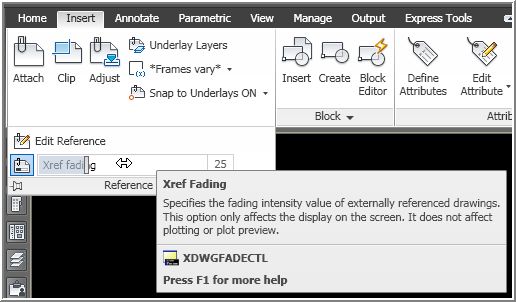 ------------- Dave Hein, P.E. Hawaii District Engineer Kona International Airport AutoCAD Certified Professional Autodesk Expert Elite |
Posted By: rappelzdzd
Date Posted: 13.Aug.2012 at 03:57
|
Good news never goes beyond the gate, while bad news spread far and wide.
------------- I heart which I could not help him |