How to shade when I plot
Printed From: CAD Forum
Category: EN
Forum Name: AutoCAD
Forum Description: Discussion about AutoCAD and AutoCAD LT, viewers, DWG and DXF formats, Design Review, AutoCAD web, Drive, add-ons
URL: https://www.cadforum.cz/forum_en/forum_posts.asp?TID=8456
Printed Date: 05.Sep.2026 at 16:29
Topic: How to shade when I plot
Posted By: Jens C
Subject: How to shade when I plot
Date Posted: 08.Oct.2012 at 11:39
|
I use AutoCad 2010 with MagiCad 2013.4 to create electrical drawings. When I plot and print today, my drawings AND my "X-ref drawing" are the colour black. I want to shade my "X-ref-drawings" so the result will be: My drawing (electrical) are black X-ref drawing (walls, doors, windows) are shaded In options->display->fade control I know how to shade the X-ref drawing, but when I print it it´s still black.
|
Replies:
Posted By: John Connor
Date Posted: 08.Oct.2012 at 12:29
|
Can't you just change the Screening value for the xref layers in your CTB or STB plot style?
------------- "Humans have a strength that cannot be measured. This is John Connor. If you are reading this, you are the resistance." <<AutoCAD 2015>> |
Posted By: Jens C
Date Posted: 08.Oct.2012 at 12:40
|
Where and how do I do that? I´m a beginner
|
Posted By: John Connor
Date Posted: 08.Oct.2012 at 12:49
|
You would have to edit the plot style file you are using. You are familiar with the PLOT dialog box aren't you?
------------- "Humans have a strength that cannot be measured. This is John Connor. If you are reading this, you are the resistance." <<AutoCAD 2015>> |
Posted By: Jens C
Date Posted: 08.Oct.2012 at 12:53
| No, I don´t think so |
Posted By: John Connor
Date Posted: 08.Oct.2012 at 12:58
|
Start the PLOT command and when the dialog box opens expand it further using the arrow in the lower right hand corner.
------------- "Humans have a strength that cannot be measured. This is John Connor. If you are reading this, you are the resistance." <<AutoCAD 2015>> |
Posted By: Jens C
Date Posted: 08.Oct.2012 at 13:17
|
Oh, that i knew, but where do I change Screening value? I use Sv_kvart.ctb
|
Posted By: John Connor
Date Posted: 08.Oct.2012 at 13:20
|
You edit the file. Stop. Did you just want to fade out the xrefs on-screen? I think there is a fade control for that purpose. Something to do with transparency. ------------- "Humans have a strength that cannot be measured. This is John Connor. If you are reading this, you are the resistance." <<AutoCAD 2015>> |
Posted By: Jens C
Date Posted: 08.Oct.2012 at 13:46
| No, I want the X-ref to be fade out when I print it |
Posted By: John Connor
Date Posted: 08.Oct.2012 at 14:10
|
Just checking. Then edit the CTB. There is an EDIT button you must click on to the right.
------------- "Humans have a strength that cannot be measured. This is John Connor. If you are reading this, you are the resistance." <<AutoCAD 2015>> |
Posted By: Jens C
Date Posted: 08.Oct.2012 at 14:22
| I´ve been there. The only thing I can do here, is do change all colors plot color. I cant choose the whole X-ref |
Posted By: John Connor
Date Posted: 08.Oct.2012 at 19:20
|
You can do a lot more than that.
------------- "Humans have a strength that cannot be measured. This is John Connor. If you are reading this, you are the resistance." <<AutoCAD 2015>> |
Posted By: Jens C
Date Posted: 08.Oct.2012 at 21:00
| Hmm? But where do I fade the X-ref in here? |
Posted By: John Connor
Date Posted: 09.Oct.2012 at 00:13
|
The xrefs are on their own layers aren't they? And these layers have their own color don't they? And under Properties, when you edit the CTB style you are using, there is a separate line that reads"Screening" right? And the default setting is 100 which means you could change that value to something less than 100 right? You do kind of see where this is all going don't you? Yes/No/I don't know? ------------- "Humans have a strength that cannot be measured. This is John Connor. If you are reading this, you are the resistance." <<AutoCAD 2015>> |
Posted By: John Connor
Date Posted: 09.Oct.2012 at 00:28
|
mmm
------------- "Humans have a strength that cannot be measured. This is John Connor. If you are reading this, you are the resistance." <<AutoCAD 2015>> |
Posted By: edwinprakoso
Date Posted: 09.Oct.2012 at 05:04
|
Interesting. I never use screening before. So we use screening to plot objects transparently? Basically it just reduce the amount of ink when we plot. Is there a way to really plot object transparently? When I plot the drawing to PDF/DWF the color is faded but still not transparent. ------------- Edwin Prakoso http://cad-notes.com" rel="nofollow - CAD notes | CAD tutorials and best practices |
Posted By: John Connor
Date Posted: 09.Oct.2012 at 12:23
|
I don't believe there is a way to "plot transparency" because AutoCAD is a vector based program not raster based. If you need transparency then you might want to look at bring your drawing into a program like Sketchup. ------------- "Humans have a strength that cannot be measured. This is John Connor. If you are reading this, you are the resistance." <<AutoCAD 2015>> |
Posted By: heinsite
Date Posted: 09.Oct.2012 at 19:53
|
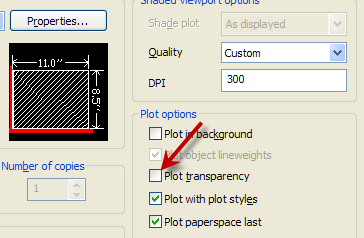
You can plot transparency... but it does require conversion of vector to rastor and it does take longer. And that's why we almost always leave the "Plot transparency" box unchecked in the expanded Plot dialog.
But if you check it you might get what you're after.
Dave.
 ------------- Dave Hein, P.E. Hawaii District Engineer Kona International Airport AutoCAD Certified Professional Autodesk Expert Elite |
Posted By: Jens C
Date Posted: 11.Oct.2012 at 11:00
| John Connor! It bloody works now! thank you for explain for a beginner like me |
Posted By: edwinprakoso
Date Posted: 12.Oct.2012 at 04:01
|
Thanks Dave. The transparency works. I've been wondering why AutoCAD has transparency if we can't plot it. But now I know that we can. ------------- Edwin Prakoso http://cad-notes.com" rel="nofollow - CAD notes | CAD tutorials and best practices |
Posted By: heinsite
Date Posted: 12.Oct.2012 at 04:40
|
It will take longer via the Plot menu transparency box however, especially in larger and more complex drawings. So this is where John's suggestion to use a custom Plot Style and screened colors may end up being faster and more efficient. But both ideas work. AutoCAD usually gives us many ways of doing the same thing. I like to keep things as simple as I can so I don't lose time months or years later trying to figure out what I did. And at that I still usually fail pretty miserably!  Dave. ------------- Dave Hein, P.E. Hawaii District Engineer Kona International Airport AutoCAD Certified Professional Autodesk Expert Elite |