How to create a simple canopy with skylights?
Printed From: CAD Forum
Category: EN
Forum Name: AutoCAD
Forum Description: Discussion about AutoCAD and AutoCAD LT, viewers, DWG and DXF formats, Design Review, AutoCAD web, Drive, add-ons
URL: https://www.cadforum.cz/forum_en/forum_posts.asp?TID=8464
Printed Date: 05.Sep.2026 at 01:54
Topic: How to create a simple canopy with skylights?
Posted By: brentatterton@h
Subject: How to create a simple canopy with skylights?
Date Posted: 09.Oct.2012 at 18:08
|
I am having a very hard time trying to create a very simple canopy in 3d the canopy is 9'-0 wide and 30'-7 long and 6" thick and there are three skylights. so when I draw the canopy and draw the skylights in place and then give thickness to the canopy I can not figure out how to remove the skylights so you can see through the canopy. I have tried the presspull but I can not figure it out. Please can someone help? Brent
|
Replies:
Posted By: John Connor
Date Posted: 09.Oct.2012 at 18:12
|
You should be able to PressPull a rectangle equivalent in size to your skylights through the canopy to create the void you are looking for. If for some reason you can't get it (PressPull) to work then extrude the rectangle and subtract it from the canopy to create the opening.
------------- "Humans have a strength that cannot be measured. This is John Connor. If you are reading this, you are the resistance." <<AutoCAD 2015>> |
Posted By: John Connor
Date Posted: 09.Oct.2012 at 18:16
|
Another option would be to draw the canopy and the skylight openings in 2D then use the PressPull command on the entire set of geometry raising it to a height of 6 inches. > 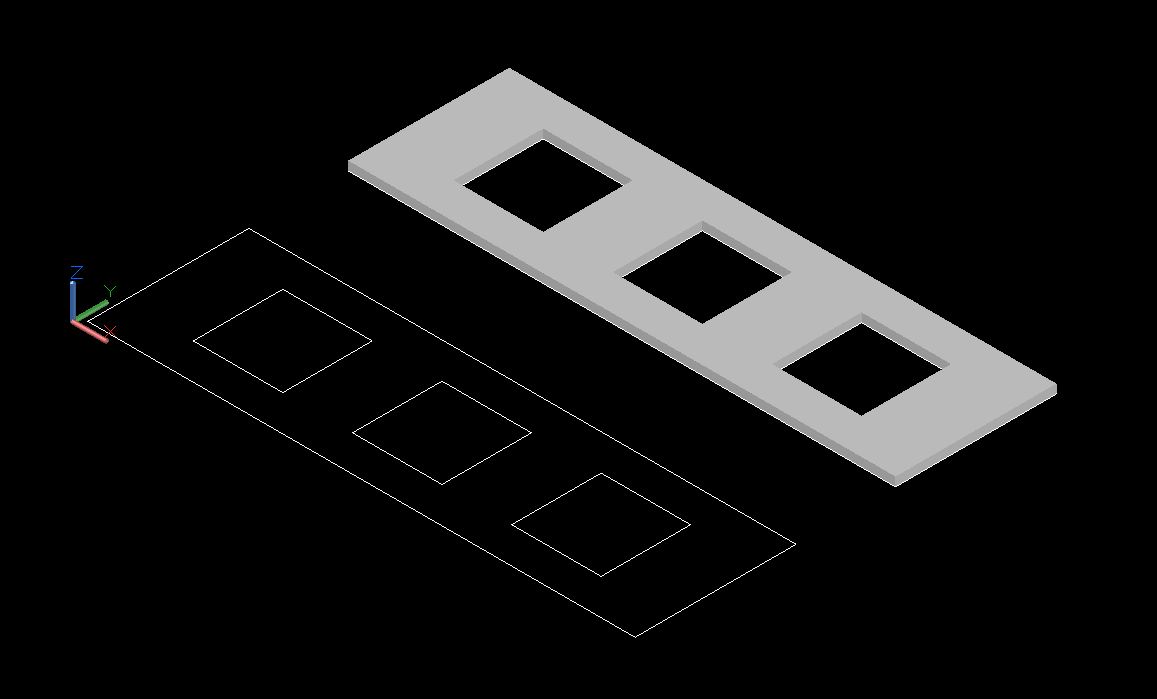 ------------- "Humans have a strength that cannot be measured. This is John Connor. If you are reading this, you are the resistance." <<AutoCAD 2015>> |
Posted By: brentatterton@h
Date Posted: 09.Oct.2012 at 18:19
| thanks that worked. |