help! pdf plot lineweights
Printed From: CAD Forum
Category: EN
Forum Name: AutoCAD
Forum Description: Discussion about AutoCAD and AutoCAD LT, viewers, DWG and DXF formats, Design Review, AutoCAD web, Drive, add-ons
URL: https://www.cadforum.cz/forum_en/forum_posts.asp?TID=8851
Printed Date: 04.Sep.2026 at 22:25
Topic: help! pdf plot lineweights
Posted By: tcohen
Subject: help! pdf plot lineweights
Date Posted: 15.Jan.2013 at 19:24
| How do I plot with the lineweights I have on layers in Modelspace. I'm trying to plot a pdf with the right lineweights and they all show the same thickness in plot preview. How do I set this up? |
Replies:
Posted By: lilly1234
Date Posted: 16.Jan.2013 at 02:56
| I believe you are referring to the plotstyle- make sure you right-click when you are in paperspace and select "print lineweight" |
Posted By: heinsite
Date Posted: 18.Jan.2013 at 06:16
|
There are two areas you need to check: 1. In the main Plot dialog check that the "Plot object lineweights" box is checked. 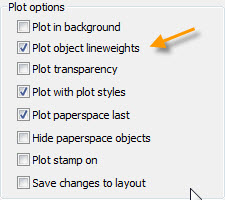 2. Go into the Plot style table editor and make sure that the plot style you've selected is set to "Use object lineweights" for the colors you're using.  Dave. ------------- Dave Hein, P.E. Hawaii District Engineer Kona International Airport AutoCAD Certified Professional Autodesk Expert Elite |