ASCPOINT LSP - Importing elevations as attribute
Printed From: CAD Forum
Category: EN
Forum Name: AutoCAD
Forum Description: Discussion about AutoCAD and AutoCAD LT, viewers, DWG and DXF formats, Design Review, AutoCAD web, Drive, add-ons
URL: https://www.cadforum.cz/forum_en/forum_posts.asp?TID=8866
Printed Date: 05.Sep.2026 at 04:15
Topic: ASCPOINT LSP - Importing elevations as attribute
Posted By: steelworx
Subject: ASCPOINT LSP - Importing elevations as attribute
Date Posted: 18.Jan.2013 at 13:52
|
The ASCPOINT LSP works great at importing points into AutoCAD but when I try and import the elevation as the attribute I am having some major annoyances. Using 358147.369,4982842.266,110.349,110.349 as an example where ASCPOINT requires X,Y,Z,attribute and "110.349 should be displayed as the text on the block but I either get "110.349000000" if imported as shown above or if I add another character like "358147.369,4982842.266,110.349,EL110.349" then it will only show the elevation before the decimal like "EL110" (missing the EL110."349" which is important information to display.) I have been importing it as "358147.369,4982842.266,110.349,110.349" and getting 110.349000000 and manually editing each block to remove the 000000 at the end. Is there any way to edit ASCPOINT to import elevations as the attribute without these 000000 at the end?  ASCPOINT: http://www.cadforum.cz/cadforum_en/tips.asp?t=ascpoint |
Replies:
Posted By: Vladimir Michl
Date Posted: 18.Jan.2013 at 14:18
|
Unfortunately there is no easy solution for either of these two problems in ASCPOINT. ------------- Vladimir Michl (moderator) https://www.linkedin.com/in/vmichl/" rel="nofollow - LinkedIn , Autodesk Expert Elite |
Posted By: CarlB
Date Posted: 18.Jan.2013 at 17:45
|
Two possibilities- Revise the lisp. Should be fairly straightforward (but I don't know the routine you are using). The lisp has to read the elevation, as text, from a file, convert it to a number to give the point a z value, and apparently convert that real to a string to place it in the attribute. It could use a precision othe than 6 decimal places when converting. Or it could use the initially read string to place in the attribute. Two, use another list to revise all selected point inserts to display number of decimals you specify. |
Posted By: CarlB
Date Posted: 19.Jan.2013 at 02:17
|
I made some lisp modifications that seem to work for your particular case. It's not a "robust" solution that handles all variations. It displays elevations to 3 decimal places. If you know a little about editing lisp, it involves replace a the defun "toSym" in ASCPOINT.LSP with the following:
|
Posted By: Vladimir Michl
Date Posted: 19.Jan.2013 at 14:59
|
Or better yet - we have used a more general line parser and generalized ASCPOINT.LSP (covering both mentioned problems) is now available for download on the Download page. ------------- Vladimir Michl (moderator) https://www.linkedin.com/in/vmichl/" rel="nofollow - LinkedIn , Autodesk Expert Elite |
Posted By: Miche11e
Date Posted: 01.Mar.2013 at 09:02
I have tried it and it works well, however I can't get my attribute to show. It remains 0.00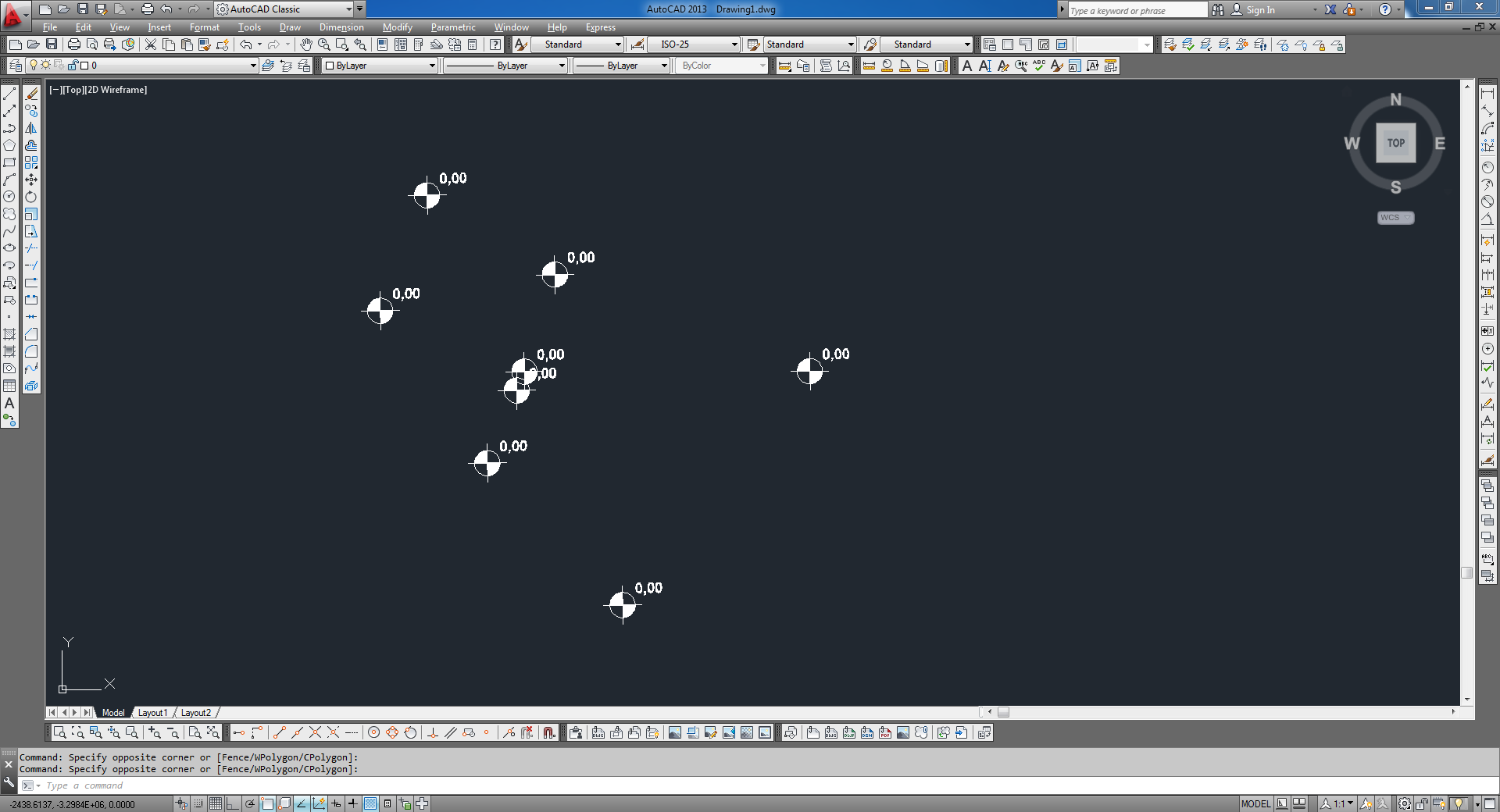 
|
Posted By: Torban
Date Posted: 25.Aug.2013 at 20:18
|
Vladimir, Using the ASCPOINT.lisp I have tried everything I can think of to get the attributes to come in but it's just not happening!! XYZ no problem and it inserts the other points with a block at each one but does not update the attribute field??? I have a block with a sphere and one attdef with name pnum, noting in the prompt and 000-00 for the default and that is what gets put into all the attribute labels (it doesn't update them!!) Any ideas?? Tom |
Posted By: Torban
Date Posted: 25.Aug.2013 at 20:20
|
Michelle, Did you ever solve this problem?? Tom |
Posted By: Torban
Date Posted: 27.Aug.2013 at 14:42
Is there anyone that can help me with this?? Tom |
Posted By: John Connor
Date Posted: 27.Aug.2013 at 15:39
|
A REGEN doesn't force an update? ------------- "Humans have a strength that cannot be measured. This is John Connor. If you are reading this, you are the resistance." <<AutoCAD 2015>> |
Posted By: Torban
Date Posted: 27.Aug.2013 at 15:43
| Nope! |
Posted By: Torban
Date Posted: 27.Aug.2013 at 15:57
|
I removed the ; in front of the (PRINT PT) command so I could see what data was being imported. This is what it shows on the command line so I know the XYZ and label information is there. Select the block to insert (may have attributes): NewExcel8 ("887.2700" "650.0000" "71.7400" "101" "point1") ("887.2700" "-650.0000" "71.7400" "102" "POINT2") ("601.5600" "0.0000" "577.0100" "103" "POINT2") ("694.4700" "-400.1100" "483.7500" "104" "POINT4") ("694.4500" "400.1300" "483.7600" "1005" "POINT5") ("907.5500" "-232.1400" "162.7900" "1006" "POINT6") I also know for a a fact that I have at least 2 attributes in my block. I don't know the programming language so I don't know what it's doing to put the label information in there?!?!?! Sooooooo Frustrating!! |
Posted By: Vladimir Michl
Date Posted: 27.Aug.2013 at 16:06
|
There are two approaches for displaying elevation as an attribute through ASCPOINT: 1) add/copy the elevation data (Z, usually the third column) again as a fourth column/parameter in your import file - it will be read into the block attribute 2) modify your block so that its attribute is predefined and contains a field pointing to Z-part of its insertion point -- such block will automatically display the Z of its position (whether it was inserted by ASCPOINT or not); see examples of such blocks here in the Block library - look for "elevation label", dynamic blocks ------------- Vladimir Michl (moderator) https://www.linkedin.com/in/vmichl/" rel="nofollow - LinkedIn , Autodesk Expert Elite |
Posted By: Torban
Date Posted: 27.Aug.2013 at 16:34
|
Vladimir and John, Thank you both for taking the time to reply and trying to help me. My file and structure is set up as follows: 877.27,650.0000,71.7400,101,POINT1 877.27 is my X 650.0000 is my Y 71.7400 is my Z 101 is what I want to have inserted into the first attribute POINT is what I want to have inserted into the second attribute So it appears as if my file is in the proper format and information is in the correct columns. I run the ascpoint lisp and this shows up on the command line: Select the block to insert (may have attributes): NewExcel8 ("887.2700" "650.0000" "71.7400" "101" "point1") ("887.2700" "-650.0000" "71.7400" "102" "POINT2") ("601.5600" "0.0000" "577.0100" "103" "POINT2") ("694.4700" "-400.1100" "483.7500" "104" "POINT4") ("694.4500" "400.1300" "483.7600" "1005" "POINT5") ("907.5500" "-232.1400" "162.7900" "1006" "POINT6") Again it looks as if the data is all there and in the proper format yet non of the attribute information updates to the new point and blocks. The program brings in all the XYZ's, creates the new point and attaches a copy of the block I select to each new point but the attributes do not update to the data above. 1001, 1002 etc. should be in the first attribute field and the POINT1, POINT2 etc should be in the second attribute field. Instead they retain the original data from the first block they were inserted from?!?!??! Tom |
Posted By: Torban
Date Posted: 29.Aug.2013 at 13:54
|
So does anyone have any suggestions or ideas as to what''s going on here and how to fix it?? Tom |
Posted By: Vladimir Michl
Date Posted: 29.Aug.2013 at 15:44
|
Please try the updated version of ASCPOINT (see Download). You can try it e.g. with the block AttPoint4 (with 4 attributes): http://www.cadforum.cz/catalog_en/block.asp?blk=10458" rel="nofollow - http://www.cadforum.cz/catalog_en/block.asp?blk=10458 ------------- Vladimir Michl (moderator) https://www.linkedin.com/in/vmichl/" rel="nofollow - LinkedIn , Autodesk Expert Elite |
Posted By: Torban
Date Posted: 30.Aug.2013 at 00:09
|
Vladimir, Tried the new ascpoint with your AttPoint and with mine. Didn't work with either one. Does the same thing with both-brings in the XYZ's plots the points, attaches the block to each but does NOT update the attribute information????? Looks just like the picture Michelle posted. ???? Tom |
Posted By: Torban
Date Posted: 30.Aug.2013 at 12:23
|
Vladimir, Want to thank you for all your help with this lisp program but I think this just might be a Mechanical desktop issue. I ran this program in AutoCad10 and it worked just fine but still doesn't work with Mechanical Desktop 2009. Not sure if there is a setting somewhere I need to change or what but it's obviously not the program. If anyone has any suggestions I'd really appreciate them!! Tom |