How can I create Y dynamic block
Printed From: CAD Forum
Category: EN
Forum Name: AutoCAD
Forum Description: Discussion about AutoCAD and AutoCAD LT, viewers, DWG and DXF formats, Design Review, AutoCAD web, Drive, add-ons
URL: https://www.cadforum.cz/forum_en/forum_posts.asp?TID=9003
Printed Date: 21.Oct.2026 at 02:09
Topic: How can I create Y dynamic block
Posted By: gegenytibor
Subject: How can I create Y dynamic block
Date Posted: 28.Feb.2013 at 12:46
|
Hey guys, I would like to create an "Y" dynamic block, see bellow. The hole lenght and the "cross" point will be variable, between the two sticks will be 90 deg, and it will be FIX. I would like if I change the "variable 2" distance the two sticks follow the cross point, and the top of the sticks stay in the same level, but between the sticks the 90 deg stay! Is possible somhow? Please help me if you can! Thx T 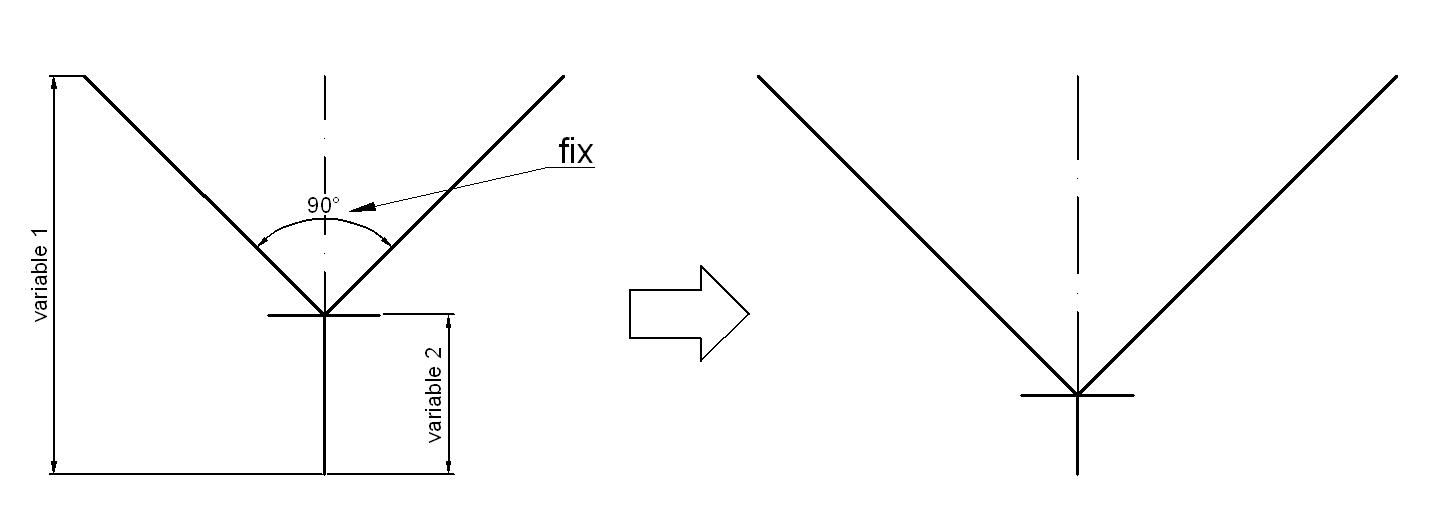
|
Replies:
Posted By: heinsite
Date Posted: 01.Mar.2013 at 09:08
|
Do you mean something like this? Dave uploads/35918/why.dwg" rel="nofollow - uploads/35918/why.dwg ------------- Dave Hein, P.E. Hawaii District Engineer Kona International Airport AutoCAD Certified Professional Autodesk Expert Elite |
Posted By: gegenytibor
Date Posted: 01.Mar.2013 at 10:01
|
Hey Dave! Not realy... but thank you so much! the realy problem see below: 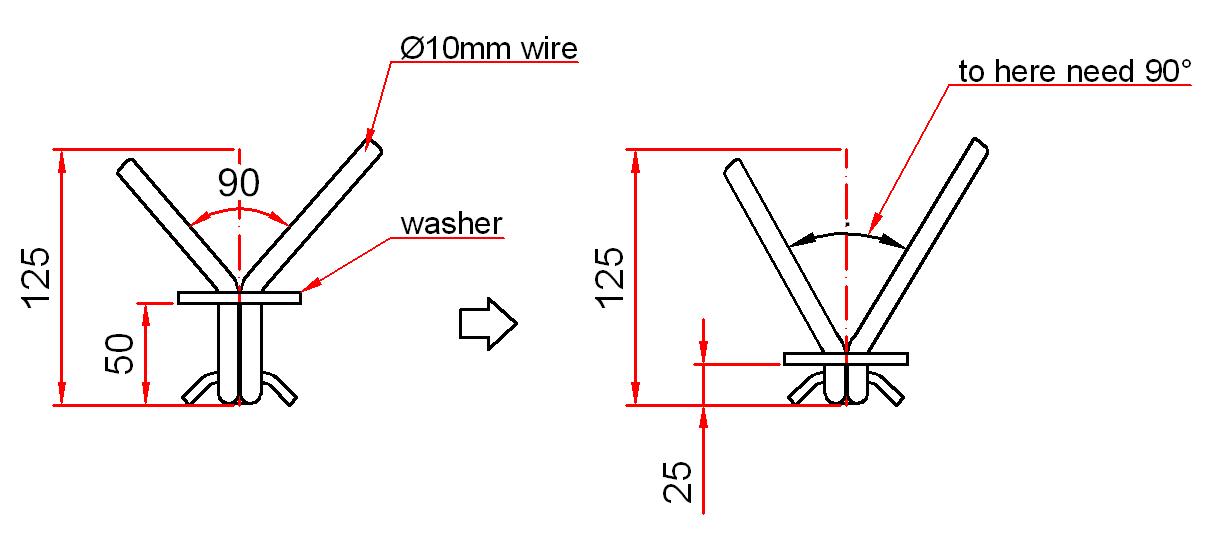 If you have idea please write to me! THX |
Posted By: DTalbot
Date Posted: 04.Mar.2013 at 06:18
|
How did you get on? You could use two linear parameters. The first for adjusting the length of the lower portion with a Stretch Action. The second linear parameter parallel to the axis of the upper portion, use two separate Stretch Actions with this same linear parameter and box just the ends, use an Angle offset of 45 degrees and minus 45 degrees respectively to alter the directions to match the arms of the 'Y'. et voila! |
Posted By: DTalbot
Date Posted: 04.Mar.2013 at 06:37
|
PS You can CHAIN the two parameters together. It's in the Properties but you'll need look up the process, easier to see on Youtube or somewhere than explain. |