Edit Multiline Text
Printed From: CAD Forum
Category: EN
Forum Name: AutoCAD
Forum Description: Discussion about AutoCAD and AutoCAD LT, viewers, DWG and DXF formats, Design Review, AutoCAD web, Drive, add-ons
URL: https://www.cadforum.cz/forum_en/forum_posts.asp?TID=9071
Printed Date: 27.Oct.2026 at 13:34
Topic: Edit Multiline Text
Posted By: kenjg
Subject: Edit Multiline Text
Date Posted: 22.Mar.2013 at 01:50
|
Hello All, I have a situation where I'm adding some text and want to identify the part with a part#. For example Item 1, I want to add a circle to the number one for it to stand out on my text notes. The same goes for each line item I have for my text note. For example, if I have 5 lines of text notes, I want to be able to put for example a triangle around 1 thru 5 line items. 1. 2. 3. 4. 5. 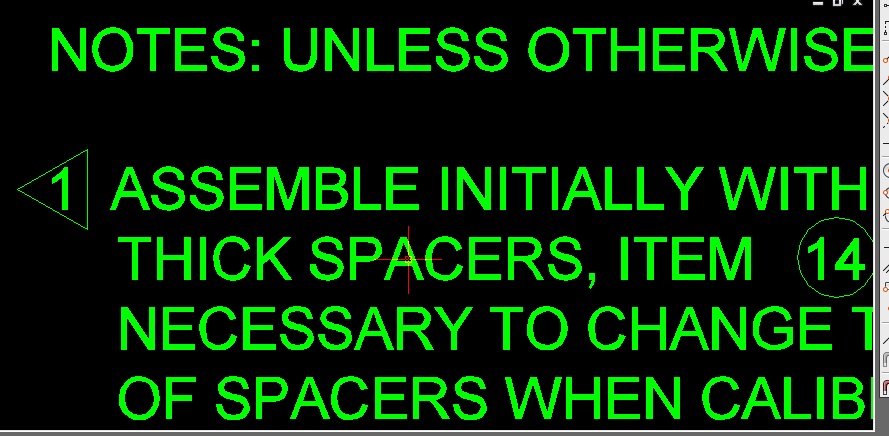 Thanks in advance KenJG |
Replies:
Posted By: John Connor
Date Posted: 22.Mar.2013 at 12:34
|
One option. Start MTEXT. Right-click, select Symbol, then Other. At the Character Map dialog box click on the Help button. At the Windows Help & Support dialog box click on the topic "How do I create a private character?". Start reading. Another option. Create the text in a word processing program, where you have more flexibility for doing these sort of things, then bring it into AutoCAD via cut/paste. ------------- "Humans have a strength that cannot be measured. This is John Connor. If you are reading this, you are the resistance." <<AutoCAD 2015>> |
Posted By: kenjg
Date Posted: 22.Mar.2013 at 19:05
|
Hello John,
Thank you for your reply and suggestions. Have a Great Day & Weekend. I'm sure I'll be back with more questions. Best Regards KenJG
|