command to toolbar help
Printed From: CAD Forum
Category: EN
Forum Name: AutoCAD
Forum Description: Discussion about AutoCAD and AutoCAD LT, viewers, DWG and DXF formats, Design Review, AutoCAD web, Drive, add-ons
URL: https://www.cadforum.cz/forum_en/forum_posts.asp?TID=9074
Printed Date: 05.Sep.2026 at 05:31
Topic: command to toolbar help
Posted By: javierperez
Subject: command to toolbar help
Date Posted: 22.Mar.2013 at 19:43
|
Hello My name is Javier Thanks in advance for any help on this topic. I want to add 2 commands to my custom toolbar. one is dimreassoc and the other is dimrotated I tired doing this using the cui, but I could not find these commands there. Any help would be appreciated. Javier Javier.perez@kaiseraluminum.com or javier1956@q.com |
Replies:
Posted By: heinsite
Date Posted: 27.Mar.2013 at 13:13
|
I wrote an article for my fellow workers on this subject not that long ago. I'll share it here for the benefit of the community. Dave. uploads/35918/haaug_067_-_Have_it_Your_Way_-_A_Custom_Toolbar_2013-02-06.pdf" rel="nofollow - uploads/35918/haaug_067_-_Have_it_Your_Way_-_A_Custom_Toolbar_2013-02-06.pdf ------------- Dave Hein, P.E. Hawaii District Engineer Kona International Airport AutoCAD Certified Professional Autodesk Expert Elite |
Posted By: javierperez
Date Posted: 27.Mar.2013 at 16:46
|
Thanks for the article. I am sorry that I did not mention that I am using ACAD 2012. The two commands that do not show up at the Command list. If type DIM at the commands list, dim commands show up, but as soon as add a R to Dim (DIMR)the command list goes blank. Dimreassoc Dimrotated are the commands I would like to add to my custom toolbar. Thanks all for viewing. Javier |
Posted By: John Connor
Date Posted: 27.Mar.2013 at 17:06
|
Dimension, Reassociate Dimensions does indeed show up on the list of commands. I'm looking at it right now (AutoCAD 2012). ------------- "Humans have a strength that cannot be measured. This is John Connor. If you are reading this, you are the resistance." <<AutoCAD 2015>> |
Posted By: heinsite
Date Posted: 28.Mar.2013 at 01:28
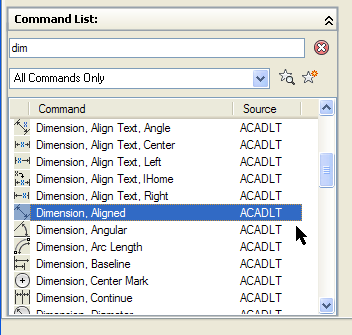 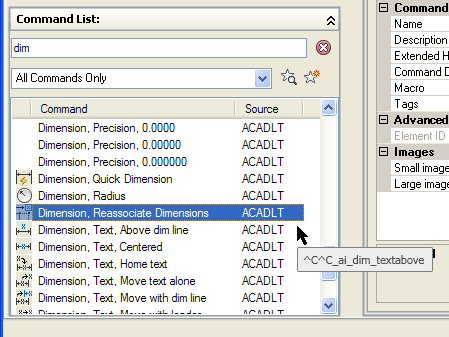 Yup. Both there in the Command List on the CUI page. I'd recommend you create a custom toolbar with these two commands and any others you regularly use. Follow the steps in my paper above and get your system set up just the way you like! Have fun! Dave. ------------- Dave Hein, P.E. Hawaii District Engineer Kona International Airport AutoCAD Certified Professional Autodesk Expert Elite |
Posted By: philippe JOSEPH
Date Posted: 28.Mar.2013 at 07:26
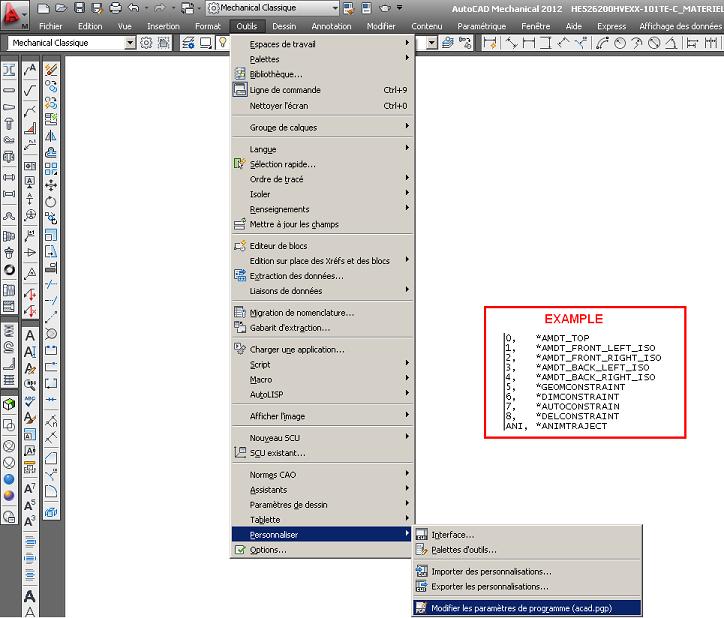 Hello javierperez, you can also update your acad.pgp file so you can use short alias. Hello javierperez, you can also update your acad.pgp file so you can use short alias.
Here is where to find it on AutoCAD Mechanical ( 2012 french release ).
You can find your PGP file in C\Program files\Autocad or Autodesk....... with asearch with the word acad.pgp.
I you update it directly from AutoCAD you will have to reinit it ( command REINIT ) or shut and open again your AutoCAD.
|
Posted By: John Connor
Date Posted: 28.Mar.2013 at 10:37
|
javier is not looking to add the commands to his acad.pgp file. ------------- "Humans have a strength that cannot be measured. This is John Connor. If you are reading this, you are the resistance." <<AutoCAD 2015>> |
Posted By: philippe JOSEPH
Date Posted: 28.Mar.2013 at 11:13
|
Yes John but it's an other way for a quick access to his most used commands. |
Posted By: John Connor
Date Posted: 28.Mar.2013 at 15:00
|
javier specifically says he wants to add the two commands to his custom toolbar. ------------- "Humans have a strength that cannot be measured. This is John Connor. If you are reading this, you are the resistance." <<AutoCAD 2015>> |