How to draw an irregular rectangle ??
Printed From: CAD Forum
Category: EN
Forum Name: AutoCAD
Forum Description: Discussion about AutoCAD and AutoCAD LT, viewers, DWG and DXF formats, Design Review, AutoCAD web, Drive, add-ons
URL: https://www.cadforum.cz/forum_en/forum_posts.asp?TID=9100
Printed Date: 05.Sep.2026 at 09:56
Topic: How to draw an irregular rectangle ??
Posted By: lovejeevan
Subject: How to draw an irregular rectangle ??
Date Posted: 31.Mar.2013 at 16:33
|
Hi all, I wish to draw an irregular rectangle. I know the measurement, but where as i dont know the angle. how to draw an irregular rectangle without angles. please help. 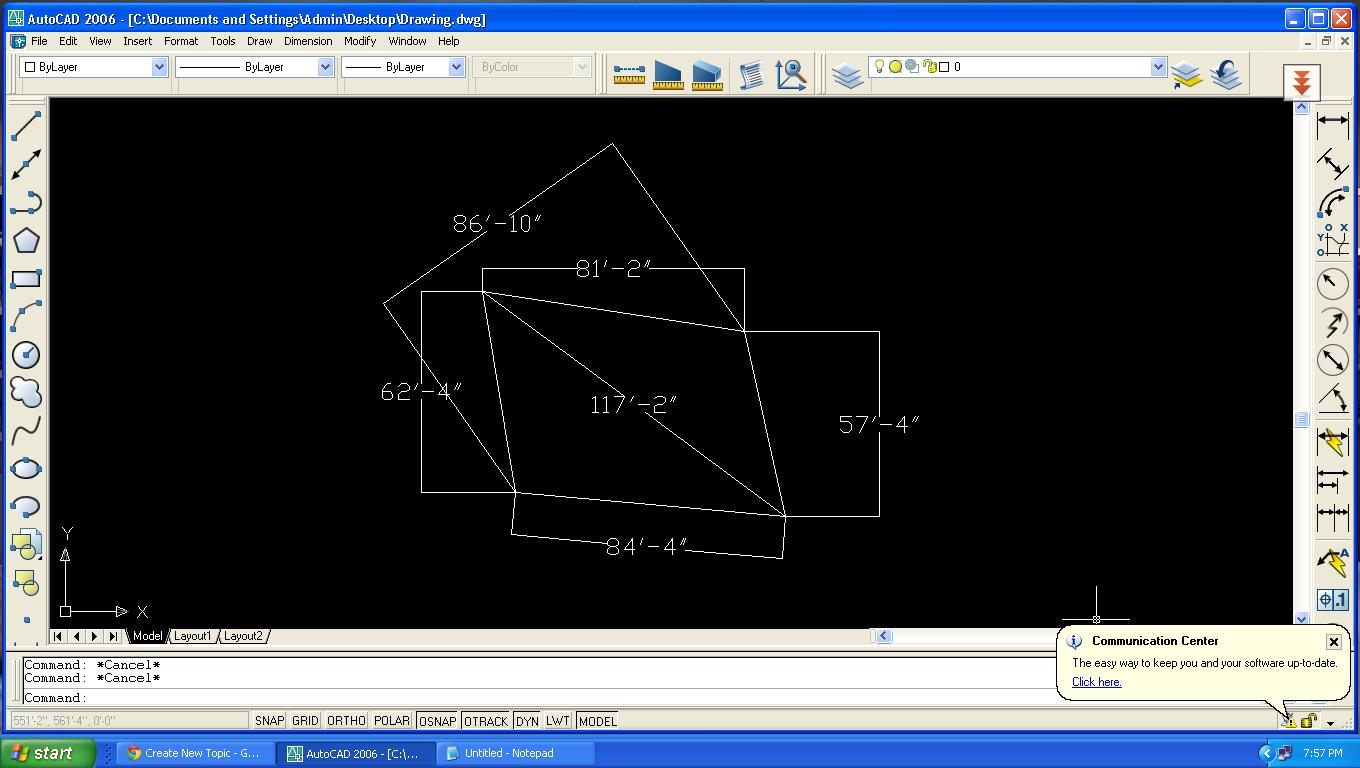 |
Replies:
Posted By: John Connor
Date Posted: 01.Apr.2013 at 01:01
|
Draw the diagonal then use intersecting circles drawn from the endpoints. ------------- "Humans have a strength that cannot be measured. This is John Connor. If you are reading this, you are the resistance." <<AutoCAD 2015>> |
Posted By: heinsite
Date Posted: 01.Apr.2013 at 06:18
|
If these are the only measurements you have then I don't see that you have enough information to draw the object. Dave. ------------- Dave Hein, P.E. Hawaii District Engineer Kona International Airport AutoCAD Certified Professional Autodesk Expert Elite |
Posted By: heinsite
Date Posted: 01.Apr.2013 at 06:19
|
Try it, John. I don't see enough aligned dimensions. Dave. ------------- Dave Hein, P.E. Hawaii District Engineer Kona International Airport AutoCAD Certified Professional Autodesk Expert Elite |
Posted By: John Connor
Date Posted: 01.Apr.2013 at 12:00
|
I can reproduce the rectangle with one exception. The 86'-10" distance ends up being closer to 86'-3". What is the source of the distances used? Why is the rectangle being constructed in this manner? In other words, why no angles? ------------- "Humans have a strength that cannot be measured. This is John Connor. If you are reading this, you are the resistance." <<AutoCAD 2015>> |
Posted By: heinsite
Date Posted: 01.Apr.2013 at 14:23
|
You're a better man than I, John. But I bet it was more work than you bargained for.
Let's not call this a rectangle anymore however, let's call it what it is: a Quadralateral.
Dave. ------------- Dave Hein, P.E. Hawaii District Engineer Kona International Airport AutoCAD Certified Professional Autodesk Expert Elite |
Posted By: John Connor
Date Posted: 01.Apr.2013 at 18:09
|
It took less than 30 seconds. ------------- "Humans have a strength that cannot be measured. This is John Connor. If you are reading this, you are the resistance." <<AutoCAD 2015>> |
Posted By: CarlB
Date Posted: 01.Apr.2013 at 18:17
| I agree with Heinsite, difficult or possibly not enough information. Only way to draw it easily is asume alldimensions are aligned, although some clearly appear to be horizontal/vertical. Probably why John's result didn't match the "given". |
Posted By: John Connor
Date Posted: 02.Apr.2013 at 11:32
|
Let's see...yep, I came closer than either one of you! LoL ------------- "Humans have a strength that cannot be measured. This is John Connor. If you are reading this, you are the resistance." <<AutoCAD 2015>> |
Posted By: John Connor
Date Posted: 02.Apr.2013 at 11:58
|
lovejeevan: What is the purpose of this exercise? It's not the sides that are the problem. It's the fact that you cannot get both diagonals to match the given dimensions easily. You can get one or the other to match but you're left with the other diagonal being short. Maybe the solution requires constructing the rectangle using constraints? ------------- "Humans have a strength that cannot be measured. This is John Connor. If you are reading this, you are the resistance." <<AutoCAD 2015>> |