3D Cylinders in ACAD 2011
Printed From: CAD Forum
Category: EN
Forum Name: AutoCAD
Forum Description: Discussion about AutoCAD and AutoCAD LT, viewers, DWG and DXF formats, Design Review, AutoCAD web, Drive, add-ons
URL: https://www.cadforum.cz/forum_en/forum_posts.asp?TID=9118
Printed Date: 05.Sep.2026 at 00:03
Topic: 3D Cylinders in ACAD 2011
Posted By: GHiatt
Subject: 3D Cylinders in ACAD 2011
Date Posted: 05.Apr.2013 at 17:05
|
I am new to 3D, and would like to join 2 cylinders at right angles to one another, and clean up the corners where they intersect, so that the appear mitered. Any suggestions? Thanks for the great forum. ------------- GRHiatt |
Replies:
Posted By: John Connor
Date Posted: 05.Apr.2013 at 17:36
|
Copy your original objects twice. In the first pair of cylinders subtract cylinder A from cylinder B. In the second pair of cylinders subtract cylinder B from cylinder A. Combine the results. If you like what you got erase the original cylinders. If you don't start over and use a different technique. ------------- "Humans have a strength that cannot be measured. This is John Connor. If you are reading this, you are the resistance." <<AutoCAD 2015>> |
Posted By: John Connor
Date Posted: 05.Apr.2013 at 18:26
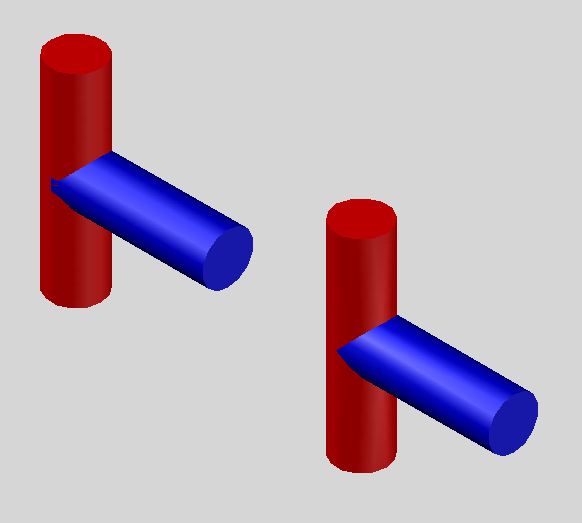 The original cylinders are on the left. The mitered ones are on the right. ------------- "Humans have a strength that cannot be measured. This is John Connor. If you are reading this, you are the resistance." <<AutoCAD 2015>> |
Posted By: GHiatt
Date Posted: 09.Apr.2013 at 15:37
|
John, Thanks for the help. I am trying create an "L" shape where the cylinders are cleaned up at the corner, rather than the "T" that you described. Thanks! ------------- GRHiatt |
Posted By: John Connor
Date Posted: 09.Apr.2013 at 18:27
|
Use the SLICE command then. Or sweep a circle along a path that represents a 90 degree corner. Either or both should work. ------------- "Humans have a strength that cannot be measured. This is John Connor. If you are reading this, you are the resistance." <<AutoCAD 2015>> |