Sports Car
Printed From: CAD Forum
Category: EN
Forum Name: AutoCAD
Forum Description: Discussion about AutoCAD and AutoCAD LT, viewers, DWG and DXF formats, Design Review, AutoCAD web, Drive, add-ons
URL: https://www.cadforum.cz/forum_en/forum_posts.asp?TID=9309
Printed Date: 09.Jun.2026 at 10:41
Topic: Sports Car
Posted By: curtie
Subject: Sports Car
Date Posted: 19.Jun.2013 at 20:08
|
uploads/380818/IMG_20130619_0001.pdf" rel="nofollow - uploads/380818/IMG_20130619_0001.pdf Good Evening guys, I'm having a problem getting the radius on this drawing. It has a lot of radius and its kinda confusing. Please help ------------- sean |
Replies:
Posted By: John Connor
Date Posted: 19.Jun.2013 at 23:56
|
Yes, there are numerous radii but since you did not specify which one or ones you are having trouble "getting" it is going to be difficult to assist you until such time as you provide more detail. ------------- "Humans have a strength that cannot be measured. This is John Connor. If you are reading this, you are the resistance." <<AutoCAD 2015>> |
Posted By: curtie
Date Posted: 20.Jun.2013 at 04:38
|
R518 on top of the car tyre, R96 on the side of the tyre. R1057, R96and R2032 at the back of the car. Sorry for not been specific first time, thanks. ------------- sean |
Posted By: heinsite
Date Posted: 20.Jun.2013 at 07:22
|
You're still going to have a bit of fun. If the "assignment" is to recreate this drawing the challenge is to find the actual radius points. And that's the real point of the exercise. Dave. ------------- Dave Hein, P.E. Hawaii District Engineer Kona International Airport AutoCAD Certified Professional Autodesk Expert Elite |
Posted By: curtie
Date Posted: 20.Jun.2013 at 07:30
|
I just need a start and I'll fugure out the rest ------------- sean |
Posted By: heinsite
Date Posted: 20.Jun.2013 at 07:42
|
Draw all those things you know for sure. You should be able to get pretty far into it and fairly close. The specification does give you some wiggle room with the statement, "Use your own discretion for any dimensions not specified". So you can make an assumption now and again. The key is that curves are most usually *tangent* to the straight lines they intersect. You can use this all over the drawing to find radius points. Dave. ------------- Dave Hein, P.E. Hawaii District Engineer Kona International Airport AutoCAD Certified Professional Autodesk Expert Elite |
Posted By: curtie
Date Posted: 20.Jun.2013 at 07:44
|
Ok, I will try ------------- sean |
Posted By: heinsite
Date Posted: 20.Jun.2013 at 07:56
|
Or as my first boss once told me, "Do something! Even if it's wrong." :) He also told me I'd get in more trouble if he found me doing nothing. So the more mistakes you make the faster you'll learn. So go make some! Dave. ------------- Dave Hein, P.E. Hawaii District Engineer Kona International Airport AutoCAD Certified Professional Autodesk Expert Elite |
Posted By: John Connor
Date Posted: 20.Jun.2013 at 12:37
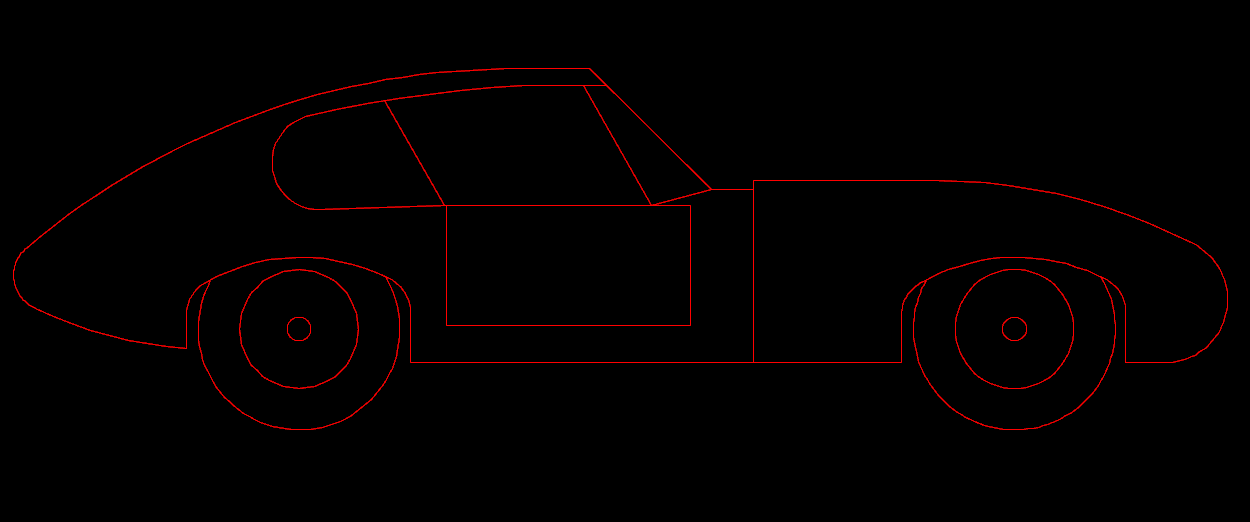 Given the "flexibility" your teacher has allowed you there is no reason why something like the above wouldn't be within the realm of possibility. This took about 20 minutes. Given the "flexibility" your teacher has allowed you there is no reason why something like the above wouldn't be within the realm of possibility. This took about 20 minutes.
------------- "Humans have a strength that cannot be measured. This is John Connor. If you are reading this, you are the resistance." <<AutoCAD 2015>> |
Posted By: John Connor
Date Posted: 20.Jun.2013 at 12:39
|
Many of the arcs could be constructed using the CIRCLE command and the Tan-Tan-Radius option. Re: my previously posted image. I had to guess about the front end of the car because some information was blurry and thus unreadable and some was missing. Sorry about that. ------------- "Humans have a strength that cannot be measured. This is John Connor. If you are reading this, you are the resistance." <<AutoCAD 2015>> |
Posted By: curtie
Date Posted: 22.Jun.2013 at 18:30
|
I got it right, took about 3 days but then im still learning ------------- sean |