FILTER IN AUTOCAD LT 2013 MAC
Printed From: CAD Forum
Category: EN
Forum Name: AutoCAD
Forum Description: Discussion about AutoCAD and AutoCAD LT, viewers, DWG and DXF formats, Design Review, AutoCAD web, Drive, add-ons
URL: https://www.cadforum.cz/forum_en/forum_posts.asp?TID=9333
Printed Date: 01.Nov.2026 at 13:03
Topic: FILTER IN AUTOCAD LT 2013 MAC
Posted By: Baione
Subject: FILTER IN AUTOCAD LT 2013 MAC
Date Posted: 26.Jun.2013 at 17:53
|
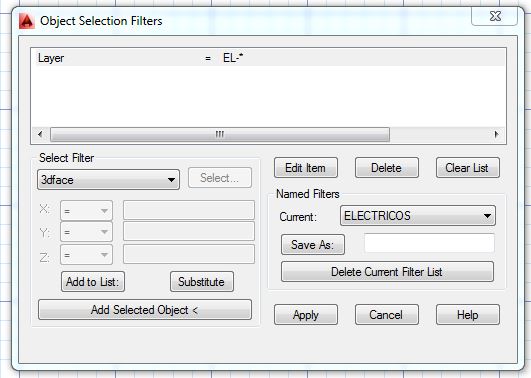
GOODMORNING EVERYONE, COME TO APPLY TO SEE WHAT COMMAND USE IN LT 2013 FOR MAC FILTER INSTEAD OF WHICH HE HAS BEEN VERY USEFUL IN AUTOCAD LT 2012 WINDOWS , BUT I MIGRATED TO MAC . FOR EXAMPLE TO SELECT LAYERS HAVING THE SAME COMMON LETTERS IN AUTOCAD 2012 [ WIN] I USE THE FOLLOWING:
------------- Ivan Arosemena B. |
Replies:
Posted By: John Connor
Date Posted: 26.Jun.2013 at 18:21
|
That's what happens when you jump from one platform to another without first checking to see what features did and did not get ported over. Now you're stuck trying to find a work-around. ------------- "Humans have a strength that cannot be measured. This is John Connor. If you are reading this, you are the resistance." <<AutoCAD 2015>> |
Posted By: barisof
Date Posted: 16.Feb.2014 at 17:55
|
Hello AutoCAD Mac users. I'm not a savvy AutoCAD user, and just got a new MacBook Pro. Apple Geniuses migrated everything from the old MacBook Pro, and AutoCAD is on the new machine, but it won't work. The error message says AutoCAD needs Access to folders that are not available due to permission issues. AutoDesk says to re-install AutoCAD. Two questions; (1) is that the only thing left for me to do, and (2) (DON'T Laugh) to do so, do I need to remove the AutoCAD I currently have, or will it just override what's there already if I reinstall it? How and what do I remove, if that's my only options before doing the re-install? Thanks! ------------- enbee |
Posted By: John Connor
Date Posted: 16.Feb.2014 at 21:13
|
You'll have to UNINSTALL AutoCAD first then do a new INSTALL. Unfortunately since you are on a Mac I don't know if there is a "specific" procedure for uninstalling AutoCAD as there is for PC users. PC users have to manually delete a couple of folders and edit the Windows Registry to ensure what AutoDesk refers to as a "clean" install environment. One of the side benefits to being an AutoCAD for Mac user is the fact there are far fewer knowledgeable users you can go to, and rely on, when you have a problem. You do have one (probably only one) other option: visit the AutoCAD for Mac discussion group at the AutoDesk website and post your question there. Maybe someone can give you a better idea of what to do. PC users of AutoCAD have several forums they can access and countless fellow users to seek help from. ------------- "Humans have a strength that cannot be measured. This is John Connor. If you are reading this, you are the resistance." <<AutoCAD 2015>> |
Posted By: barisof
Date Posted: 17.Feb.2014 at 17:11
|
Thanks so much for taking the time to walk me through the process. I will do so today! ------------- enbee |