plotting from layout
Printed From: CAD Forum
Category: EN
Forum Name: AutoCAD
Forum Description: Discussion about AutoCAD and AutoCAD LT, viewers, DWG and DXF formats, Design Review, AutoCAD web, Drive, add-ons
URL: https://www.cadforum.cz/forum_en/forum_posts.asp?TID=9421
Printed Date: 03.Sep.2026 at 12:04
Topic: plotting from layout
Posted By: ardeiasi
Subject: plotting from layout
Date Posted: 23.Jul.2013 at 15:27
|
Hi,
I have a a lot of DWG drawing files which contains multiple frames (with individual drawings and viewports) composed as an array in the paperspace, all these frames are in one single layout.
There is a way to plot them fast?
Thanks.
|
Replies:
Posted By: John Connor
Date Posted: 23.Jul.2013 at 16:34
|
You have a single layout with multiple viewports and you want to plot each viewport separately? Is that correct? ------------- "Humans have a strength that cannot be measured. This is John Connor. If you are reading this, you are the resistance." <<AutoCAD 2015>> |
Posted By: ardeiasi
Date Posted: 23.Jul.2013 at 16:46
|
Yes. single layout with multiple A3 page formats (one next to eachother) in this layout.
I'm searching for a fast way or to move them to separate layouts in order to publish them to pdf, or to print them directly to pdf without manualy take PLOT->WINDOW....etc.
Thank you.
BRO
|
Posted By: ardeiasi
Date Posted: 23.Jul.2013 at 16:53
| P.S. If the freeware PlotDWGarr + LayDWGarr will genarate diferent layouts for the paperspace it will be perfect. because I have the viewports (A3 formats) witch are presented as an array in the first layout. BRO |
Posted By: John Connor
Date Posted: 23.Jul.2013 at 17:19
|
The only options I know of were recently discussed here... http://www.cadtutor.net/forum/showthread.php?80029-How-to-print-multiple-drawing-in-one-layout-combined&highlight=plot+multiple+viewports ------------- "Humans have a strength that cannot be measured. This is John Connor. If you are reading this, you are the resistance." <<AutoCAD 2015>> |
Posted By: ardeiasi
Date Posted: 23.Jul.2013 at 17:38
|
thanks John Connor but...there is no answer in the link that you send ....
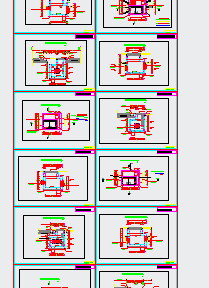
the think is how can i modify the lisp mentioned earlyer (from your site) in order to do the same think but in paperspace, not in modelspace? see the situation below please.....
Thanks again for looking into it.
BRO
 |
Posted By: John Connor
Date Posted: 31.Jul.2013 at 11:59
|
The discussion referenced was about plotting from a paperspace layout. ------------- "Humans have a strength that cannot be measured. This is John Connor. If you are reading this, you are the resistance." <<AutoCAD 2015>> |
Posted By: heinsite
Date Posted: 01.Aug.2013 at 08:37
|
I don't know why someone would deliberately create a mess like that, but I wouldn't fuss with trying to figure it out. That could take longer than simply moving the individual setups to their own Layout tabs. From there I'd batch plot the lot of them. Dave. ------------- Dave Hein, P.E. Hawaii District Engineer Kona International Airport AutoCAD Certified Professional Autodesk Expert Elite |