Tool Palettes-AutoCAD MEP 2012
Printed From: CAD Forum
Category: EN
Forum Name: AutoCAD
Forum Description: Discussion about AutoCAD and AutoCAD LT, viewers, DWG and DXF formats, Design Review, AutoCAD web, Drive, add-ons
URL: https://www.cadforum.cz/forum_en/forum_posts.asp?TID=9489
Printed Date: 05.Sep.2026 at 09:56
Topic: Tool Palettes-AutoCAD MEP 2012
Posted By: Caddesigns3
Subject: Tool Palettes-AutoCAD MEP 2012
Date Posted: 08.Aug.2013 at 20:34
|
I need to export Tool Palette(s) from AutoCAD MEP 2012 so that others may use it. However, the drop down menu in AutoCAD does not give me the option of Exporting Tool Palettes. Any Ideas??? Thanks in Advance for your help. Larry ------------- "Perseverance alone is omnipotent!" |
Replies:
Posted By: John Connor
Date Posted: 08.Aug.2013 at 23:52
|
Don't you have to right-click in a blank space on a Tool Palette to access that feature? ------------- "Humans have a strength that cannot be measured. This is John Connor. If you are reading this, you are the resistance." <<AutoCAD 2015>> |
Posted By: heinsite
Date Posted: 09.Aug.2013 at 04:31
|
John is correct. In the Tool Palettes dialog your can right-click anywhere in the grey sidebar to see the menu of options. Select Customize Palettes. Once in the Customize dialog you can right-click any Palette or Palette Group to Export them. Keep track of where you send them... then reverse the process in your other program to Import them.
Dave. ------------- Dave Hein, P.E. Hawaii District Engineer Kona International Airport AutoCAD Certified Professional Autodesk Expert Elite |
Posted By: Caddesigns3
Date Posted: 09.Aug.2013 at 14:58
|
Dave: My company copy of AutoCAD is apparently not acting as a normal seat. However in 30 years using AutoCAD, I don't think I've seen a copy of AutoCAD "act normal". Here is a screen capture of what I get when I right clik on the gray area of the tool palette I created: 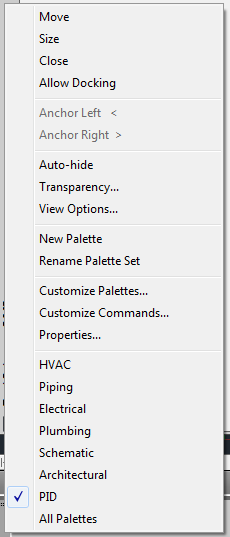 When I click on Customize Commands I get:  If I drag a copy of the "Export" command into my tool palette (which is the only place it will let me drop it) and invoke the command I get:  I don't believe any of these formats will support an import into another copy and/or machine with AutoCAD. I am open for suggestions and/or educating me to anything that I'm missing. Thanks in advance for anything you gentlemen or ladies can come up with. Sincrerely, Larry ------------- "Perseverance alone is omnipotent!" |
Posted By: John Connor
Date Posted: 09.Aug.2013 at 15:55
|
When all else fails consult your AutoCAD Help file. Yeah, I know, most times you can't find what you are looking for or the help that is provided is of no real help at all. What can I say, I did not write the program. To share a tool palette
------------- "Humans have a strength that cannot be measured. This is John Connor. If you are reading this, you are the resistance." <<AutoCAD 2015>> |


Posted By: heinsite
Date Posted: 09.Aug.2013 at 20:51
|
Hi, Larry!
That top menu looks correct to me. You were in the right place, you just clicked the "wrong" Customize choice.
 Click Customize Palettes and try again. That's the one you need to complete the instruction set I wrote up above.
Dave. ------------- Dave Hein, P.E. Hawaii District Engineer Kona International Airport AutoCAD Certified Professional Autodesk Expert Elite |