what is this, and how i remover it ?
Printed From: CAD Forum
Category: EN
Forum Name: AutoCAD
Forum Description: Discussion about AutoCAD and AutoCAD LT, viewers, DWG and DXF formats, Design Review, AutoCAD web, Drive, add-ons
URL: https://www.cadforum.cz/forum_en/forum_posts.asp?TID=9644
Printed Date: 05.Nov.2026 at 13:45
Topic: what is this, and how i remover it ?
Posted By: FS2
Subject: what is this, and how i remover it ?
Date Posted: 15.Sep.2013 at 09:55
|
hi. hello ... weird title , isn't it ? anyway :D, I am new with the AutoCAD and i have a silly little problem .. WTH is this, and how i remover it, it come every time i apply a command
http://epvpimg.com/9IGKd" rel="nofollow"> 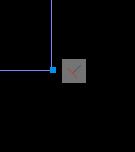
|
Replies:
Posted By: Vladimir Michl
Date Posted: 15.Sep.2013 at 09:58
|
These icons are autoconstraints. You can switch it off and on with the AutoConstratint icon in the bottom status bar (Ctrl+Shift+I) or via the Parametric ribbon. ------------- Vladimir Michl //CADs.cz" rel="nofollow - //CADs.cz , https://www.linkedin.com/in/vmichl/" rel="nofollow - LinkedIn Autodesk Expert Elite |
Posted By: heinsite
Date Posted: 15.Sep.2013 at 11:45
|
And in this case it means that the two lines will always be perpendicular to each other and each end coincident at the point where the small blue square is. Unless you remove these constraints they will always keep this condition regardless of how you might move one of them. To see this for yourself, grab and move one of the lines and watch what happens. Dave. ------------- Dave Hein, P.E. Hawaii District Engineer Kona International Airport AutoCAD Certified Professional Autodesk Expert Elite |
Posted By: FS2
Date Posted: 15.Sep.2013 at 15:53
|
Thanks alot |