Dynamic block scaling
Printed From: CAD Forum
Category: EN
Forum Name: AutoCAD
Forum Description: Discussion about AutoCAD and AutoCAD LT, viewers, DWG and DXF formats, Design Review, AutoCAD web, Drive, add-ons
URL: https://www.cadforum.cz/forum_en/forum_posts.asp?TID=9659
Printed Date: 25.Oct.2026 at 16:41
Topic: Dynamic block scaling
Posted By: David May
Subject: Dynamic block scaling
Date Posted: 19.Sep.2013 at 17:55
I am building a 2D dynamic block and having an issue. I have a top view of an open door. The goal is to have the Panel Width scale in size as the Door Width changes. see below: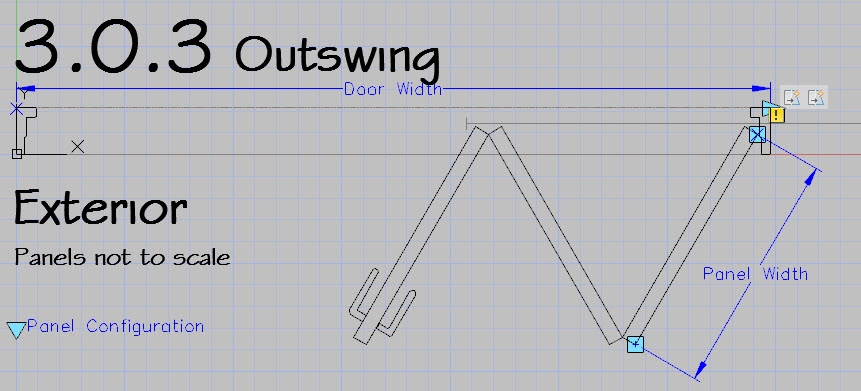 I have tried to control a polar stretch from a linear parameter. Not good. I have also tried making the "Panel Width" expression a formula using "Door Width" as a variable. I get a syntax error. I have been able to use user parameters in formulas before, but not in Action Parameters. Does anyone have another solution or a suggestion? |
Replies:
Posted By: David May
Date Posted: 19.Sep.2013 at 17:56
| I am using Auto CAD 2014 |
Posted By: heinsite
Date Posted: 20.Sep.2013 at 10:36
|
I haven't experimented with this, but my first thought is to use a parametric constraint. Let's say your total width will be divided with three panels. Therefore a panel length is equal to w/3. Play with this idea if you haven't already. Dave. ------------- Dave Hein, P.E. Hawaii District Engineer Kona International Airport AutoCAD Certified Professional Autodesk Expert Elite |