AutoDesk HW problem
Printed From: CAD Forum
Category: EN
Forum Name: AutoCAD
Forum Description: Discussion about AutoCAD and AutoCAD LT, viewers, DWG and DXF formats, Design Review, AutoCAD web, Drive, add-ons
URL: https://www.cadforum.cz/forum_en/forum_posts.asp?TID=9668
Printed Date: 06.Sep.2026 at 21:21
Topic: AutoDesk HW problem
Posted By: GoplerGop
Subject: AutoDesk HW problem
Date Posted: 24.Sep.2013 at 21:59
|
Hi Guys, thx for the previous help So far I learned, line, offset, circle, xline and rotate. I don't know how to get "left and right slopes" with 36 degree. My approach was to think them as triangle with 36 degree. So I extend central line and rotate 18 degree to left and right, but it was wrong. please give me help and tips thank you so much Gary 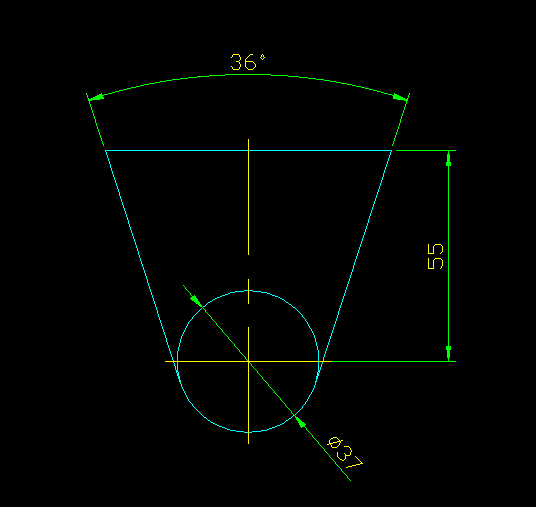 ficult with ficult with |
Replies:
Posted By: John Connor
Date Posted: 24.Sep.2013 at 23:45
|
First. Are you aware that the default setting for AutoCAD measures angles in a counter-clockwise direction and East happens to be angle zero? Second. Are you familiar with direct distance entry at the command line? If I wanted to draw a line 20 units long at a 45 degree angle I would start the line command, pick my start point then type @20<45. Third. Are you familiar with Polar Tracking or with the SNAPANG command. Both are other ways to accomplish the same task. ------------- "Humans have a strength that cannot be measured. This is John Connor. If you are reading this, you are the resistance." <<AutoCAD 2015>> |
Posted By: Kent Cooper
Date Posted: 25.Sep.2013 at 14:32
|
That will be affected by what you use as the base point for the rotation. If starting at the center-line position, you would need to know the point at which the 36-degree-angle Lines would (virtually) intersect in order to get the right result using Rotate. In that situation, I would draw Lines vertically from the quadrant points of the Circle, and Rotate each 18 degrees one way or the other, using the center of the Circle as the rotation base point. |
Posted By: GoplerGop
Date Posted: 25.Sep.2013 at 16:40
|
oh my gosh, i try both of your methods and then after a moment of truth, yes it work. it work. Is this some kind of math illusion..? i receive like 100 gigabyte of help from you guys thx
|