Title Block Placement in Layout
Printed From: CAD Forum
Category: EN
Forum Name: AutoCAD
Forum Description: Discussion about AutoCAD and AutoCAD LT, viewers, DWG and DXF formats, Design Review, AutoCAD web, Drive, add-ons
URL: https://www.cadforum.cz/forum_en/forum_posts.asp?TID=980
Printed Date: 21.Oct.2026 at 02:09
Topic: Title Block Placement in Layout
Posted By: Breeze104
Subject: Title Block Placement in Layout
Date Posted: 07.Aug.2008 at 18:04
|
It has been almost 12yrs sinceI had to do this and I don't remember how to get our company title block to show up in the layout view for every dwg I create.
I know I need to add it to the standard template, but that is what I don't remember how to do. I read some of the help files in ACADM but I am still not getting the results I want.
Also, when I try to insert an Xref into the layout of our title block which is 12x18 it doesn't fit in the sheet area. ------------- Breeze |
Replies:
Posted By: Arben.Allaraj
Date Posted: 07.Aug.2008 at 20:25
|
If you mean about AutoCAD Template it can solve with AutoCAD Icon Switch. Check below. http://www.hyperpics.com/downloads/resources/customization/general/AutoCAD%20Icon%20Switch.pdf - www.hyperpics.com/downloads/resources/customization/general/AutoCAD%20Icon%20Switch.pdf ------------- Ing Arben.Allaraj http://cad-drafting-corner.blogspot.com |
Posted By: Breeze104
Date Posted: 07.Aug.2008 at 20:38
|
What I ment was, when I switch to layout view I want to see our title block and then be able to create view ports and then have it print out with our title block. I know almost everyone does it but working for this company I have always just inserted the title block into model space and scaled it to fit around the drawing. Now that we have AIS 2009 instead of 2000i LT I would like to get more up to speed with the rest of the CAD world...LOL ------------- Breeze |
Posted By: Arben.Allaraj
Date Posted: 07.Aug.2008 at 20:43
|
Try using way that I wrote before. ------------- Ing Arben.Allaraj http://cad-drafting-corner.blogspot.com |
Posted By: Breeze104
Date Posted: 07.Aug.2008 at 21:17
|
I looked through all the switches and I didn't see anything that would take the current dwg of my border/title block and replace the standard layout backdrop. I saw where if you already had a layout created you could specify to use that one, but creating the layout like some of the tutorial files have is what I am having trouble with. ------------- Breeze |
Posted By: Breeze104
Date Posted: 07.Aug.2008 at 22:35
|
I figured that I would try using the wizard to create a layout but when I get to the dialog box that would allow me to select a title block to insert it says "NONE" and I don't know why or how to change it so it shows my title block. Any suggestions? ------------- Breeze |
Posted By: Breeze104
Date Posted: 26.Aug.2008 at 18:38
|
Well I now got the TBlock Template files to show up but I still can't get it to be the default when I switch to layout view. ------------- Breeze |
Posted By: Breeze104
Date Posted: 26.Aug.2008 at 20:24
|
Well I created Layouts in my template file, but when I go to use the icon switch /layout "B-Size.dwg"|"12x17 LS" it tells me "Cannot find the specified drawing file. Please verify that the file exists."
Now what? Where do I need to put the .dwgs that I need to use? ------------- Breeze |
Posted By: Arben.Allaraj
Date Posted: 26.Aug.2008 at 20:52
If this file exist check the below image. 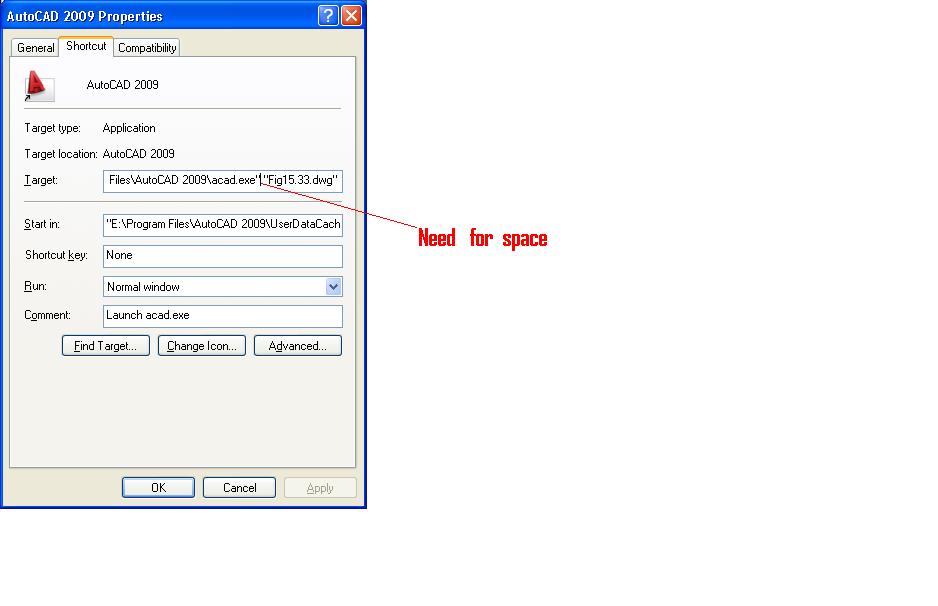 ------------- Ing Arben.Allaraj http://cad-drafting-corner.blogspot.com |
 Breeze104 wrote:
Posted By: Breeze104
Date Posted: 26.Aug.2008 at 20:57
|
I put the space in and still get the same response. ------------- Breeze |
Posted By: Breeze104
Date Posted: 26.Aug.2008 at 21:01
|
Also, I seein the pic you don't have the "/layout" in the string. Is that how it is supposed to be?
------------- Breeze |
Posted By: Arben.Allaraj
Date Posted: 27.Aug.2008 at 10:14
|
Can I see your icon properties image just how can i posted.
------------- Ing Arben.Allaraj http://cad-drafting-corner.blogspot.com |
Posted By: Frederico
Date Posted: 27.Aug.2008 at 14:53
|
Hi, Breeze104 since you are using a template, and the program always starts up with a template drawing, you should save your template as a .dwt (in the dwts place), and use a /t between the quotes, with spaces,
Take a loock on my start up string.....
"C:\Program Files\Autodesk Architectural Desktop 3\acad.exe" /t "Tipuana.dwt" /p "C:\Program Files\Autodesk Architectural Desktop 3\adt.arg"
hope i helped
 |
Posted By: Breeze104
Date Posted: 27.Aug.2008 at 15:11
|
"C:\Program Files\Autodesk\ACADM 2009\acad.exe" /p <<ACADMPP>> /t "_Peck.dwt" /layout "\B-Size.dwg"| "12x18 LS" ------------- Breeze |
Posted By: Frederico
Date Posted: 27.Aug.2008 at 17:12
Did you try right clicking the mouse with the pointer on the paper space tab?
Doing that you can import templates from other drawings.
|
Posted By: zhang820910
Date Posted: 30.Aug.2008 at 02:44
|
its very useful to me,thanks!
------------- i am mechanical engineer of china,want to make friends with everybody! |
Posted By: mandeep
Date Posted: 11.Sep.2008 at 01:06
|
Okay, This is how I did this.
*Open a new dwg file
*Create standard layouts(which you regularly use, like A0, A1, B1, A3...)
*Create templates in each layout.
*When done save that drawing as template.
*Go to options and change default template file name for qnew to the template u have just created.
*So whenever you open a new dwg you will have these standard layouts.
*You can delete the ones u don't need.
Hope this helps.
Cheers
|