A WASTE OF TIME
Printed From: CAD Forum
Category: EN
Forum Name: AutoCAD
Forum Description: Discussion about AutoCAD and AutoCAD LT, viewers, DWG and DXF formats, Design Review, AutoCAD web, Drive, add-ons
URL: https://www.cadforum.cz/forum_en/forum_posts.asp?TID=10172
Printed Date: 19.Jul.2026 at 19:07
Topic: A WASTE OF TIME
Posted By: rs_higgins
Subject: A WASTE OF TIME
Date Posted: 26.Mar.2014 at 17:01
|
a ------------- No electrons were harmed in the making of this post. I will admit a few protons were momentarily Inconvenienced |
Replies:
Posted By: John Connor
Date Posted: 26.Mar.2014 at 17:05
|
Both so called problems are easily solved by merely changing a setting. ------------- "Humans have a strength that cannot be measured. This is John Connor. If you are reading this, you are the resistance." <<AutoCAD 2015>> |
Posted By: rs_higgins
Date Posted: 26.Mar.2014 at 17:16
|
waste ------------- No electrons were harmed in the making of this post. I will admit a few protons were momentarily Inconvenienced |
Posted By: John Connor
Date Posted: 26.Mar.2014 at 17:33
|
If you do not see a thumbnail in either Explorer or in ACAD then that points to a setting in the Windows Registry that has to be changed. ------------- "Humans have a strength that cannot be measured. This is John Connor. If you are reading this, you are the resistance." <<AutoCAD 2015>> |
Posted By: rs_higgins
Date Posted: 26.Mar.2014 at 17:45
|
of |
Posted By: John Connor
Date Posted: 26.Mar.2014 at 17:58
|
And what version of AutoCAD is being used at the moment? ------------- "Humans have a strength that cannot be measured. This is John Connor. If you are reading this, you are the resistance." <<AutoCAD 2015>> |
Posted By: rs_higgins
Date Posted: 26.Mar.2014 at 18:12
|
Time |
Posted By: John Connor
Date Posted: 26.Mar.2014 at 18:15
|
Try changing it again. Prayer might help too. ------------- "Humans have a strength that cannot be measured. This is John Connor. If you are reading this, you are the resistance." <<AutoCAD 2015>> |
Posted By: rs_higgins
Date Posted: 26.Mar.2014 at 18:54
|
Dang you just could not help yourself |
Posted By: John Connor
Date Posted: 26.Mar.2014 at 19:08
|
God helps those who help themselves. Listen padre, I had the same problems in 2013 and 2014. I can't tell you how many times I applied the only known fix. Sometimes it sticks and sometimes it doesn't. I didn't write the program code so don't go getting all riled up. I've even read the fix was incorporated in SP1 for 2014 and I can tell you if it was it doesn't work consistently because I loaded that service pack as soon as it was available. I've had the same problem both at work and at home. So there. Stick that in the collection plate and see where it gets you. Praise the Lord and pass the code. BTW...stop changing the thread title just because your clerical collar got itself in a twist. And it is WASTE not WAST. Spell check broken? ------------- "Humans have a strength that cannot be measured. This is John Connor. If you are reading this, you are the resistance." <<AutoCAD 2015>> |
Posted By: John Connor
Date Posted: 26.Mar.2014 at 19:21
|
Yeah, going the extra mile for a guy who says he won't read or listen to any advice I have to offer. Lisp routine which should permanently fix the problem. Found this at the AutoDesk website in the Discussion Groups. 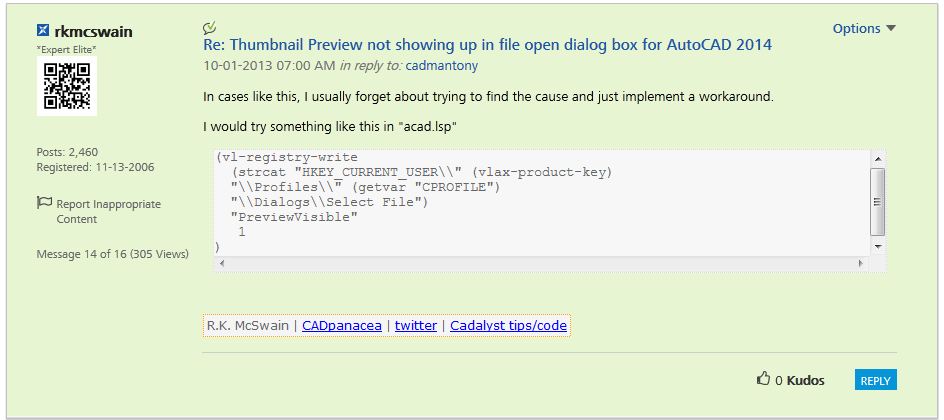 Maybe it will help you find religion. ------------- "Humans have a strength that cannot be measured. This is John Connor. If you are reading this, you are the resistance." <<AutoCAD 2015>> |
Posted By: John Connor
Date Posted: 26.Mar.2014 at 19:24
|
Well I surely wish you good luck in your attempt to fix the problem even if you want to ignore my advice. ------------- "Humans have a strength that cannot be measured. This is John Connor. If you are reading this, you are the resistance." <<AutoCAD 2015>> |
Posted By: rs_higgins
Date Posted: 27.Mar.2014 at 18:34
| Yep tried that to. |
Posted By: John Connor
Date Posted: 27.Mar.2014 at 23:11
|
Well the only thing that comes to mind is file association but I'm not 100% sure. I would assume you had already gone down that road. Sorry I can't help. ------------- "Humans have a strength that cannot be measured. This is John Connor. If you are reading this, you are the resistance." <<AutoCAD 2015>> |
Posted By: rs_higgins
Date Posted: 28.Mar.2014 at 16:43
|
Yes John it did turn out to be association I had tried it. Then I was
told to associate the dwg to any other program do a reboot then
associate dwg back to AutoCad this fixed the problem. The select file in
the system reg. brings back the preview window and the guy on the other
forum did not know why this works but only that it does. In most cases
he stated that association without the above steps works. So in short if using windows 7 pro if you get Icon only and not a thumbnail. First associate the dwg files to any other program then reboot you system and then associate the dwg files to AutoCad then you get the drawing thumbnail back. 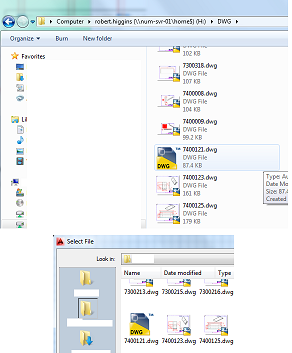 |
Posted By: Kent Cooper
Date Posted: 28.Mar.2014 at 18:19
| So now how about changing the Subject line back (if you still can) to something like what it was originally, in the hope that someone else who has the same problem might actually have a chance of finding your solution? [To the forum administrator -- this is part of the reason that it's not a good idea to allow editing messages after they've been replied to.] |
Posted By: rs_higgins
Date Posted: 28.Mar.2014 at 21:10
Can't change it so I put the fix under the first heading. Under a new thread. |
 Kent Cooper wrote: