Script to update attributes within a block
Printed From: CAD Forum
Category: EN
Forum Name: AutoCAD
Forum Description: Discussion about AutoCAD and AutoCAD LT, viewers, DWG and DXF formats, Design Review, AutoCAD web, Drive, add-ons
URL: https://www.cadforum.cz/forum_en/forum_posts.asp?TID=11510
Printed Date: 06.Sep.2026 at 03:47
Topic: Script to update attributes within a block
Posted By: dvdtlf
Subject: Script to update attributes within a block
Date Posted: 01.Dec.2015 at 15:02
|
Hi all, New to the forum and this is my first post which I hope someone can assist me with. I have started using AutoCAD Electrical 2016 (just moved up from AutoCAD 2008!) I use an access database to store information about the drawings (DWG No, Customer, Revision etc) and also to aid in configuration management. As part of this database there are various VB scripts ran, these gather the information and create an AutoCAD script which in simple terms - opens an A3 drawing template, inserts a drawing info box (a block which has attributes) and populates it with the information from access. This worked a treat in 2008 but I am having issues with 2016. I cannot workout how to get the script to write to the attributes - when the script is read it sees the text as a command rather than a description that needs to be put in the 'value' field of a tag. Has anyone got any ideas on how an AutoCAD 2016 script can update attributes in a block please? If I need to supply more info please let me know and I will do my best. Thank you David |
Replies:
Posted By: John Connor
Date Posted: 01.Dec.2015 at 15:56
|
Isn't all the information you used to track via the database when you were using AutoCAD 2008 now somehow tracked in the project information of AutoCAD Electrical 2016? ------------- "Humans have a strength that cannot be measured. This is John Connor. If you are reading this, you are the resistance." <<AutoCAD 2015>> |
Posted By: dvdtlf
Date Posted: 01.Dec.2015 at 16:43
|
yes all the information is there (contained in the AutoCAD script generated by the access script) but unfortunately something has changed between 2008 and 2016 and the script will not populate the attributes in the drawing info box within the new drawing |
Posted By: John Connor
Date Posted: 01.Dec.2015 at 17:39
|
So it was AutoCAD Electrical 2008 not "vanilla" AutoCAD that you were using? ------------- "Humans have a strength that cannot be measured. This is John Connor. If you are reading this, you are the resistance." <<AutoCAD 2015>> |
Posted By: dvdtlf
Date Posted: 02.Dec.2015 at 08:58
| 'Vanilla' AutoCAD2008 was the initial version I was using and I have now upgraded to AutoCAD Electrical 2016 |
Posted By: dvdtlf
Date Posted: 02.Dec.2015 at 09:17
|
The below is a screen shot of the script generated by Access which AutoCAD 2008 will happily use to populate the drawing info box. This script works in Electrical 2016 until it see 'Fred1' when it falls over because the text is seen as a command rather than info that needs to be moved to an attribute. Hope this helps clear my query up a bit. 
|
Posted By: dvdtlf
Date Posted: 02.Dec.2015 at 10:31
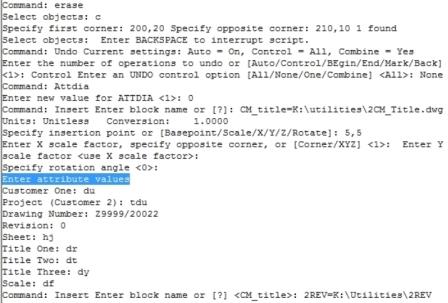 and this is what it does in 2008. the important bit is in blue when I insert a block in 2008 the attribute value dialogue is automatically opened - this does not happen in Elec 2016 my question now is how to achieve this in Elec 2016? !
|
Posted By: dvdtlf
Date Posted: 02.Dec.2015 at 12:25
|
In case anyone needs help in the future CLIPROMPTUPDATE set to 1ATTREQ set to 1 Stops dialogue boxes appearing in Elec 2016 and lets you use the command line to type in information
|