Revit Exporting to Autocad Changes the Justificat
Printed From: CAD Forum
Category: EN
Forum Name: Revit
Forum Description: Discussion about the BIM application Autodesk Revit (Architecture, Structure, MEP), Autodesk Forma
URL: https://www.cadforum.cz/forum_en/forum_posts.asp?TID=13546
Printed Date: 31.Oct.2026 at 12:36
Topic: Revit Exporting to Autocad Changes the Justificat
Posted By: ahankhah
Subject: Revit Exporting to Autocad Changes the Justificat
Date Posted: 16.Jan.2021 at 11:45
|
Hi all, I encountered a severe problem today exporting from Revit to AutoCAD (DWG). As shown in picture #1, in Revit all texts are in normal condition. Picture #2 shows AutoCAD DWG file made by Revit via EXPORT command. As seen comparing two pictures, the problem is changing the alignment of all Text (Mtext) objects to "Top-Left" ignoring the definition of Texts in Revit. Another problem is that changes in the margines of TEXT, wraps some MTexts in AutoCAD. Should any one can solve the problem? I apprecate any help or clue guiding me to study. 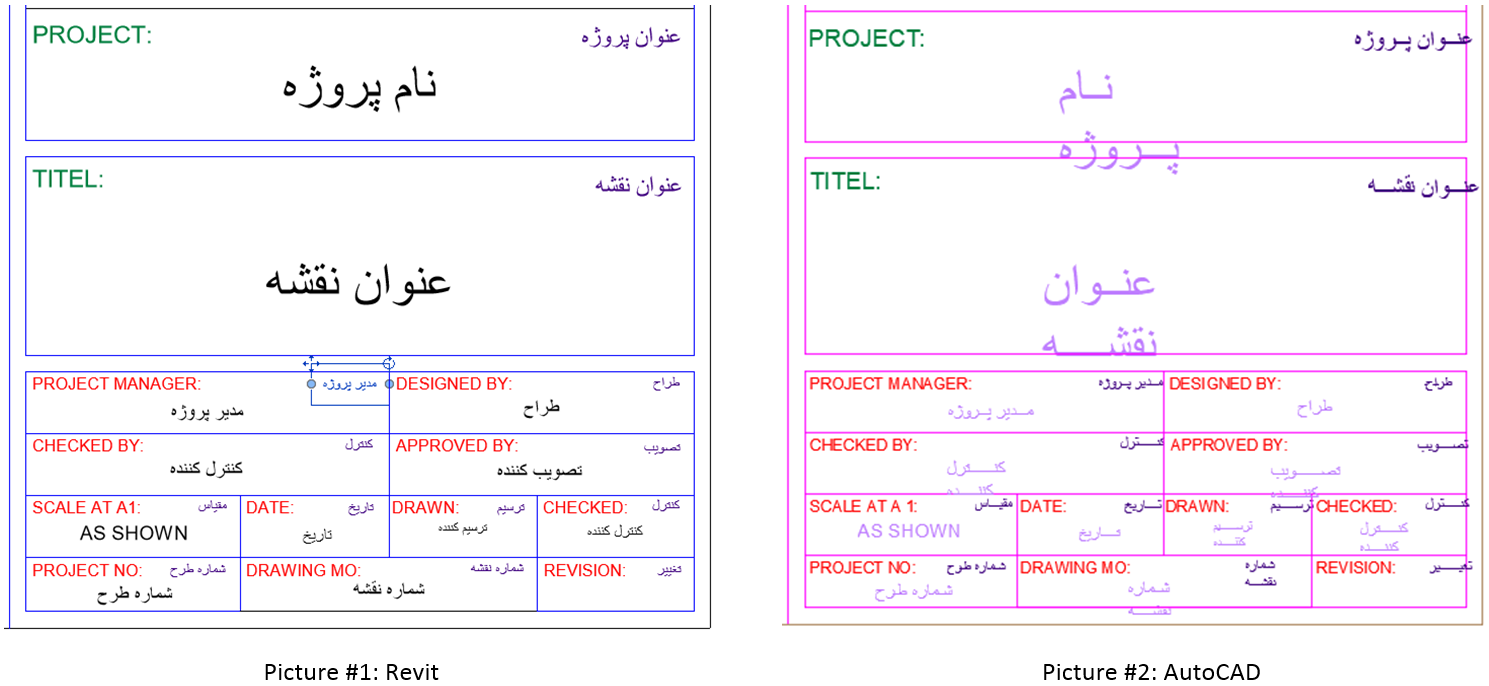 ------------- Mehrdad Ahankhah |
Replies:
Posted By: philippe JOSEPH
Date Posted: 16.Jan.2021 at 13:08
|
Hello Mehrad, years before we had some kind of that problem only "inside" AutoCAD and solved it with ATTSYNC + BLOCKREPLACE.
I hope this will help but you will have to do some searches with thoses 2 commands.
|
Posted By: ahankhah
Date Posted: 17.Jan.2021 at 14:42
|
philippe, thank you veru much. I do some coding in AutoLISP to replace the Title Block with a repaired one, and change width of MTEXTs to 0. Now I encountered a new problem and must change the justification of some MTEXTs to put them in a right place. I am searching a method to vla-put desired alignment to them, but apparently Visual LISP has no a way to do it. ------------- Mehrdad Ahankhah |
Posted By: yaree2
Date Posted: 13.Apr.2021 at 19:39
| busquedad de los comandos. |