bit maps on 3d models
Printed From: CAD Forum
Category: EN
Forum Name: 3ds Max, Maya, VRED
Forum Description: Discussion about Autodesk rendering and multimedia software, Max, Maya, VRED, Autodesk Flow platform
URL: https://www.cadforum.cz/forum_en/forum_posts.asp?TID=5581
Printed Date: 10.Oct.2026 at 03:45
Topic: bit maps on 3d models
Posted By: rendermen
Subject: bit maps on 3d models
Date Posted: 25.Mar.2011 at 21:16
|
Can you stretch a irregular bipmap with irregular shapes on a model surface as you can in PhotoShop? Thanks ------------- Renderman |
Replies:
Posted By: Cad64
Date Posted: 26.Mar.2011 at 15:45
|
You can make adjustments to your bitmaps parameters in the "Coordinates" section of the Material Editor. Offset adjusts the placement of the bitmap on the models surface Tiling adjusts the scale of the bitmap in UV space Angle adjusts the rotation of the bitmap in UVW space 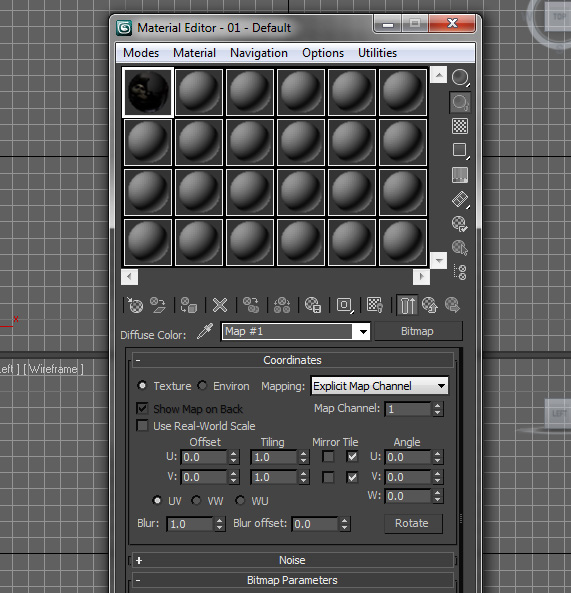 ------------- Online Portfolio: http://www.rdeweese.com/" rel="nofollow - http://www.rdeweese.com/ |
Posted By: rendermen
Date Posted: 26.Mar.2011 at 16:45
Thanks however I am looking more at not sqr or rec shapes. For instance the gable end of a house. it would be nice to insert a picture of a gable end on the gable end of a model. This could include windows, siding and a 2nd and 3rd paste could be the sofit. 
------------- Renderman |
Posted By: rendermen
Date Posted: 26.Mar.2011 at 16:57
There is no Coordin ate section shown. My only options are ate section shown. My only options areShader basic parmeters Blinn basic parmeters extended parmeters super sampling Maps dynamics properties and direct x shader mental ray connection On another note, Can anyone tell me how to past a screen shot in this forum? ------------- Renderman |
Posted By: Cad64
Date Posted: 26.Mar.2011 at 19:56
See here: http://www.cadforum.cz/forum_en/forum_posts.asp?TID=5421 - http://www.cadforum.cz/forum_en/forum_posts.asp?TID=5421 ------------- Online Portfolio: http://www.rdeweese.com/" rel="nofollow - http://www.rdeweese.com/ |
 rendermen wrote:
Posted By: Cad64
Date Posted: 26.Mar.2011 at 20:07
That's because you're not in the right area of the Material Editor. After you load your bitmap, click on the little button with the "M" on it, next to Diffuse. 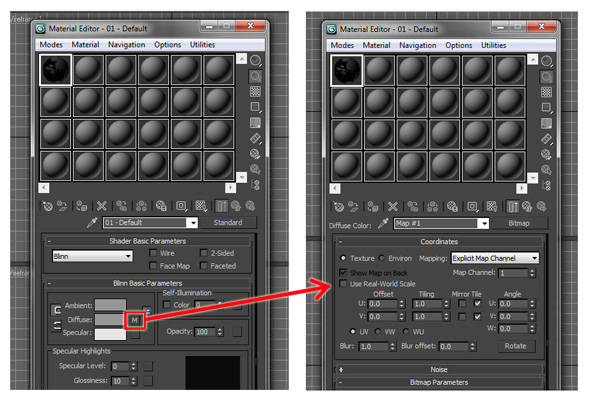 ------------- Online Portfolio: http://www.rdeweese.com/" rel="nofollow - http://www.rdeweese.com/ |
Posted By: Cad64
Date Posted: 26.Mar.2011 at 20:16
So you're trying to take a photo of a house and put it on to a model of a house and have everything wrap around and line up correctly? Sorry but it doesn't work that way. You will need to create materials for the various parts of the building and then apply them to the appropriate parts of the model. ------------- Online Portfolio: http://www.rdeweese.com/" rel="nofollow - http://www.rdeweese.com/ |
Posted By: rendermen
Date Posted: 26.Mar.2011 at 21:41
It isn't there. I did not assign my material under maps. I assigned the material in direct X shader-Metal Bump in texture 1 and normal map in bump. If I expand Blinn Basic Parameters the little box to the right of Diffuse has no M. If i select it it brings up the Material Map Browser. ------------- Renderman |
Posted By: Cad64
Date Posted: 26.Mar.2011 at 23:29
|
Why are you using the direct X shader for your materials? Are you building models for video games? If you can explain what you're working on, and what you're trying to achieve, I may be able to give you better advice. Right now I'm having a hard time understanding what you're trying to do? ------------- Online Portfolio: http://www.rdeweese.com/" rel="nofollow - http://www.rdeweese.com/ |
Posted By: rendermen
Date Posted: 27.Mar.2011 at 00:53
|
I am using PhotoShop cs4 with a Nvida normal map filter add-on which adds an incredible amount of realism. I am trying to put realistic materials on a house model.
------------- Renderman |
Posted By: Cad64
Date Posted: 27.Mar.2011 at 01:48
|
Ok, that's fine but you don't need to complicate things by trying to use the direct X shader. It's not necessary. Just create your texture normally. Put your bitmap in the "Diffuse" slot and then in the "Bump" slot, choose "Normal Bump" and then add your normal map there.
------------- Online Portfolio: http://www.rdeweese.com/" rel="nofollow - http://www.rdeweese.com/ |
Posted By: rendermen
Date Posted: 27.Mar.2011 at 14:21
|
Sorry to be a pain. I assigned a diffuse map to Diffuse Color and my Nvidia normal blue map to bump. i do not get the realistic result I was getting. I see no and bump effect. Even if i turn up the amount or off and on toggle I see no differences.
------------- Renderman |
Posted By: rendermen
Date Posted: 27.Mar.2011 at 15:09
|
I think I see the problem. I can see my result in F9 render only. Otherwise I do not see it even though I have show maps checked. I do have an inexpensive video card, I wonder if that is some of my problems.
------------- Renderman |
Posted By: rendermen
Date Posted: 27.Mar.2011 at 15:36
|
I can see the bump affect in the thumbnail however not on the model. Only if I render it. When i used the direct shader no problems seeing the bump on the model I just could not change the scale. ------------- Renderman |
Posted By: Cad64
Date Posted: 27.Mar.2011 at 16:19
|
So you want to see the effect in the viewport? I don't really see the point of that. The whole point of using maps to create detail is so you don't have to deal with it eating up resources and bogging down your system. The detail is generated during rendering. The direct x shader is for game developers so they can see how their materials will look in the game as they animate their characters and move them around in the viewport. It's not really for people doing still renders of a house. I've never used it myself, because I don't work in the game industry and therefore have no real use for it. If I want to see how something will look I will just do a quick render to check materials. But, to each his own. If that's how you want to work, it's up to you. ------------- Online Portfolio: http://www.rdeweese.com/" rel="nofollow - http://www.rdeweese.com/ |
Posted By: rendermen
Date Posted: 27.Mar.2011 at 16:58
|
Very good point! I am new at 3ds and I don't even know what I want yet. ha. I see what you mean. Thanks a ton for your input! I may need to take a class because I sure am doing a lot of stumbling trying to figure things out. ------------- Renderman |
Posted By: Cad64
Date Posted: 27.Mar.2011 at 18:51
|
That would probably be a good idea. Learning this program on your own is very difficult. I know because I did it. If you can't find a class, look online for training DVD's. There are lots of them out there.
------------- Online Portfolio: http://www.rdeweese.com/" rel="nofollow - http://www.rdeweese.com/ |
Posted By: rendermen
Date Posted: 27.Mar.2011 at 20:05
|
One area I thought I want to get in to would be remodeling work. With Inventor I create the model, add a proposed addition, and make it look realistic with a walk through. I felt that I needed the cad model for other reasons. I also felt it would be easier drawing in cad which I already kind of know. If the customer makes a revision the update is so much easier with the parametric relationship. I was in hopes they talked to each other better then that. Did you get my email the other day? I could send you my house model if you had time to give me your opinion.
------------- Renderman |
Posted By: Cad64
Date Posted: 27.Mar.2011 at 20:20
|
Autodesk only just recently added an import option for Inventor files in 2011 or 2010, but as far as the two programs talking to each other, I don't think that's possible. If you're working in Autocad, you can reference your dwg file into Max with the "File Link Manager", much like an xref in Autocad. Any changes you make to the dwg file can then be updated in the Max file. But that functionality is not available for Inventor. Maybe in a future release? I did not receive an email from you. Try sending it again. I could take a look at your model, but I'm not an architect. So if you're looking for design tips, I wouldn't really be able to give you much. ------------- Online Portfolio: http://www.rdeweese.com/" rel="nofollow - http://www.rdeweese.com/ |
Posted By: rendermen
Date Posted: 27.Mar.2011 at 20:41
|
I sent it to you RDxxxx address. The last one may have went in your junk or spam
------------- Renderman |