![CAD Forum - tips, tricks, discussion and utilities for AutoCAD, Inventor, Revit and other Autodesk products [www.cadforum.cz]](../common/arkance_186.png "CAD Forum - ARKANCE Community - tips, tricks, discussion and utilities for AutoCAD, Inventor, Revit and other Autodesk products [www.cadforum.cz]")
CAD FORUM - TIPS & TRICKS | UTILITIES | DISCUSSION | BLOCKS | SUPPORT | HELP & ASSISTANCE

 What is the ARKANCE Community?
Over 1.124.000 registered users (EN+CZ).
AutoCAD tips, Inventor tips, Revit tips, Civil tips, Fusion tips.
The new Beam calculator, Spirograph generator and Regression curves in the Converters section.
New AutoCAD 2027 commands and sys.variables

 CAD tip # 7414:
Question
A
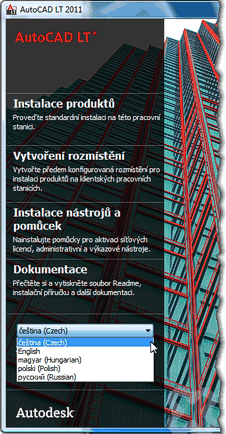
AutoCAD LT 2011 is available for the individual world regions as multi-language versions - e.g. the "ECPHR" version for the Eastern-European market (EE, ML). This is the first time a major Autodesk product comes to EE as a multi-language installer. The EE version of AutoCAD LT contains the following languages: English (EN), Czech (CZ), Polish (PL), Hungarian (HU), Russian (RU). Similarly there is the "EFIGSB" version or LT2011 (English, French, Italian, German, Spanish, Brazilian Portuguese).
The requested application language can be choosen during the installation by selecting the appropriate Language pack. In this way, you can choose the Czech version of AutoCAD LT 2011 after you start the installation (setup.exe):
ACLT2011

 *CAD
*CAD
21.6.2010
21476×
this tip shared by ARKANCE experts applies to: AutoCAD LT 2011 ·


CADforum
Tips, tricks, utilities, help, how-tos and FAQ for AutoCAD, LT, Inventor, Revit, Map, Civil 3D, Fusion, Forma, 3ds Max and other Autodesk software (community support by ARKANCE). See About CADforum.
Copyright © 2026 | Advertise with us | Online privacy





