![CAD Forum - tips, tricks, discussion and utilities for AutoCAD, Inventor, Revit and other Autodesk products [www.cadforum.cz]](../common/arkance_186.png "CAD Forum - tips, tricks, discussion and utilities for AutoCAD, Inventor, Revit and other Autodesk products [www.cadforum.cz]")
CAD FORUM - TIPS & TRICKS | UTILITIES | DISCUSSION | BLOCKS | SUPPORT | HELP & ASSISTANCE

Over 1.115.000 registered users (EN+CZ).
AutoCAD tips, Inventor tips, Revit tips, Civil tips, Fusion tips.
The new Beam calculator, Spirograph generator and Regression curves in the Converters section.
 CAD tip # 12817:
Question
A
Fusion 360 contains a hidden function, which will show you since when (start date) you are using Autodesk Fusion 360 - i.e. when exactly did the current user start Fusion 360 for the first time.
You can invoke this function with one of the Debug commands. Open the Fusion 360 command window by pressing the Ctrl+Alt+C keys and in its default "Txt" mode, type the following command to the bottom command line:
Debug.StartDateEstimate
this function will return a 13-digit number, the so called "epoch timestamp", known from Unix, e.g. 1372158706000:
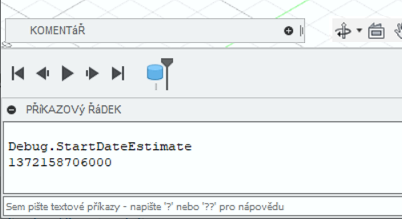
Tuesday 25. June 2013 11:11:46
Fusion360

 *CAD
*CAD
10.12.2020
15407×
this tip shared by ARKANCE experts applies to: Fusion 360 ·



CADforum
Tips, tricks, utilities, help, how-tos and FAQ for AutoCAD, LT, Inventor, Revit, Map, Civil 3D, Fusion, Forma, 3ds Max and other Autodesk software (community support by ARKANCE). See About CADforum.
Copyright © 2026 | Advertise with us | Online privacy