![CAD Forum - tips, tricks, discussion and utilities for AutoCAD, Inventor, Revit and other Autodesk products [www.cadforum.cz]](../common/arkance_186.png "CAD Forum - ARKANCE Community - tips, tricks, discussion and utilities for AutoCAD, Inventor, Revit and other Autodesk products [www.cadforum.cz]")
CAD FORUM - TIPS & TRICKS | UTILITIES | DISCUSSION | BLOCKS | SUPPORT | HELP & ASSISTANCE

 What is the ARKANCE Community?
Over 1.127.000 registered users (EN+CZ).
AutoCAD tips, Inventor tips, Revit tips, Civil tips, Fusion tips.
The new Beam calculator, Spirograph generator and Regression curves in the Converters section.
New AutoCAD 2027 commands and sys.variables

 CAD tip # 6979:
Question
A
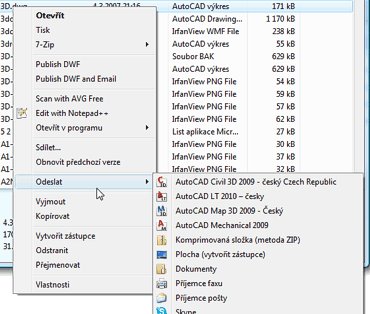
You can add your own new items to the context menu of files (documents) in Windows Explorer or other file managers. Use the following settings:
Windows Vista, Windows 7:
- In the box Windows > Start > "Start search" or "Run" type the command shell:sendto
(this will open the folder c:\Users\yourname\AppData\Roaming\Microsoft\Windows\SendTo\) - Right-click in this folder and use New > Shortcut to create a new shortcut to the requested application – e.g. notepad.exe; give a name to the new action - e.g. "Open in Notepad".
Windows XP:
- In Windows Explorer open the folder C:\Documents and Settings\yourname\SendTo (this folder may be hidden - see "Folder options" and the option "Show hidden files and folders" on the Display tab)
- Right-click in this folder and use New > Shortcut to create a new shortcut to the requested application
Instead of creating a new shortcut you can also just copy an existing shortcut (icon) from Windows desktop.
You can copy the resulting .LNK file also to other users.
When you now right-click on any document, you will be offered the newly created action. Using this method you can predefine moving files to preset folders, sending files to a given printer, copying to USB devices and other actions.
ACAD

 WinCAD,HP
8.10.2009
13418×
this tip shared by ARKANCE experts applies to: AutoCAD ·


CADforum
Tips, tricks, utilities, help, how-tos and FAQ for AutoCAD, LT, Inventor, Revit, Map, Civil 3D, Fusion, Forma, 3ds Max and other Autodesk software (community support by ARKANCE). See About CADforum.
Copyright © 2026 | Advertise with us | Online privacy





