![CAD Forum - tips, tricks, discussion and utilities for AutoCAD, Inventor, Revit and other Autodesk products [www.cadforum.cz]](../common/arkance_186.png "CAD Forum - ARKANCE Community - tips, tricks, discussion and utilities for AutoCAD, Inventor, Revit and other Autodesk products [www.cadforum.cz]")
CAD FORUM - TIPS & TRICKS | UTILITIES | DISCUSSION | BLOCKS | SUPPORT | HELP & ASSISTANCE

 What is the ARKANCE Community?
Over 1.127.000 registered users (EN+CZ).
AutoCAD tips, Inventor tips, Revit tips, Civil tips, Fusion tips.
The new Beam calculator, Spirograph generator and Regression curves in the Converters section.
New AutoCAD 2027 commands and sys.variables

 CAD tip # 6710:
Question
A
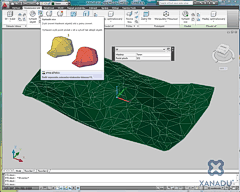
You can smooth a surface defined by a group of 3D faces (3DFACE objects) but you have to convert it first to a 3D mesh.
If you get a series of 3D faces (terrain generator, import from another 3D software, et.c), you can convert it to a single "3D mesh" object in AutoCAD 2010. Then you can manipulate it, smooth it and interactively edit its 3D shape.
- First convert the selected 3D faces to individual surfaces - the CONVTOSURFACE command
- Then use the UNION command to join the surfaces together
- To retain the shape of the original faces, set the FACETERSMOOTHLEV variable to 0 (or perform this setting through the MESHOPTIONS command)
- And finally convert the unified surface to a 3D mesh object with the MESHSMOOTH command
ACAD2010ADT2010Civil2010

 *CAD
*CAD
28.5.2009
30348×
this tip shared by ARKANCE experts applies to: AutoCAD 2010 · AutoCAD Architecture 2010 · Civil 3D 2010 ·


CADforum
Tips, tricks, utilities, help, how-tos and FAQ for AutoCAD, LT, Inventor, Revit, Map, Civil 3D, Fusion, Forma, 3ds Max and other Autodesk software (community support by ARKANCE). See About CADforum.
Copyright © 2026 | Advertise with us | Online privacy





