![CAD Forum - tips, tricks, discussion and utilities for AutoCAD, Inventor, Revit and other Autodesk products [www.cadforum.cz]](../common/arkance_186.png "CAD Forum - ARKANCE Community - tips, tricks, discussion and utilities for AutoCAD, Inventor, Revit and other Autodesk products [www.cadforum.cz]")
CAD FORUM - TIPS & TRICKS | UTILITIES | DISCUSSION | BLOCKS | SUPPORT | HELP & ASSISTANCE

 What is the ARKANCE Community?
Over 1.134.000 registered users (EN+CZ).
AutoCAD tips, Inventor tips, Revit tips, Civil tips, Fusion tips.
See the new Beam calculator, Engineering calculator, Tolerances, Spirograph generator and Regression curves in the Converters section.
New AutoCAD 2027 commands and sys.variables

 CAD tip # 8973:
Question
A
"MineSweeper3D" is a free game by CAD Studio, running in Inventor 2013 and 2012 (both 32- and 64-bit). It is similar to the classic Windows Minesweeper game but you control it inside a 3D assembly environment in Inventor.
 Download, install it through the appropriate MSI file, run Inventor and go to the Assembly > Assemble ribbon where you can run the "Mine Sweeper" with the "Start" button.
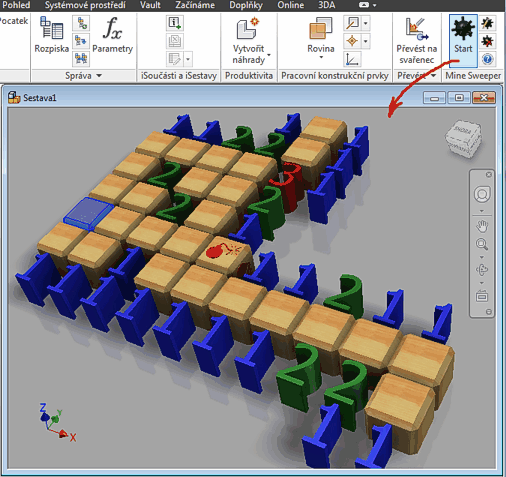
Download, install it through the appropriate MSI file, run Inventor and go to the Assembly > Assemble ribbon where you can run the "Mine Sweeper" with the "Start" button.Now try to reveal all not-undermined cells in the battlefield of 10x10 cells (the size can be set in Settings, also the language of the game - CultureName). You can control the game by mouse double-clicks:
- Double-click on a non-revealed cell reveals it.
- Double-click on a revealed cell reveals all cells in neighborhood if neigborhood contains the right number of mines.
- Ctrl+double-click marks a cell as undermined. This cell cannot be revealed.
In-game video:
Enjoy!
Inv2013Inv2012

 *CAD
*CAD
16.12.2012
17160×
this tip shared by ARKANCE experts applies to: Inventor 2013 · Inventor 2012 ·


CADforum
Tips, tricks, utilities, help, how-tos and FAQ for AutoCAD, LT, Inventor, Revit, Map, Civil 3D, Fusion, Forma, 3ds Max and other Autodesk software (community support by ARKANCE). See About CADforum.
Copyright © 2026 | Advertise with us | Online privacy





