![CAD Forum - tips, tricks, discussion and utilities for AutoCAD, Inventor, Revit and other Autodesk products [www.cadforum.cz]](../common/arkance_186.png "CAD Forum - ARKANCE Community - tips, tricks, discussion and utilities for AutoCAD, Inventor, Revit and other Autodesk products [www.cadforum.cz]")

 What is the ARKANCE Community?
 CAD tip # 7585:
Question
The free LISP utility ARKANCE PlotDWGarr can be downloaded from  Download. After you load it with APPLOAD, you can use the PlotDWGarr command to start the batch plotting (to the current - last-used - print device, with the current parameters - see your last PLOT) of all frames in the array, or the LayDWGarr command to generate new layouts containing the individual "drawings" (frames), or the wbDWGarr command to wblock the frames to separate DWG files, or the pcDWGarr command to generate a set of page setups (plot configs).
In all cases, the application first prompts for the shape of the rectangular array with the "drawings". You will sequentially specify the top left point (1), the size of a single frame (2), the distance between columns (3) and between rows (4), the number of columns and rows (see the picture). Possible missing frames - frames with no content - are ignored (not plotted).
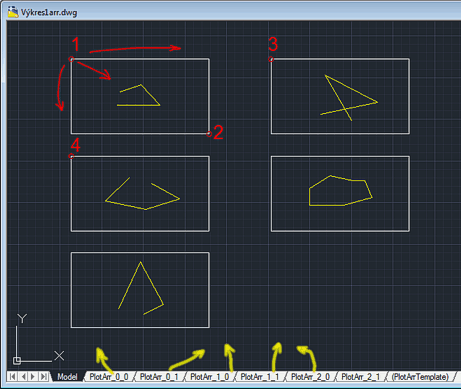
Alternatively you can specify the plot frames using predrawn rectangles (on a given layer) or pre-inserted block references (of a given name).
As a result, either a respective number of plots is printed, or a series of numbered layouts or DWG files or a set of page setups is created. The generated layouts are created from the layout template "(PlotArrTemplate)" (rename an existing layout to this name or pick any existing layout). In this template you can predefine the viewport size, its scale, page setup, etc.). You can then plot this series in one go using the PUBLISH command. Similarly, the pcDWGarr creates page setups and automatically publishes these setups to the output device defined in the page setup template ("PlotArrTemplate").
Since version 1.8, you can use predefined texts (or attribute blocks) to name the individual frames. You can specify the output folder. AutoCAD LT is also supported.
Since version 1.9 you can also filter the texts influencing frame names.
See LayDwgArr in action:
See a sample of a drawing.
Please avoid using AutoCAD drawings in this "fake modelspace" way - use rather Layouts, or specialized solutions like AutoCAD Electrical.

 *CAD
*CAD







