![CAD Forum - tips, tricks, discussion and utilities for AutoCAD, Inventor, Revit and other Autodesk products [www.cadforum.cz]](../common/arkance_186.png "CAD Forum - ARKANCE Community - tips, tricks, discussion and utilities for AutoCAD, Inventor, Revit and other Autodesk products [www.cadforum.cz]")
CAD FORUM - TIPS & TRICKS | UTILITIES | DISCUSSION | BLOCKS | SUPPORT | HELP & ASSISTANCE

 What is the ARKANCE Community?
Over 1.131.000 registered users (EN+CZ).
AutoCAD tips, Inventor tips, Revit tips, Civil tips, Fusion tips.
See the new Beam calculator, Engineering calculator, Tolerances, Spirograph generator and Regression curves in the Converters section.
New AutoCAD 2027 commands and sys.variables

 CAD tip # 1784:
Question
A
Use the PSOUT command and write your drawing to an .EPS format file (encapsulated postscript).
Using Tools/Options (top right) in the EPS file dialog you can set scale, preview type and other parameters of the exported vector file.
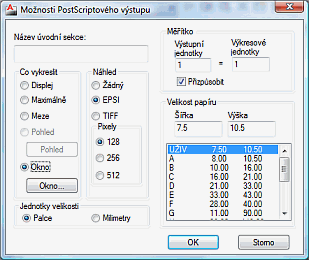
Alternatively, you can define a PostScript plotter and PLOT to this device (.EPS), or use the PDF output from AutoCAD.
To control lineweights and colors in the PSOUT command (object-assigned lineweights are ignored), you can use the PSPROLOG variable. Set it e.g. to "*PSLWRGB" to search for a PSLWRGB.ps file in AutoCAD support path and load this postscript control file to change the default line weights and colors in the PSOUT output. See sample .PS files in the pslwgs.zip ZIP archive.
ACADACLT

 *CAD
*CAD
3.12.2001
49933×
FAQ


CADforum
Tips, tricks, utilities, help, how-tos and FAQ for AutoCAD, LT, Inventor, Revit, Map, Civil 3D, Fusion, Forma, 3ds Max and other Autodesk software (community support by ARKANCE). See About CADforum.
Copyright © 2026 | Advertise with us | Online privacy





