![CAD Forum - tips, tricks, discussion and utilities for AutoCAD, Inventor, Revit and other Autodesk products [www.cadforum.cz]](../common/arkance_186.png "CAD Forum - ARKANCE Community - tips, tricks, discussion and utilities for AutoCAD, Inventor, Revit and other Autodesk products [www.cadforum.cz]")
CAD FORUM - TIPS & TRICKS | UTILITIES | DISCUSSION | BLOCKS | SUPPORT | HELP & ASSISTANCE

 What is the ARKANCE Community?
Over 1.131.000 registered users (EN+CZ).
AutoCAD tips, Inventor tips, Revit tips, Civil tips, Fusion tips.
See the new Beam calculator, Engineering calculator, Tolerances, Spirograph generator and Regression curves in the Converters section.
New AutoCAD 2027 commands and sys.variables

 CAD tip # 4570:
Question
A
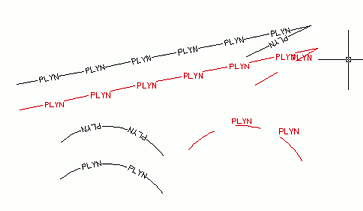
Texts in complex linetypes (e.g. in the standard AutoCAD "GAS" linetype; "PLYN" in the Czech version) is drawn in the direction the line was drawn. But arcs are drawn by AutoCAD always in the same direction, so texts always face inside arcs with their top side.
If you convert an arc to a polyline (_PEDIT), you can reverse its direction (see e.g.  Download ) and then also the text changes its orientation (if you have the object property 'linetype generation' set to On).
Another way is to modify the linetype definition(the .LIN file) and use an absolute rotation angle instead of the commonly used relative angle (e.g. A=0.0, "text always horizontal", straight text) - but you will probably need to adjust the text alignment to fit the line gap.
The illustration shows the "PLYN" (GAS) linetype and its modified version with the absolute angle (the red version). The bottom arc is converted to a polyline and reversed:
ACADACLTADT

 *CAD
*CAD
5.8.2005
34156×
FAQ


CADforum
Tips, tricks, utilities, help, how-tos and FAQ for AutoCAD, LT, Inventor, Revit, Map, Civil 3D, Fusion, Forma, 3ds Max and other Autodesk software (community support by ARKANCE). See About CADforum.
Copyright © 2026 | Advertise with us | Online privacy





