![CAD Forum - tips, tricks, discussion and utilities for AutoCAD, Inventor, Revit and other Autodesk products [www.cadforum.cz]](../common/arkance_186.png "CAD Forum - ARKANCE Community - tips, tricks, discussion and utilities for AutoCAD, Inventor, Revit and other Autodesk products [www.cadforum.cz]")
CAD FORUM - TIPS & TRICKS | UTILITIES | DISCUSSION | BLOCKS | SUPPORT | HELP & ASSISTANCE

 What is the ARKANCE Community?
Over 1.134.000 registered users (EN+CZ).
AutoCAD tips, Inventor tips, Revit tips, Civil tips, Fusion tips.
See the new Beam calculator, Engineering calculator, Tolerances, Spirograph generator and Regression curves in the Converters section.
New AutoCAD 2027 commands and sys.variables

 CAD tip # 5063:
Question
A
AutoCAD Map 3D 2007 (and higher) directly supports online web data using the OGC standard WMS (or WFS). WMS data services can be used on your company network or you can link to public map providers like NASA.
From the Map "Task pane" palette choose "Display manager", click the Data button and select "Add data" from the context menu.
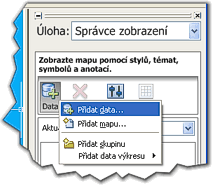
In the Data link palette, click on the WMS item and name your data connection. In the field "Server name or URL" enter the web address of the WMS service and its login credentials. From the downloaded layer (feature) names select the requested layers and click on the "Add to map" button.
To test the WMS functionality you can use e.g. the NASA WMS service.
Map2008Map2007Civil2008Civil2007

 *CAD
*CAD
12.6.2006
17043×
this tip shared by ARKANCE experts applies to: AutoCAD Map 3D 2008 · AutoCAD Map 3D 2007 · Civil 3D 2008 · Civil 3D 2007 ·


CADforum
Tips, tricks, utilities, help, how-tos and FAQ for AutoCAD, LT, Inventor, Revit, Map, Civil 3D, Fusion, Forma, 3ds Max and other Autodesk software (community support by ARKANCE). See About CADforum.
Copyright © 2026 | Advertise with us | Online privacy





