![CAD Forum - tips, tricks, discussion and utilities for AutoCAD, Inventor, Revit and other Autodesk products [www.cadforum.cz]](../common/arkance_186.png "CAD Forum - ARKANCE Community - tips, tricks, discussion and utilities for AutoCAD, Inventor, Revit and other Autodesk products [www.cadforum.cz]")
CAD FORUM - TIPS & TRICKS | UTILITIES | DISCUSSION | BLOCKS | SUPPORT | HELP & ASSISTANCE

 What is the ARKANCE Community?
Over 1.134.000 registered users (EN+CZ).
AutoCAD tips, Inventor tips, Revit tips, Civil tips, Fusion tips.
See the new Beam calculator, Engineering calculator, Tolerances, Spirograph generator and Regression curves in the Converters section.
New AutoCAD 2027 commands and sys.variables

 CAD tip # 6159:
Question
A
AutoCAD 2008, 2009 and higher allow to watch and read the content of dynamically created web pages using "RSS channels" (content syndication) in the InfoCenter window (communication center). Of course you have to be connected to the internet.
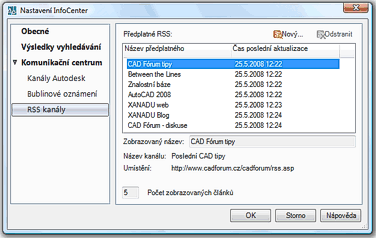
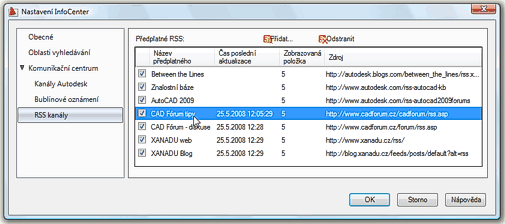
In the InfoCenter settings in your CAD application you can easily add e.g. watching of newly added CAD tips from CADForum.cz, notifications of new postings in the discussion forums or CAD news from the CADstudio Blog.
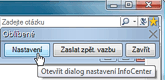
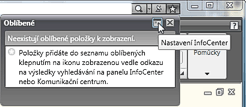
You can setup these information channels in the "InfoCenter settings" dialog. This dialog can be launched e.g. with the "star" icon in the top-right Infocenter panel - see samples from AutoCAD 2008 and 2009:
The result is a clear display of current news in your "Communication center" (the satellite dish icon) and semi-transparent bubble notifications of new incoming news.
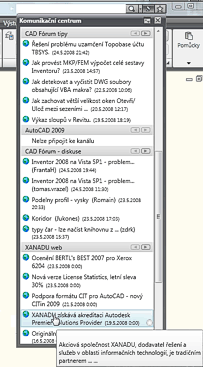
- CAD tips:
https://www.cadforum.cz/en/rss.asp - CAD discussions (all):
https://www.cadforum.cz/forum_en/rss_topic_feed.asp - CAD discussion (only Inventor):
https://www.cadforum.cz/forum_en/rss_topic_feed.asp?FID=3 - CADstudio Blog:
http://budweiser.cadstudio.cz/feeds/posts/default?alt=rss
ACAD2010ACAD2009ACAD2008ADTACADMCivilMap

 *CAD
*CAD
4.6.2008
12612×
this tip shared by ARKANCE experts applies to: AutoCAD 2010 · AutoCAD 2009 · AutoCAD 2008 · ADT · ACADM · Civil · Map ·


CADforum
Tips, tricks, utilities, help, how-tos and FAQ for AutoCAD, LT, Inventor, Revit, Map, Civil 3D, Fusion, Forma, 3ds Max and other Autodesk software (community support by ARKANCE). See About CADforum.
Copyright © 2026 | Advertise with us | Online privacy





