![CAD Forum - tips, tricks, discussion and utilities for AutoCAD, Inventor, Revit and other Autodesk products [www.cadforum.cz]](../common/arkance_186.png "CAD Forum - ARKANCE Community - tips, tricks, discussion and utilities for AutoCAD, Inventor, Revit and other Autodesk products [www.cadforum.cz]")
CAD FORUM - TIPS & TRICKS | UTILITIES | DISCUSSION | BLOCKS | SUPPORT | HELP & ASSISTANCE

 What is the ARKANCE Community?
Over 1.134.000 registered users (EN+CZ).
AutoCAD tips, Inventor tips, Revit tips, Civil tips, Fusion tips.
See the new Beam calculator, Engineering calculator, Tolerances, Spirograph generator and Regression curves in the Converters section.
New AutoCAD 2027 commands and sys.variables

 CAD tip # 6176:
Question
A
By default, AutoCAD 2009 does not contain a ribbon user interface for Express Tools (only the standard menu and toolbars). Thanks to the customized CUI file (by a user GTVic) you can add such ribbon to your AutoCAD 2009:

- Download the modified CUI file from
 Download
- Copy the unzipped acetmain.cui file to your AutoCAD support folder (making a backup copy of the original version) - e.g.:
C:\Documents and Settings\YOURNAME\Application Data\Autodesk\AutoCAD 2009\R17.2\enu\Support (WinXP)
or
C:\Users\YOURNAME\AppData\Roaming\Autodesk\AutoCAD 2009\R17.2\enu\Support (Vista) - Run AutoCAD 2009 and start the CUI command
- In the top left panel, switch to the current workspace, so that its contents is displayed in the right panel:
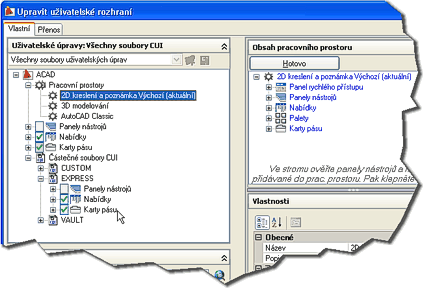
- Click on the "Customize Workspace" button (turns blue)
- In the left panel, expand the tree "Partial CUI files" > EXPRESS
- Check the box by the "Ribbon Tabs" item
- In the top right panel, click the "Done" button and end the CUI dialog with OK
ACAD2009

 *CAD
*CAD
13.6.2008
46966×
this tip shared by ARKANCE experts applies to: AutoCAD 2009 ·


CADforum
Tips, tricks, utilities, help, how-tos and FAQ for AutoCAD, LT, Inventor, Revit, Map, Civil 3D, Fusion, Forma, 3ds Max and other Autodesk software (community support by ARKANCE). See About CADforum.
Copyright © 2026 | Advertise with us | Online privacy





