![CAD Forum - tips, tricks, discussion and utilities for AutoCAD, Inventor, Revit and other Autodesk products [www.cadforum.cz]](../common/arkance_186.png "CAD Forum - ARKANCE Community - tips, tricks, discussion and utilities for AutoCAD, Inventor, Revit and other Autodesk products [www.cadforum.cz]")

 What is the ARKANCE Community?
 CAD tip # 6461:
Question
The standard template names are: _Autodesk Civil 3D (Imperial) NCS Base.dwt, _Autodesk Civil 3D (Imperial) NCS Classic.dwt, _Autodesk Civil 3D (Imperial) NCS Extended.dwt, _Autodesk Civil 3D (Metric) NCS Base.dwt, _Autodesk Civil 3D (Metric) NCS Classic.dwt, _Autodesk Civil 3D (Metric) NCS Extended.dwt. Older versions of Civil 3d used the names _Autodesk Civil 3D Metric By Layer.dwt, _Autodesk Civil 3D Imperial By Style.dwt, ...
The preinstalled templates are stored in the folder (WinXP):
c:\Documents and Settings\USERNAME\Local Settings\Application Data\Autodesk\C3D 2009\enu\Template\
resp. (Vista):
c:\users\USERNAME\appdata\local\autodesk\c3d 2009\enu\template\
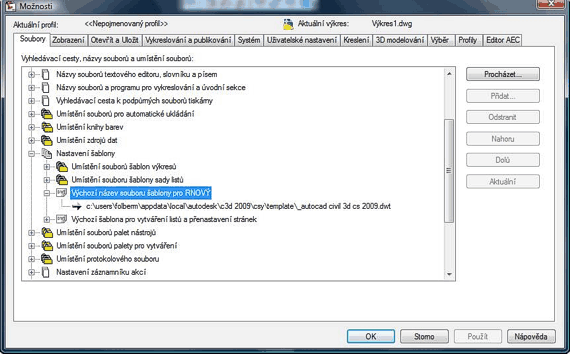
You can preset the default DWT template in the Files tab of the Options dialog:

 *CAD
*CAD







